Product Overview
These personalized address labels are designed for easy application to envelopes, packages, or other mail items. Each set contains 150 matte, self-adhesive, peel-and-stick labels, distributed across 5 sheets with 30 labels per sheet. The labels feature an abstract painting flowers design and are customizable with your chosen font and color.

Figure 1: Example of a Personalized Address Label. This image displays a single address label featuring an abstract floral design in vibrant pink and yellow hues on the left, with a light, airy background on the right. Placeholder text "Name", "Address", and "City, State Zip" is shown on the right side, indicating where personalized information will be printed.
Setup and Personalization
Before using your personalized address labels, you will need to provide your desired text, font style, and font color during the ordering process. The following images illustrate the available font styles and color choices.
1. Font Style Selection
Refer to the image below to choose your preferred font style. Each font is numbered and includes a sample text for easy identification.

Figure 2: Font Styles. This image presents a comprehensive chart titled "FONT STYLES", listing over 50 different font options. Each font is numbered and accompanied by a sample phrase, such as "THIS IS A SAMPLE WITH HOLLY CHRISTMAS" or "THIS IS A SAMPLE WITH ARIAL BLACK", to demonstrate its appearance.
2. Font Color Selection
Select your desired font color from the palette provided in the image below. Each color swatch is numbered for reference.
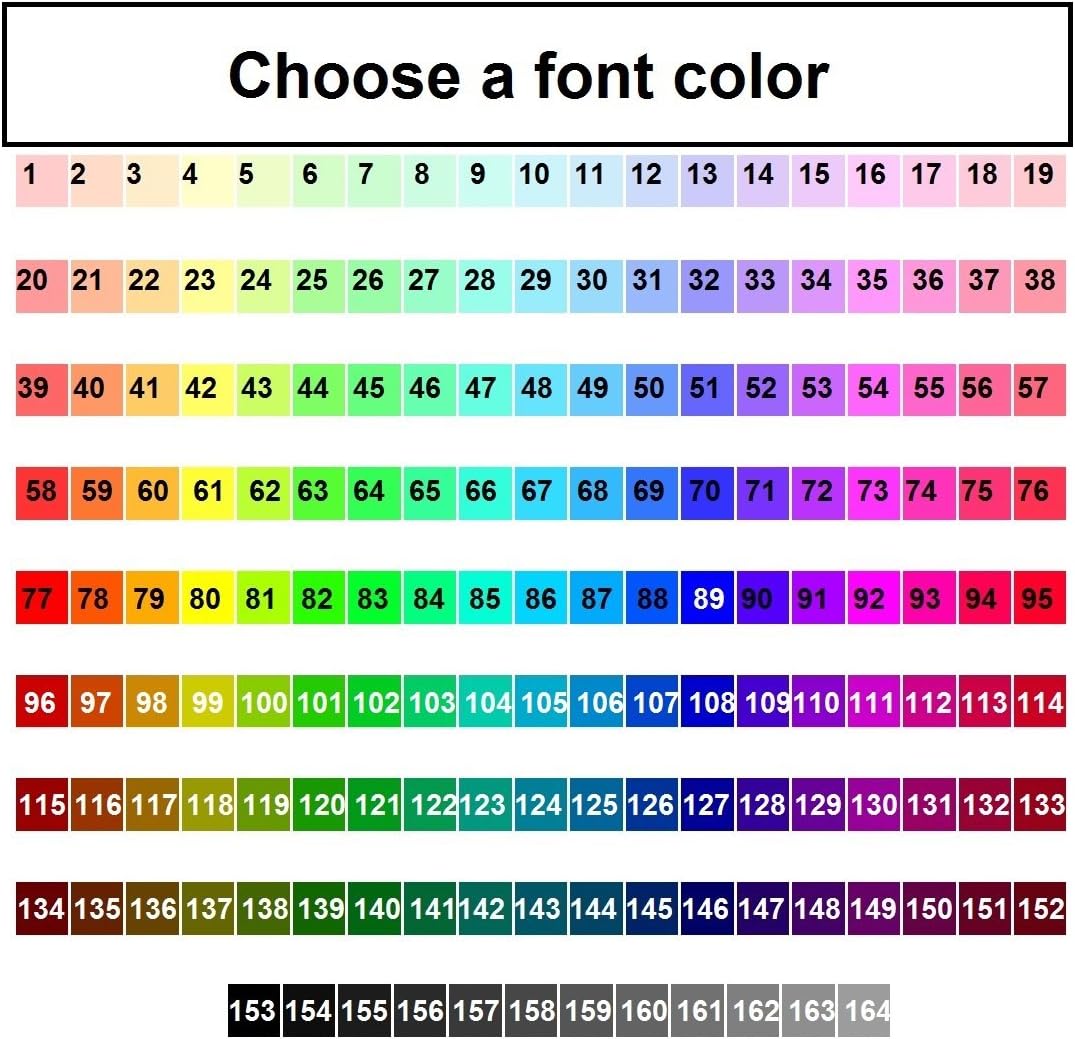
Figure 3: Font Color Choices. This image displays a wide array of numbered color swatches, organized in rows, under the heading "Choose a font color". The palette includes a spectrum of colors from light pastels to vibrant primary and secondary colors, and darker shades, allowing for precise font color selection.
Ensure all personalization details are accurately submitted during the purchase process to avoid delays or errors.
Operating Instructions
Using your personalized address labels is a straightforward process:
- Prepare the Surface: Ensure the surface where the label will be applied (e.g., envelope, package) is clean, dry, and free of dust or oils.
- Peel the Label: Carefully peel one address label from its backing sheet. Avoid touching the adhesive side excessively to maintain its stickiness.
- Apply the Label: Position the label accurately on the desired surface. Once placed, press down firmly from the center outwards to smooth out any air bubbles and ensure full adhesion.
- Verify Adhesion: Gently run your finger over the edges of the label to confirm it is securely attached.
Storage and Maintenance
To ensure the longevity and adhesive quality of your address labels:
- Storage: Store unused label sheets flat in a cool, dry place, away from direct sunlight and extreme temperatures. Keep them in their original packaging or a protective folder to prevent bending or damage.
- Handling: Handle label sheets by their edges to avoid transferring oils from your skin to the adhesive or printed surface.
Troubleshooting
If you encounter any issues with your address labels, consider the following:
- Label Not Sticking: Ensure the application surface is clean and dry. Rough or heavily textured surfaces may reduce adhesion.
- Incorrect Personalization: If the printed information (text, font, color) on your labels is incorrect, please refer to the "Support and Contact Information" section for assistance.
Specifications
| Attribute | Detail |
|---|---|
| Product Type | Personalized Address Labels |
| Quantity | 150 labels per set (5 sheets of 30 labels) |
| Label Dimensions | 2.75 inches x 1 inch (each label) |
| Material | Matte Self-Adhesive |
| Installation Type | Peel and Stick |
| Design | Abstract Painting Flowers |
| Brand | Generic |
| Model Number | P 539 |
| ASIN | B07BD57RQF |
| UPC | 716417018377 |
Support and Contact Information
For any questions regarding your personalized address labels, including issues with personalization or product quality, please contact the seller directly.
Seller: Labelsnstuff
You can reach the seller through Amazon's messaging system:
- Go to the product listing on Amazon.com and click on the seller's name, then click the "Ask a question" button.
- Alternatively, go to "Your Orders" in your Amazon account, find your order in the list, and click "Contact Seller".
Please have your order number ready when contacting support.


