1. Introduction
This instruction manual provides comprehensive guidance for the setup, operation, and maintenance of your Enter 2.0 USB Bluetooth Dongle. Please read this manual carefully before using the device to ensure optimal performance and longevity.
2. Product Overview
The Enter 2.0 USB Bluetooth Dongle is a compact and portable device designed to add Bluetooth connectivity to your computer or other compatible devices. It enables wireless communication for data transfer, networking, and audio streaming.

Figure 1: Front view of the Enter 2.0 USB Bluetooth Dongle.
Its plug-and-play functionality ensures ease of use across various operating systems, making it an ideal solution for expanding your device's wireless capabilities.
3. Features
- Efficient Data Transmission: Designed for seamless sending and receiving of data.
- High Processing Speed: Features a 2GHz processing speed for reliable performance.
- Versatile Connectivity: Connects to notebooks, laptops, PCs, PDAs, and mobile phones via USB.
- Extended Range: Operates within a range of 0 to 100 meters for data transfer.
- Broad Application Support: Supports LAN access, fax, dial-up networking, and headset connections.
- Wide OS Compatibility: Compatible with Windows 98, 98SE, Me, 2000, 7 (32-bit), Vista, and XP.
- Multi-language Support: Offers support for multiple languages.
- Voice Data Function: Includes functionality for voice data.
- Fast Data Rate: Achieves a data transmission rate of 3Mbps.
- USB Standards: Compliant with USB v1.1 and v2.0.
- Plug-and-Play: Simple installation without the need for complex driver setup.
- Wireless Audio Streaming: Enables streaming music to Bluetooth-enabled earphones, speakers, or audio receivers.
- Compact Design: Portable and small in size for easy transport.
4. Setup Instructions
- Insert the Dongle: Locate an available USB port on your computer (desktop, laptop) or compatible device. Gently insert the Enter 2.0 USB Bluetooth Dongle into the USB port. Ensure it is fully seated.
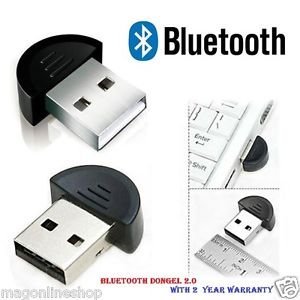
Figure 2: The dongle inserted into a USB port, demonstrating its compact size.
- Driver Installation (Automatic): The dongle is designed for plug-and-play operation. Your operating system (Windows 98/98SE/Me/2000/7 32-bit/Vista/XP) should automatically detect the device and install the necessary drivers. This process may take a few moments.
- Verification: Once the drivers are installed, a notification may appear, or you can check your device manager to confirm that the Bluetooth adapter is recognized and functioning correctly. A Bluetooth icon should appear in your system tray.
5. Operating Instructions
5.1. Pairing with Bluetooth Devices
- Enable Bluetooth: Ensure Bluetooth is enabled on your computer. You can usually find this option in your operating system's settings or control panel.
- Activate Pairing Mode: Put your desired Bluetooth device (e.g., headphones, speaker, phone) into pairing mode. Refer to your device's manual for specific instructions on how to do this.
- Search for Devices: On your computer, open the Bluetooth settings and initiate a search for new devices. The Enter Bluetooth Dongle will facilitate this search.
- Select and Pair: From the list of discovered devices, select your device and click "Pair" or "Connect." You may be prompted to enter a PIN (usually "0000" or "1234") if required by the device.
- Confirmation: Once paired, your device should show as "Connected" in your Bluetooth settings.
5.2. Data Transfer
To transfer files between your computer and a paired Bluetooth device:
- Right-click on the file you wish to send.
- Select "Send to" and then "Bluetooth device."
- Choose the paired device from the list and follow the on-screen prompts to complete the transfer.
5.3. Audio Streaming
After pairing Bluetooth headphones or speakers:
- Ensure your Bluetooth audio device is selected as the default playback device in your computer's sound settings.
- Play any audio on your computer, and it will be streamed wirelessly to your connected Bluetooth device.
6. Maintenance
The Enter 2.0 USB Bluetooth Dongle requires minimal maintenance. Follow these guidelines to ensure its longevity:
- Keep Clean: Use a soft, dry cloth to gently wipe the dongle if it becomes dusty. Avoid using liquid cleaners or abrasive materials.
- Protect from Damage: Avoid dropping the dongle or exposing it to extreme temperatures, humidity, or direct sunlight.
- Proper Storage: When not in use, store the dongle in a safe place to prevent physical damage.
- Handle with Care: Always insert and remove the dongle gently from the USB port.
7. Troubleshooting
| Problem | Possible Cause | Solution |
|---|---|---|
| Dongle not detected by computer. | Loose connection, faulty USB port, or driver issue. |
|
| Cannot pair with a Bluetooth device. | Device not in pairing mode, out of range, or interference. |
|
| Slow data transfer or intermittent connection. | Distance, obstacles, or interference. |
|
8. Specifications
| Brand | Enter |
| Model | e-ubtv |
| Product Dimensions (LxWxH) | 12.8 x 1.2 x 10.6 cm |
| Item Weight | 290 g |
| Operating System Compatibility | Windows 98/ 98SE/ Me/ 2000/ 7 (32-bit)/ Vista/ XP |
| Hardware Interface | Bluetooth, USB |
| Compatible Devices | Desktop, Laptop |
| Special Features | Bluetooth v2.0 Compliance |
| Wireless Type | Bluetooth |
| Data Link Protocol | Bluetooth, USB |
| Processor Speed | 2GHz |
| Data Transmission Rate | 3Mbps |
| Range of Data Sending-Receiving | 0 to 100 m |
9. Warranty and Support
For any technical assistance or inquiries regarding your Enter 2.0 USB Bluetooth Dongle, please refer to the manufacturer's official website or contact their customer support. Specific warranty details, if applicable, are typically provided with the product packaging or on the manufacturer's website.
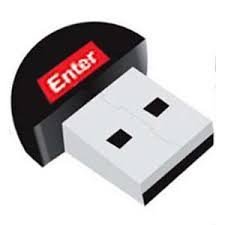
Figure 3: The Enter 2.0 USB Bluetooth Dongle, highlighting the brand logo.