
Introduction
This manual provides instructions for the installation, operation, and maintenance of your LPS Lowpricesupply White Single Pole Line Volt Thermostat Cover and Knob Set, Model D22. This set is designed as a replacement for old style D22 single pole line volt thermostats.
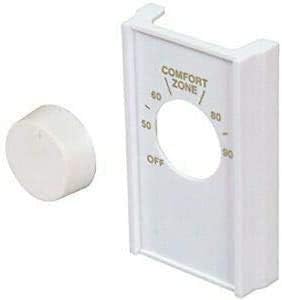
Figure 1: LPS Lowpricesupply White Single Pole Line Volt Thermostat Cover and Knob Set.
Setup and Installation
This product is intended for replacing an existing thermostat cover and knob. Ensure the power to the thermostat is turned off at the circuit breaker before beginning any installation or replacement work.
- Verify Compatibility: Before installation, confirm that this cover and knob set is compatible with your existing thermostat. This set is designed for old style D22 single pole line volt thermostats.
- Check Dimensions: It is crucial to verify the dimensions of the replacement cover against your existing thermostat to ensure a proper fit. Refer to the dimension diagram below.
- Remove Old Cover and Knob: Carefully remove the old thermostat cover and knob from your existing thermostat unit.
- Install New Cover: Align the new white cover with the thermostat unit and gently snap it into place. Ensure it is securely fastened.
- Install New Knob: Place the new white knob onto the thermostat's control shaft.
- Restore Power: Once the new cover and knob are securely installed, restore power to the thermostat at the circuit breaker.

Figure 2: Detailed dimensions of the thermostat cover and knob. The cover measures approximately 2-3/4" wide by 4-9/16" high, with a depth of 0.93".

Figure 3: Example of the thermostat cover and knob installed, showing its approximate dimensions.
Operating Instructions
The thermostat cover and knob facilitate manual temperature control. To operate your thermostat:
- Adjusting Temperature: Rotate the knob clockwise or counter-clockwise to select your desired temperature setting. The markings on the cover indicate temperature values (e.g., 50, 60, 80, 90) and an "OFF" position.
- Turning Off: Rotate the knob to the "OFF" position to disable heating or cooling.

Figure 4: Close-up view of the thermostat cover with the knob, illustrating the temperature adjustment markings.
Maintenance
The thermostat cover and knob require minimal maintenance.
- Cleaning: To clean the cover and knob, gently wipe with a soft, damp cloth. Avoid using abrasive cleaners or solvents, as these may damage the finish or markings.
- Inspection: Periodically inspect the cover and knob for any signs of wear or damage.
Troubleshooting
If you encounter issues with your thermostat cover and knob, consider the following:
- Improper Fit: If the cover does not fit correctly, re-verify the dimensions against your existing thermostat unit. Ensure it is designed for a D22 model.
- Damaged Item: If the item arrives damaged, refer to the "Support" section for instructions on how to proceed.
- Knob Functionality: Ensure the knob is properly seated on the thermostat's control shaft. If the thermostat itself is not responding to knob adjustments, the issue may lie with the thermostat unit, not the cover or knob.
Figure 5: Important notice regarding damaged items and customer support contact.
Specifications
| Brand | LPS Lowpricesupply |
| Model Number | D22 |
| Color | White |
| Controller Type | Mechanical knob |
| Temperature Control Type | Manual |
| Included Components | 1 Line Volt Thermostat Cover, 1 Line Volt Thermostat Knob Set |
| Shape | Rectangular |
| Display Type | Analog |
| Mounting Type | Wall Mount |
| Item Weight | 1.13 ounces |
| Package Dimensions | 5.2 x 4.13 x 1.14 inches |
| UPC | 689227597342 |
Warranty Information
Specific warranty details for the LPS Lowpricesupply White Single Pole Line Volt Thermostat Cover and Knob Set (Model D22) are not provided in the product information. For inquiries regarding warranty, please contact the seller directly.
Customer Support
For any questions, concerns, or support regarding your product, please contact LPS Lowpricesupply directly through the Amazon messaging system. This is especially important if your item arrives damaged. Please do not open a return request before contacting the seller to resolve the issue.
Thank you for your purchase.