
1. Introduction
The Biotronix Comfy Stim EV-806 is a portable, dual-channel Transcutaneous Electrical Nerve Stimulator (TENS) and Electrical Muscle Stimulator (EMS) device. It is designed to provide symptomatic relief of chronic intractable pain and for muscle re-education. This manual provides essential information for the safe and effective operation of your device.
2. Important Safety Information
Please read all instructions and warnings carefully before using this device. Failure to do so may result in injury or improper operation.
- Consult your physician before using this device, especially if you have pre-existing medical conditions.
- Do not use this device if you have a cardiac pacemaker, implanted defibrillator, or other implanted metallic or electronic device.
- Do not use this device if you are pregnant.
- Do not place electrodes over your carotid sinus nerves (front of the neck), across your chest, or on your head.
- Do not use over open wounds, rashes, or swollen, red, infected, or inflamed areas.
- Keep out of reach of children.
- Discontinue use if skin irritation, discomfort, or adverse reactions occur and consult your physician.
- Do not operate machinery or drive a vehicle while using this device.
3. Product Overview
The Biotronix Comfy Stim EV-806 is a compact, pocket-sized device featuring a clear LCD for easy setting adjustments. It offers both TENS and EMS therapy options with dual channels for treating two areas simultaneously.
Device Components
- LCD Display: Shows current mode, pulse width, timer, and other settings.
- Control Buttons: Power, Mode, Set, Up (▲), Down (▼).
- Output Channels: CH1 and CH2 for connecting lead wires and electrodes.
- Battery Compartment: Located on the back of the device.
- Protective Strips: On both sides of the unit for durability.
- Belt Clip: Unbreakable, stainless steel clip for portability.
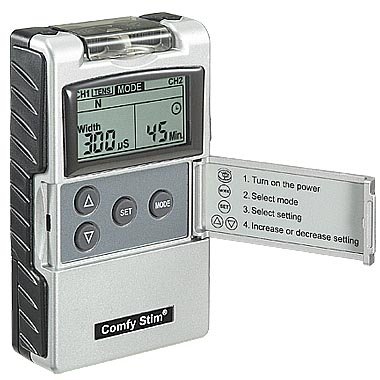
Figure 1: Front view of the Biotronix Comfy Stim EV-806 with the protective cover open, displaying controls and basic instructions.
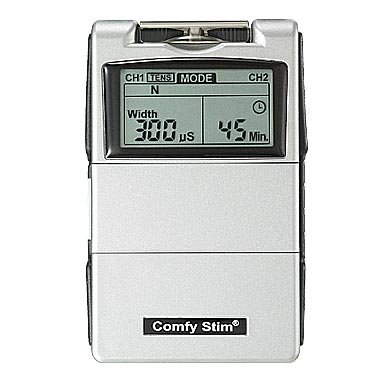
Figure 2: The Biotronix Comfy Stim EV-806 connected to electrode pads via lead wires.
4. Setup
4.1 Battery Installation
- Open the battery compartment cover on the back of the device.
- Insert the 9V battery, ensuring correct polarity (+/-).
- Close the battery compartment cover securely.
4.2 Connecting Lead Wires and Electrodes
- Insert the pin connectors of the lead wires into the output jacks (CH1 and CH2) on the top of the device.
- Attach the electrode pads to the other end of the lead wires.
- Ensure the skin area where electrodes will be placed is clean, dry, and free of oils or lotions.
- Apply the electrode pads firmly to the skin in the desired treatment area.
5. Operating Instructions
5.1 Powering On/Off
- To turn on: Press the Power button. The LCD will illuminate.
- To turn off: Press and hold the Power button until the display turns off.
5.2 Mode Selection
The device offers TENS and EMS modes. The current mode (TENS or EMS) is indicated on the top of the LCD.
- Press the MODE button to cycle between TENS and EMS therapy types.
- Once the desired therapy type (TENS or EMS) is selected, press the MODE button again to cycle through the specific modes within that therapy type.
TENS Modes:
- B (Burst): Delivers bursts of pulses, often used for chronic pain.
- N (Normal/Conventional): Continuous, steady pulses for general pain relief.
- M (Modulation): Varies pulse width and/or rate to prevent nerve adaptation.
- SD1 (Strength Duration 1): Modulates pulse width and intensity.
- SD2 (Strength Duration 2): Similar to SD1 with different modulation patterns.
EMS Modes:
- S (Synchronous): Both channels stimulate simultaneously.
- A (Alternate): Channels stimulate alternately, useful for muscle re-education.
5.3 Parameter Adjustment
After selecting a mode, press the SET button to cycle through adjustable parameters. Use the ▲ (Up) and ▼ (Down) buttons to change the values.
- Pulse Amplitude: Adjustable, 0-100 mA peak into 500 ohm load. Increase gradually to a comfortable level.
- Pulse Rate: Adjustable, from 2 to 150 Hz (1Hz/Step).
- Pulse Width: Adjustable, from 50 to 300 microseconds (10µs/step).
- Timer: Adjustable, from 5 to 60 minutes or Continuous (adjustable in 5-minute steps).
- On Time (EMS): Adjustable, 2~90 seconds (1 Sec./step).
- Off Time (EMS): Adjustable, 0~90 seconds (1 Sec./step).
- Ramp Time (EMS): Adjustable, 1~8 seconds (1 Sec./step).
5.4 Patient Compliance Meter
The device includes a patient compliance meter that records usage up to 999 hours. This feature helps track therapy duration.
5.5 Last Used Settings
The device automatically stores the last used settings, allowing for quick resumption of therapy.
6. Maintenance and Care
6.1 Cleaning the Device
- Turn off the device and remove the battery before cleaning.
- Wipe the device with a soft, damp cloth. Do not use abrasive cleaners or immerse the device in water.
- Ensure the device is completely dry before reinserting the battery or using it.
6.2 Electrode Pad Care
- Always apply electrode pads to clean, dry skin.
- After each use, place the electrode pads back on their protective liner.
- Replace electrode pads when they lose their adhesiveness or become damaged.
6.3 Storage
- Store the device and accessories in the provided carry case.
- Store in a cool, dry place away from direct sunlight and extreme temperatures.
- Remove the battery if the device will not be used for an extended period.
7. Troubleshooting
| Problem | Possible Cause | Solution |
|---|---|---|
| Device does not turn on | Low or dead battery; Incorrect battery insertion | Replace battery; Check battery polarity |
| No sensation or weak sensation | Electrodes not properly attached; Lead wires loose; Intensity too low; Electrodes dry | Re-apply electrodes firmly; Check lead wire connections; Increase intensity gradually; Replace electrodes |
| Skin irritation under electrodes | Electrodes used too long; Allergic reaction; Skin not clean | Reduce treatment time; Use hypoallergenic electrodes; Clean skin thoroughly before use; Consult physician if irritation persists |
| Low battery indicator | Battery is running low | Replace the battery immediately |
8. Specifications
- Model: EV-806 (Comfy Stim)
- Output Type: TENS and EMS
- Channels: Dual Channel
- Wave Form: Asymmetrical Bi-Phasic Square Pulse
- Pulse Amplitude: Adjustable, 0-100 mA peak into 500 ohm load
- Pulse Rate: Adjustable, 2-150 Hz (1Hz/Step)
- Pulse Width: Adjustable, 50-300 µs (10µs/step)
- Timer: Adjustable, 5-60 minutes or Continuous (5-minute steps)
- TENS Modes: B (Burst), N (Normal), M (Modulation), SD1 (Strength Duration 1), SD2 (Strength Duration 2)
- EMS Modes: S (Synchronous), A (Alternate)
- EMS Ramp Time: Adjustable, 1-8 seconds (1 Sec./step)
- EMS On Time: Adjustable, 2-90 seconds (1 Sec./step)
- EMS Off Time: Adjustable, 0-90 seconds (1 Sec./step)
- Size: 10.1cm (L) x 6.1cm (W) x 2.45cm (H)
- Weight: 150 grams (with battery)
- Power Source: 9V Battery
- Manufacturer: Everyway Medical
- Date First Available: 10 March 2018
9. Included Accessories
- 1 x Carry Case
- 1 x Set of Sticking Electrode Pads
- 1 x 9V Battery
- 2 x PC Lead Wires
- 1 x User Manual (this document)
10. Warranty and Support
For warranty information, technical support, or service inquiries, please refer to the documentation provided with your purchase or contact the manufacturer directly. Keep your purchase receipt as proof of purchase.