
1. Introduction
Thank you for choosing the KINGJOY G-Series Monopod Tripod Kit G555+G0. This versatile 2-in-1 camera support system is designed for photographers seeking stability, flexibility, and portability. This manual provides essential information for the safe and effective use of your new equipment. Please read it thoroughly before operation and retain it for future reference.
2. Safety Information
- Always ensure your camera is securely mounted to the quick release plate and the ball head is tightened before use.
- Do not exceed the maximum weight capacity of 3.1 pounds (1.4 kg) to prevent damage to the tripod and camera.
- Avoid placing the tripod on unstable or slippery surfaces.
- When adjusting leg sections, ensure your fingers are clear of the locking mechanisms to prevent pinching.
- Do not leave the tripod unattended in windy conditions, especially with a camera mounted, as it may tip over.
- Keep the product away from extreme temperatures and corrosive substances.
3. Package Contents
Verify that all items are present in your package:
- KINGJOY G555+G0 Tripod Kit
- Zippered Carry Bag
- User Manual
4. Product Overview
The KINGJOY G-Series Monopod Tripod Kit G555+G0 is crafted from durable aluminum alloy, offering a robust yet lightweight solution for photographers. Key features include:
- 2-in-1 Tripod/Monopod Functionality: Easily converts from a stable tripod to a full-size monopod by detaching the center column and one tripod leg.
- Compact and Lightweight Design: Legs invert and fold back 180 degrees for a compact storage size of 17.5 inches (44.5 cm) and a weight of approximately 3.16 pounds (1.43 kg).
- Adjustable Leg Angle Lock: Three leg angle positions provide flexibility for shooting in various environments, including tight spaces or uneven terrain.
- 360-Degree Panoramic Ball Head: Features a graduated rotation scale for precise panoramic photography and a 1/4-inch quick release plate for easy camera attachment.
- Durable Construction: High hardness density, efficient shock absorption, and improved resistance to heat and corrosion ensure longevity.
5. Setup
5.1 Unfolding the Tripod
- Remove the tripod from its carry bag.
- Release the leg locks and extend the legs outwards.
- Adjust the leg angles using the angle lock mechanisms located at the top of each leg. There are three preset angles for stability on different surfaces.
- Extend the leg sections by flipping open the quick-flip leg locks and pulling out each section. Close the locks firmly to secure the legs at the desired height.
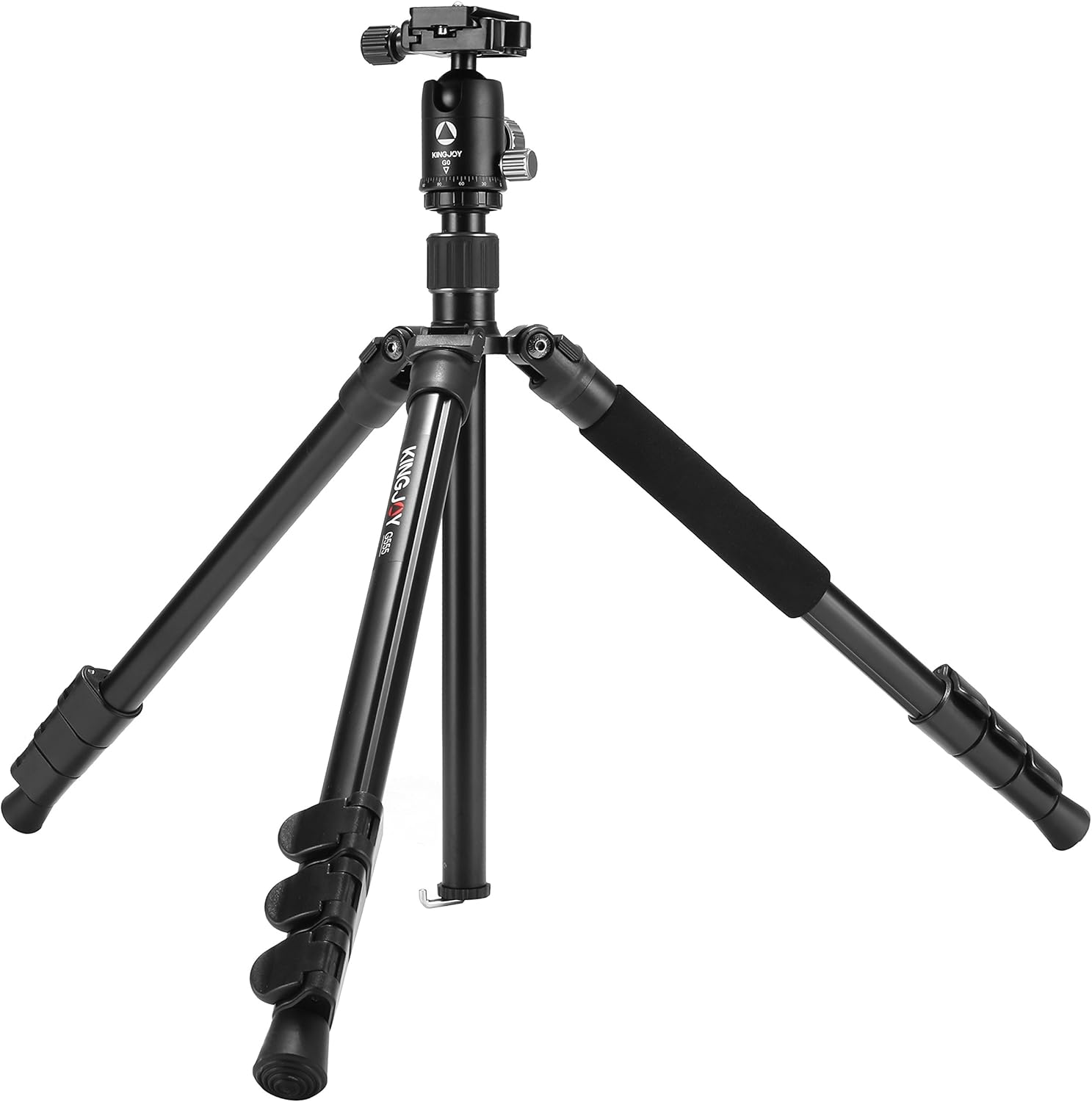
Figure 1: Tripod in standard configuration with legs extended.
5.2 Attaching Your Camera
- Locate the quick release plate on the ball head.
- Unscrew the quick release plate from the ball head by turning the locking knob.
- Attach the quick release plate to the 1/4-inch tripod socket on the bottom of your camera. Ensure it is tightened securely.
- Slide the camera with the attached quick release plate back into the ball head receiver. Tighten the locking knob firmly to secure the camera.

Figure 2: Camera mounted on the tripod using the quick release plate.
5.3 Converting to Monopod
- Unscrew the center column from the tripod chassis.
- Identify the tripod leg with the foam grip. This leg is designed to be detachable.
- Unscrew the detachable leg from the tripod chassis.
- Screw the detached leg onto the bottom of the center column. This forms the monopod.
- Attach the ball head to the top of the assembled monopod.

Figure 3: Monopod configuration with extended leg and ball head.
6. Operating Instructions
6.1 Adjusting Height
- Leg Sections: Open the quick-flip leg locks on each leg section, extend the legs to the desired height, and then firmly close the locks.
- Center Column: Loosen the center column locking knob, raise or lower the center column, and then tighten the knob to secure it.
6.2 Using the Ball Head
- Positioning: Loosen the main locking knob on the ball head to allow free movement. Adjust your camera to the desired angle, then tighten the knob to lock it in place.
- Panoramic Shots: The ball head features a separate panoramic rotation lock and a graduated scale. Loosen the panoramic lock, rotate the camera to capture your panoramic sequence, and then tighten the lock. Use the scale for precise, repeatable movements.

Figure 4: Detailed view of ball head and leg adjustment points.
7. Maintenance
- Cleaning: Wipe down the tripod with a soft, dry cloth after each use. For stubborn dirt, use a slightly damp cloth and mild soap, then dry thoroughly. Avoid harsh chemicals.
- Lubrication: Periodically check leg locks and moving parts. If they become stiff, apply a small amount of silicone-based lubricant. Do not over-lubricate.
- Storage: Store the tripod in its carry bag in a cool, dry place, away from direct sunlight and extreme temperatures.
- Inspection: Regularly inspect all screws, bolts, and locking mechanisms to ensure they are tight and functioning correctly.
8. Troubleshooting
- Tripod is unstable: Ensure all leg sections are fully extended and their locks are securely fastened. Check that the leg angle locks are engaged. Verify the tripod is on a flat, stable surface.
- Camera wobbles on ball head: Confirm the quick release plate is tightly screwed onto the camera and the ball head's locking knob is fully tightened.
- Leg sections are difficult to extend/retract: Clean the leg sections to remove any dirt or debris. A small amount of silicone lubricant can be applied to the inner surfaces if needed.
- Ball head movement is stiff: Loosen the main locking knob. If still stiff, clean the ball head mechanism and apply a minimal amount of lubricant if necessary.
9. Specifications
| Feature | Specification |
|---|---|
| Brand | KINGJOY |
| Model Number | G555+G0 |
| Material | Aluminum Alloy |
| Color | Black |
| Compatible Devices | Camera |
| Item Weight | 3.16 pounds (1.43 kg) |
| Maximum Weight Capacity | 3.1 pounds (1.4 kg) |
| Maximum Height | 156 cm (61.4 inches) |
| Minimum Height | 45 cm (17.7 inches) |
| Leg Diameter | 25 Millimeters |
| Tripod Head Type | Ball Head |
| UPC | 610877753604 |
| ASIN | B07BC7GK84 |
10. Warranty and Support
KINGJOY products are manufactured to high-quality standards. For information regarding warranty coverage, technical support, or service inquiries, please refer to the warranty card included with your product or visit the official KINGJOY website. Please retain your proof of purchase for any warranty claims.


