
1. Introduction
Thank you for choosing the Philips Multigroom Series 3000. This versatile 8-in-1 trimmer is designed for precise grooming of your beard, hair, and body. Featuring durable, self-sharpening stainless steel blades, it provides a comfortable and irritation-free experience. This manual will guide you through the setup, operation, and maintenance of your new grooming tool.

The Philips Multigroom Series 3000 with all included accessories.
2. Safety Information
Please read all safety instructions carefully before using the appliance. Failure to follow these instructions may result in electric shock, fire, or serious injury.
- Do not use on babies.
- Keep away from water sources.
- Follow recommended cleaning and maintenance instructions to avoid skin irritation or eye injuries.
- Ensure the appliance is fully dry before charging.
- Do not use the appliance if it is damaged.
3. Components and Accessories
Your Philips Multigroom MG3731/15 comes with 8 versatile tools to achieve various grooming styles:

Detailed view of the trimmer and its accessories.
- Trimmer: For precise lines around your beard and neck.
- Nose and Ear Hair Trimmer: Easily and comfortably removes unwanted nose and ear hair.
- 2 Stubble Combs: (1 mm and 2 mm) For maintaining short beard styles.
- 1 Adjustable Beard Comb: (3 to 7 mm) For various beard lengths.
- 3 Hair Combs: (9 mm, 12 mm, and 16 mm) For different hair lengths.
- Storage Stand: Keeps your trimmer and accessories organized.
- Cleaning Brush: For easy maintenance.
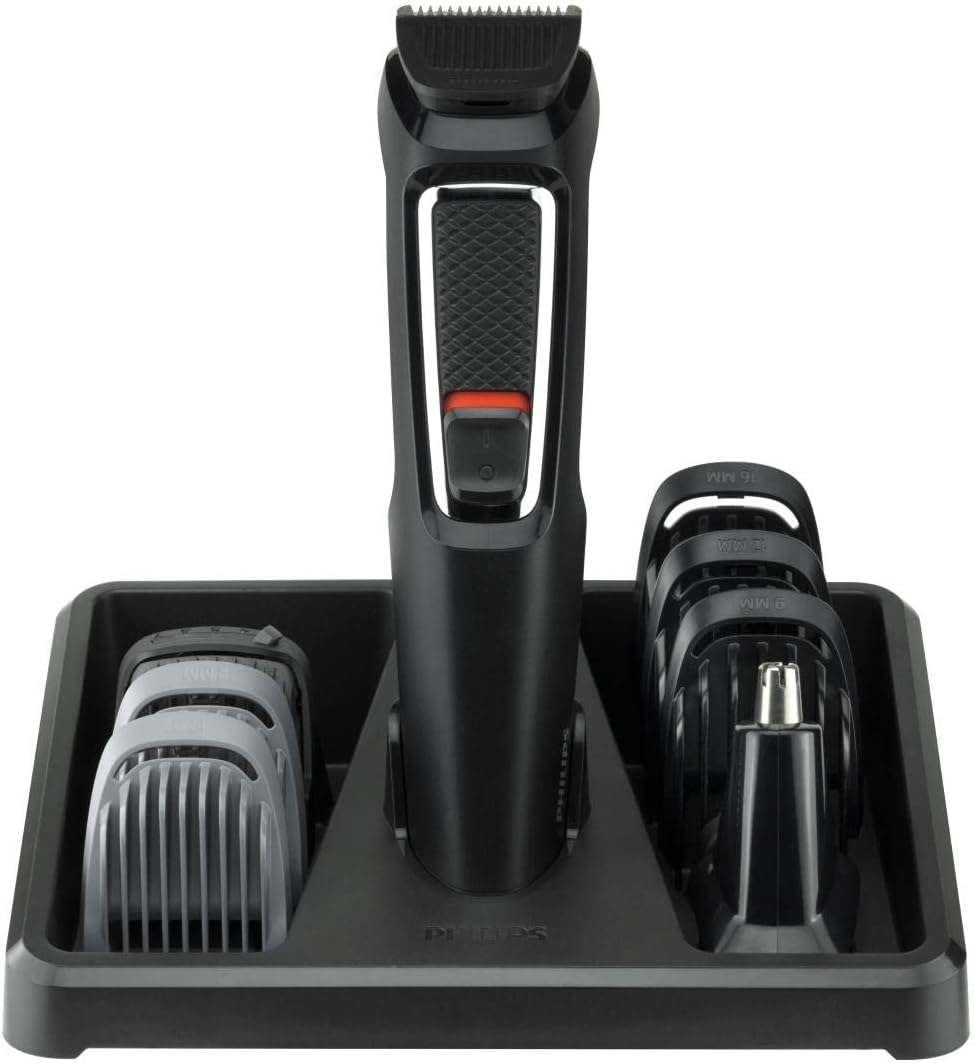
The trimmer and its accessories neatly stored in the included stand.
4. Setup
4.1 Charging the Appliance
The Philips Multigroom MG3731/15 is a rechargeable, bivolt device. Before first use, or if the battery is low, charge the appliance fully. A full charge provides approximately 60 minutes of cordless use.
- Ensure the appliance is switched off.
- Connect the charging cable to the trimmer and plug it into a wall outlet.
- The charging indicator will show the charging status (refer to the indicator light behavior in your quick start guide for details).
- Allow the appliance to charge for the recommended time (typically several hours for a full charge).
4.2 Attaching and Detaching Combs/Heads
To attach a comb or trimmer head, align it with the main trimmer body and push gently until it clicks into place. To detach, pull the comb or head away from the trimmer body.
5. Operating Instructions
The Multigroom MG3731/15 can be used on dry or wet skin for comfortable grooming.
5.1 General Trimming
- Ensure the desired comb or trimmer head is securely attached.
- Switch on the appliance.
- Move the trimmer against the direction of hair growth for optimal results.
- For precise lines, remove the comb and use the trimmer head directly on the skin.
5.2 Beard Trimming
Select one of the stubble combs (1mm, 2mm) or the adjustable beard comb (3-7mm) depending on your desired beard length. Trim evenly across your beard, moving the trimmer in smooth strokes.

Using the trimmer for beard grooming.
5.3 Hair Trimming
Choose one of the hair combs (9mm, 12mm, 16mm) for your preferred hair length. Guide the trimmer through your hair, ensuring consistent pressure for an even cut.
5.4 Nose and Ear Hair Trimming
Attach the nose and ear hair trimmer head. Gently insert the trimmer into your nostril or ear canal and rotate it to remove unwanted hair. Be careful not to insert it too deeply.
6. Maintenance
Proper maintenance ensures the longevity and performance of your Philips Multigroom.
6.1 Cleaning
The trimmer heads and combs are washable for easy cleaning.
- Switch off the appliance and detach the trimmer head and comb.
- Rinse the trimmer head and combs under running water.
- Use the included cleaning brush to remove any trapped hairs from the trimmer head.
- Allow all parts to air dry completely before reattaching or storing.

Rinsing the trimmer head under running water for easy cleaning.
6.2 Blade Care
The stainless steel blades of your Philips Multigroom are self-sharpening and designed to remain sharp over time. They do not require lubrication.
7. Troubleshooting
If you encounter any issues with your Philips Multigroom, please refer to the following common solutions:
- Appliance does not turn on: Ensure the battery is charged. Connect the charger and allow it to charge for at least 30 minutes before attempting to turn it on again.
- Reduced trimming performance: Clean the trimmer head and combs thoroughly to remove any accumulated hair. Ensure the blades are free from debris.
- Skin irritation: Ensure you are using the correct comb for your desired length and moving the trimmer against the direction of hair growth. Clean the blades regularly. If irritation persists, discontinue use and consult a dermatologist.
For further assistance, please contact Philips customer support.
8. Specifications
| Feature | Specification |
|---|---|
| Product Name | Hair Trimmer |
| Brand | PHILIPS |
| Model Number | MG3731/15 |
| Voltage | 110 Volts, 220 Volts (Bivolt) |
| Battery Type | 1 x 9V battery (included) |
| Cordless Use Time | Up to 60 minutes |
| Blade Material | Stainless Steel (Self-sharpening) |
| Washable | Yes (Heads and combs) |
| Dimensions (Product) | 3 x 3.5 x 15.5 cm |
| Weight (Product) | 773 g |
| Country of Origin | Indonesia |
9. Warranty and Support
Your Philips Multigroom MG3731/15 comes with a 2-year warranty from the date of purchase. Additionally, Philips offers a 90-day trial period, allowing you to return the product if you are not satisfied (terms and conditions apply, please refer to Philips' official website for details).
For warranty claims, technical support, or any questions regarding your product, please visit the official Philips support website or contact their customer service line. Keep your proof of purchase for warranty validation.


