
Introduction
This manual provides comprehensive instructions for the VINABTY BN59-01180A Replacement Remote Control. This remote is designed to be a direct replacement for various Samsung LFD TVs and displays, offering seamless functionality without the need for complex programming.
Please read this manual carefully before using the remote control to ensure proper operation and to maximize its lifespan.
Product Overview

Figure 1: Front view of the BN59-01180A Replacement Remote Control, showing all buttons and their labels.
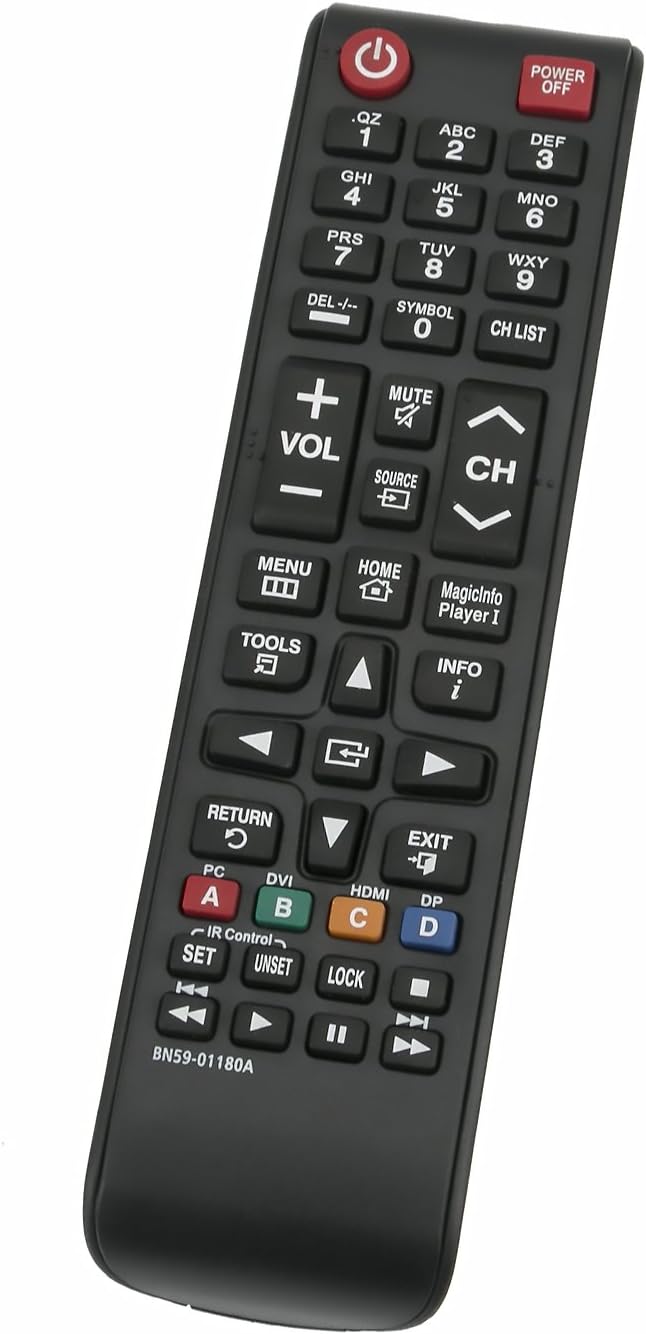
Figure 2: Angled view of the remote control, highlighting its ergonomic design.
The BN59-01180A remote control features a standard layout with dedicated buttons for power, volume, channel, menu, home, and various input selections. It is designed for intuitive use with compatible Samsung displays.
Setup
Battery Installation
- Locate the battery compartment on the back of the remote control.
- Slide the battery cover downwards or in the direction indicated by the arrow to open it.
- Insert two (2) AAA batteries, ensuring the positive (+) and negative (-) terminals align correctly with the markings inside the compartment.
- Slide the battery cover back into place until it clicks securely.
Note: No programming is required. The remote is ready to use once batteries are installed.
Operating Instructions
Basic Functions
- Power On/Off: Press the POWER button (red button at the top right) to turn the TV/display on or off.
- Volume Control: Use the VOL +/- buttons to adjust the volume level.
- Channel Change: Use the CH ^/v buttons to navigate through channels.
- Mute: Press the MUTE button to silence the audio. Press again to restore.
- Source Selection: Press the SOURCE button to cycle through available input sources (HDMI, AV, etc.).
Advanced Functions
- Menu: Press the MENU button to access the TV's main menu.
- Home: Press the HOME button to go to the smart hub or main home screen.
- Info: Press the INFO button to display information about the current program or input.
- Navigation Pad: Use the directional arrows and ENTER button (center of navigation pad) to navigate menus and confirm selections.
- Color Buttons (A, B, C, D): These buttons provide access to specific functions within certain applications or menus, as indicated on your TV screen.
Compatibility
This VINABTY BN59-01180A remote control is compatible with a wide range of Samsung LFD (Large Format Display) TVs and other Samsung display models. Key compatible models include, but are not limited to:
- DH40D, DH48D, DH55D
- DM32D, DM40D, DM48D
- EM65E, EM75E
- DC32E, DC40E, DC48E, DC55E
- DC32E-M, DC40E-M, DC48E-M, DC55E-M
- DC40E-H, DC48E-H
- ED75E, ML32E, ML55E
- OH46D, OH55D, OH24E, OM24E
- And many other Samsung LFD and TV models listed in the product description.
For a complete list of compatible models, please refer to the product listing or contact customer support.
Maintenance
- Cleaning: Wipe the remote control with a soft, dry cloth. Do not use liquid cleaners or abrasive materials.
- Battery Replacement: Replace batteries when the remote's response becomes sluggish or stops working. Always replace both batteries at the same time.
- Storage: Store the remote in a cool, dry place away from direct sunlight and extreme temperatures.
- Avoid Drops: Protect the remote from physical impact, as drops can damage internal components.
Troubleshooting
| Problem | Possible Cause | Solution |
|---|---|---|
| Remote not responding. | Dead or incorrectly installed batteries. | Replace batteries with new AAA batteries, ensuring correct polarity. |
| Remote works intermittently. | Low battery power; obstruction between remote and TV; infrared sensor blocked. | Replace batteries. Ensure clear line of sight to the TV's IR sensor. Clean any dust from the TV's IR sensor. |
| Specific buttons not working. | Button stuck or damaged; remote malfunction. | Gently press the button multiple times. If issue persists, consider replacing the remote. |
| Remote does not control TV. | Incorrect remote for TV model; TV not powered on. | Verify TV model compatibility. Ensure TV is powered on and not in standby mode. |
Specifications
- Model Number: BN59-01180A
- Brand: VINABTY
- Power Source: 2 x AAA Batteries (not included)
- Color: Black
- Dimensions: 8 x 2 x 1 inches (approximately)
- Item Weight: 2.08 ounces (approximately)
- Special Feature: Ergonomic design
Warranty and Support
This product is manufactured by VINABTY factory. For specific warranty information, please refer to the terms provided at the time of purchase or contact your retailer.
The product typically comes with a return policy allowing for refund/replacement within 30 days of purchase, subject to retailer terms.
For technical support or inquiries, please contact the seller or refer to the product's official support channels.