
RAPESCO 1461
Rapesco 1461 ECO Heavy-Duty Stapler User Manual
Model: 1461 | Brand: RAPESCO
Introduction
The Rapesco 1461 ECO Heavy-Duty Stapler is designed for demanding stapling tasks, offering a capacity of up to 100 sheets. Constructed from a high percentage of recycled materials, this stapler combines durability with environmental consciousness. It features an easy top-loading mechanism, a unique paper guide/locking system, and a soft-feel rubber handle for comfortable operation. This manual provides comprehensive instructions for the proper setup, operation, maintenance, and troubleshooting of your Rapesco 1461 ECO Heavy-Duty Stapler.
Safety Information
Please read and understand all safety instructions before using the stapler. Keep this manual for future reference.
- Keep fingers clear of the stapling mechanism during operation to prevent injury.
- Use only recommended staple types and sizes (Rapesco type 923 Heavy-Duty 1/4" to 1/2" and type 24 High-Capacity 1/4" and 5/16" extra strong staples) to ensure proper function and prevent damage to the stapler.
- Do not attempt to staple materials thicker than the maximum stated capacity (100 sheets of 80gsm paper).
- Store the stapler in a safe place, out of reach of children.
- Do not disassemble or modify the stapler. Refer to qualified personnel for repairs.
Product Overview
Familiarize yourself with the main components of your Rapesco 1461 ECO Heavy-Duty Stapler.

This diagram illustrates the key features of the Rapesco HD-100 ECO Heavy-Duty Stapler, including its easy top-loading mechanism, soft-feel rubber grip for comfort, durable all-metal chassis, adjustable paper guide for precise stapling, and a capacity to staple 2 to 100 sheets.
- Stapler Head/Handle: The upper part of the stapler, featuring a soft-feel rubber grip for comfortable operation.
- Staple Channel: The internal mechanism where staples are loaded.
- Base: The lower part of the stapler, providing stability with non-slip feet.
- Paper Guide: An adjustable guide to ensure consistent and precise stapling depth.
- Staple Pusher: The component that pushes staples forward in the channel.
Setup
1. Unpacking
Carefully remove the stapler and any included accessories (such as staples) from the packaging. Inspect the stapler for any signs of damage. If damaged, do not use and contact customer support.
2. Loading Staples
The Rapesco 1461 ECO Heavy-Duty Stapler uses Rapesco type 923 Heavy-Duty staples (8mm, 10mm, 12mm, 13mm) and type 24 High-Capacity staples (1/4" and 5/16"). For optimal results, always use genuine Rapesco staples.
- Ensure the stapler is on a flat, stable surface.
- Press the button located at the rear of the stapler to release the staple channel. The channel will spring open from the front.
- Insert a full strip of Rapesco 923 or 24 series staples into the open channel, ensuring the staple points are facing downwards.
- Gently push the staple channel back into the stapler until it clicks securely into place. Do not force it.

Loading staples into the top-loading staple channel.
3. Adjusting the Paper Guide
The adjustable paper guide helps achieve consistent stapling depth and alignment.
- Locate the paper guide on the base of the stapler.
- Slide the paper guide to the desired depth, aligning it with the edge of your paper stack.
- The guide features a locking system to hold it firmly in position during use.
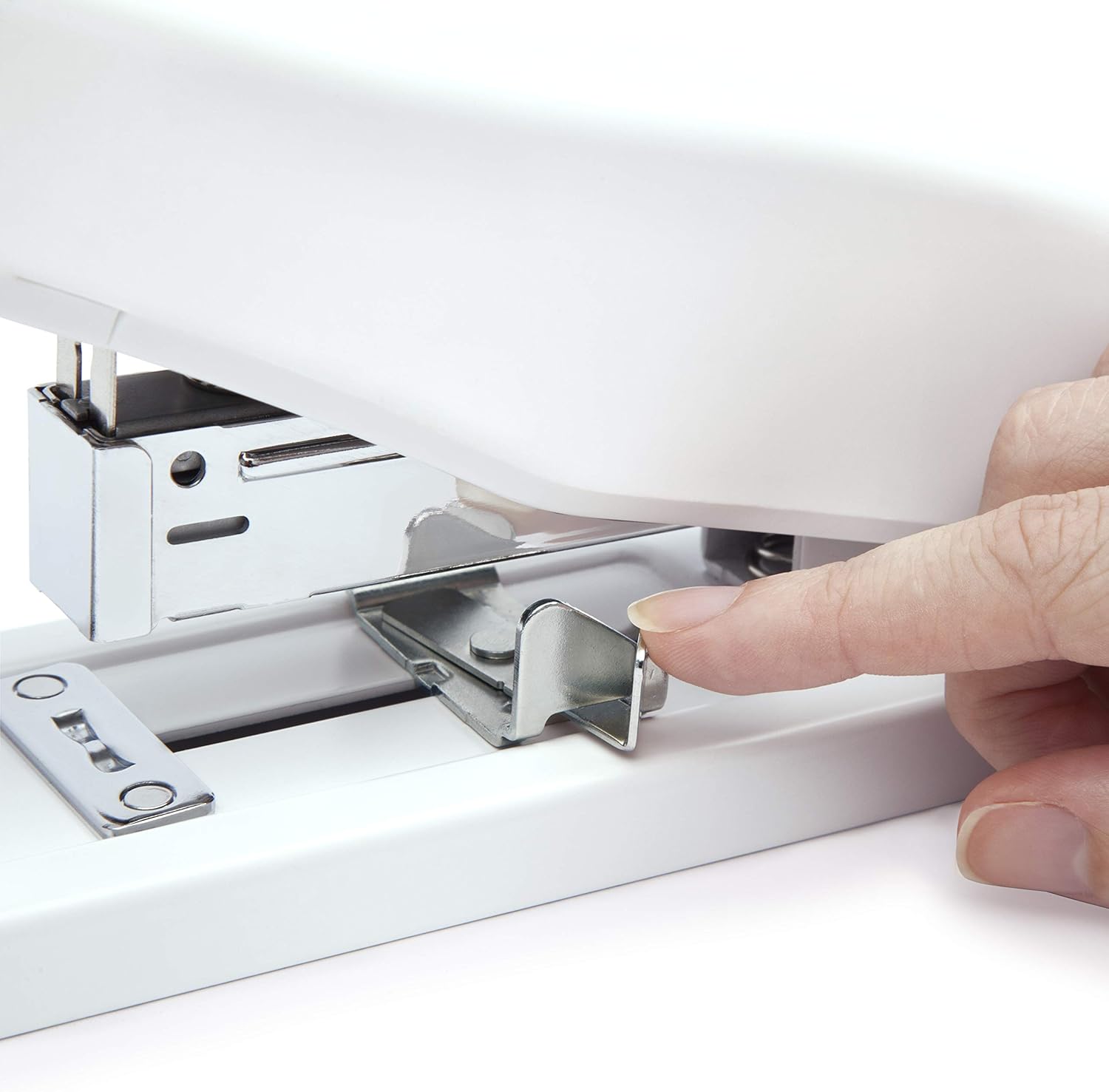
Adjusting the paper guide for precise stapling.
Operating Instructions
Stapling Documents
- Gather the documents you wish to staple, ensuring they are neatly aligned. The stapler can handle up to 100 sheets of standard 80gsm paper.
- Place the stack of papers under the stapler head, aligning the edge of the paper with the adjustable paper guide.
- With a firm, even pressure, press down on the stapler head until the staple penetrates the paper and clinches underneath. The soft-feel rubber grip provides comfort during this action.
- Release the stapler head. The stapled documents can now be removed.

Using the stapler to bind documents.
Maintenance
Regular maintenance will ensure the longevity and optimal performance of your Rapesco stapler.
- Cleaning: Wipe the exterior of the stapler with a soft, dry cloth. Do not use abrasive cleaners or solvents, as these may damage the finish.
- Staple Dust: Periodically check the staple channel for any accumulated staple dust or debris. Remove any obstructions carefully.
- Lubrication: The stapler is designed for maintenance-free operation. No lubrication is required.
- Storage: Store the stapler in a clean, dry environment when not in use.
Troubleshooting
If you encounter issues with your Rapesco 1461 ECO Heavy-Duty Stapler, refer to the following common problems and solutions:
| Problem | Possible Cause | Solution |
|---|---|---|
| Staples jamming or misfiring. | Incorrect staple size/type, low staple supply, bent staples, or debris in channel. | Ensure correct Rapesco 923/24 staples are used. Reload with a fresh strip of staples. Clear any bent staples or debris from the channel. |
| Staple not penetrating all sheets. | Too many sheets, incorrect staple length for thickness, or insufficient pressure. | Reduce the number of sheets. Use longer staples (e.g., 12mm or 13mm 923 staples) for thicker stacks. Apply firm, even pressure. |
| Staples not clinching properly. | Incorrect staple length, or stapler not fully depressed. | Ensure appropriate staple length for paper thickness. Press the stapler head down completely until it clicks. |
| Staple channel not closing. | Staple strip not fully inserted, or obstruction. | Ensure the staple strip is fully seated. Check for and remove any obstructions in the channel. |
If the problem persists after attempting these solutions, please contact Rapesco customer support.
Specifications
Key technical specifications for the Rapesco 1461 ECO Heavy-Duty Stapler:
- Model: 1461 (HD-100 ECO)
- Stapling Capacity: Up to 100 sheets (80gsm paper)
- Compatible Staples: Rapesco Type 923 Heavy-Duty (8mm, 10mm, 12mm, 13mm), Rapesco Type 24 High-Capacity (1/4", 5/16")
- Material: High percentage of recycled ABS plastic, all-metal chassis
- Color: White
- Dimensions: Approximately 10.24 x 5.35 x 4.25 inches (26 x 13.6 x 10.8 cm)
- Weight: Approximately 2.29 pounds (1.04 kg)
- Features: Easy top-loading, adjustable paper guide, soft-feel rubber grip, non-slip feet.

The Rapesco 1461 ECO Heavy-Duty Stapler, bundled with a multi-pack of compatible 923 Heavy Duty Staples.
Warranty and Support
The Rapesco 1461 ECO Heavy-Duty Stapler is backed by a 25-year guarantee, demonstrating our commitment to quality and durability. This warranty covers defects in materials and workmanship under normal use.
For warranty claims, technical support, or any inquiries regarding your product, please visit the official Rapesco website or contact their customer service department. Keep your proof of purchase for warranty validation.
For more information and to explore other Rapesco products, visit the RAPESCO Store on Amazon.