
1. Introduction
The NDJ-5S digital viscometer is designed for precise viscosity measurement. It features an advanced machine design with a Microcontroller Unit (MCU) for accurate results displayed on a high-light LCD with blue backlight. The instrument offers 16 combinations of rotors (1, 2, 3, 4) and speeds (6, 12, 30, 60 r/m) to cover a wide range of viscosity measurements.
2. Product Overview
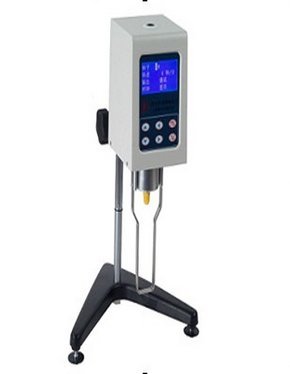
Figure 1: Front view of the MeterTo NDJ-5S Digital Rotary Viscometer, showing the display and control panel.
Key features of the NDJ-5S Digital Rotary Viscometer include:
- Advanced machine design for reliable performance.
- Blue backlight, high-light LCD display for clear readability of results.
- Viscosity measurement capacity: 1 to 2×10⁵ mPa·s.
- Includes 1, 2, 3, and 4 number rotors. A 0 number rotor can be used for low viscosity values (sold separately or included in some kits).
- Multiple rotational speeds: 6, 12, 30, and 60 r/m.
- Automatic selection of the appropriate rotor and speed for the sample.
3. Working Principle
The NDJ-5S viscometer operates by rotating a rotor at a constant speed within the sample fluid. A torque sensor measures the resistance exerted by the fluid on the rotating rotor. The speed of the electromotor is precisely controlled by a program within the Single-Chip Microcomputer (SCM). When the torsional force, which is directly proportional to the sample's viscous resistance, balances the force from the torque sensor, the viscosity value is calculated by a microprocessor and displayed on the LED screen. The display simultaneously shows the selected rotor number, rotational speed, and percentage of full scale.
4. Setup
- Unpacking: Carefully remove the viscometer and all accessories from the packaging. Inspect for any signs of damage during transit.
- Placement: Place the viscometer on a stable, level surface, free from vibrations and direct sunlight. Ensure the ambient temperature is within 5-35°C and relative humidity is not greater than 80%.
- Power Connection: Connect the power cable to the instrument and then to a grounded AC 220V ±10% 50Hz ±10% power outlet.
- Rotor Installation: Select the appropriate rotor for your expected viscosity range. Carefully screw the chosen rotor onto the coupling shaft at the bottom of the viscometer head. Ensure it is securely fastened but do not overtighten.
- Leveling: Use the leveling feet at the base of the instrument and the bubble level (if present) to ensure the viscometer is perfectly level.
5. Operating Instructions
- Prepare Sample: Ensure your sample fluid is at the desired temperature and free from air bubbles or suspended particles that could affect measurement accuracy.
- Immerse Rotor: Carefully lower the viscometer head until the rotor is immersed in the sample fluid up to the marked line on the rotor shaft. Ensure the rotor is centered and not touching the sides or bottom of the sample container.
- Power On: Turn on the viscometer using the main power switch. The LCD display will illuminate.
- Select Rotor and Speed:
- Manual Selection: Use the control buttons to manually select the desired rotor number and rotational speed (r/m) based on the expected viscosity range of your sample.
- Automatic Selection: The NDJ-5S features an auto-selection function. Activate this mode, and the instrument will automatically determine and apply the most suitable rotor and speed for the measurement.
- Start Measurement: Press the "Start" or "Measure" button to begin the rotation of the rotor.
- Read Results: Allow the measurement to stabilize. The "Stable reading cursor" (full column cursor) on the display indicates a stable reading. Once stable, the viscosity value (in mPa·s), rotor number, speed, and percentage will be displayed.
- Record Data: Note down the displayed viscosity value and other relevant parameters.
- Stop Measurement: Press the "Stop" button to halt the rotor rotation.
- Clean Rotor: Carefully remove the rotor and clean it thoroughly immediately after use to prevent sample residue from hardening.
6. Maintenance
- Cleaning: Always clean rotors and the sample container immediately after use. Use appropriate solvents for the sample material. Do not use abrasive cleaners.
- Storage: Store the viscometer and its rotors in a clean, dry, and dust-free environment when not in use. Keep rotors in their protective cases to prevent damage.
- Calibration: Regular calibration with certified viscosity standards is recommended to ensure continued accuracy. Refer to the manufacturer's guidelines for calibration frequency.
- Inspection: Periodically inspect the rotors for any signs of bending, corrosion, or damage. Damaged rotors can lead to inaccurate readings.
- Power Off: Always power off and unplug the instrument when performing maintenance or when not in use for extended periods.
7. Troubleshooting
| Problem | Possible Cause | Solution |
|---|---|---|
| Instrument does not power on. | No power supply; loose power cable. | Check power cable connection; ensure power outlet is functional. |
| Unstable readings. | Rotor not properly immersed; sample not homogeneous; external vibrations; incorrect rotor/speed selection. | Ensure rotor is immersed to the mark; stir sample if necessary; place instrument on stable surface; use auto-selection or adjust rotor/speed. |
| Rotor not rotating. | Rotor jammed; motor fault; incorrect operation. | Check for obstructions around rotor; ensure rotor is correctly installed; restart measurement. If problem persists, contact support. |
| Display shows "OVER" or "ERROR". | Viscosity exceeds range; rotor/speed combination unsuitable. | Select a smaller rotor or higher speed; dilute sample if appropriate. |
8. Specifications
| Model | NDJ-5S |
| Capacity (Viscosity Range) | 1 to 2×10⁵ mPa·s |
| Rotors Included | 1, 2, 3, 4 (Note: 0 number rotor can test low values) |
| Rotational Speeds | 6, 12, 30, 60 r/m |
| Auto Function | Automatically selects the right rotor and speed |
| Stable Reading Cursor | Full column cursor indicates stable reading |
| Accuracy | ±2% (Newtonian liquid) |
| Power Supply | AC 220V±10% 50Hz±10% |
| Operating Environment Temperature | 5—35°C |
| Operating Environment Humidity | Not larger than 80% |
| Dimensions (L×W×H) | 370×325×280mm |
| Weight | 6.8kg |
9. Warranty Information
For detailed warranty terms and conditions, please refer to the documentation provided with your purchase or contact the seller/manufacturer directly. Warranty coverage typically includes defects in materials and workmanship under normal use.
10. Customer Support
If you encounter any issues or have questions regarding the operation or maintenance of your MeterTo NDJ-5S Digital Rotary Viscometer, please contact your point of purchase or the MeterTo customer support team. Have your model number (NDJ-5S) and purchase date ready when contacting support.