
1. Product Overview
This manual provides instructions for the NB POWER 48V-72V 60A Brushless DC Sine Wave Ebike Controller and the accompanying VM960 Color Display. This system is designed for electric bicycles, scooters, and similar electric vehicles, supporting motors up to 3000W.
Key Features:
- High-efficiency 48V-72V 60A Brushless DC Sine Wave Controller.
- Compatible with 3000W brushless motors and electric bike kits.
- Advanced VM960 Color Display for comprehensive ride data.
- Suitable for various electric vehicle applications.
2. Technical Specifications
Controller Parameters:
| Parameter | Value |
|---|---|
| Maximum Current | 60±1A |
| Rated Voltage | DC 48V-72V |
| Rated Current | 30A |
| Rated Power | 3000W |
| Speed Set | 1-4.2V |
| Brake Input | LOW-LEVEL |
| Low Voltage Protection | DC40±0.5V |
| Operating Conditions | -40~80 °C |
| Certification | CE |
VM960 Display Features:
- Display Functions: Speed, Motor Power Ratio, Battery Level, Error Indication, Total Mileage, Single Mileage, Cruise Control, Single Running Time, Light Signal.
- Control and Settings: Power Switch, Front Light Control, 6km/h Inching Control, Wheel Diameter Setting, Top Speed Setting, Idleness Time Setting for Auto-Hibernation, Backlight Brightness Setting, Voltage Level Setting.
- Communication Protocol: UART.
Physical Dimensions:
The controller measures approximately 18.5 cm in length, 11 cm in width, and 5.2 cm in height.
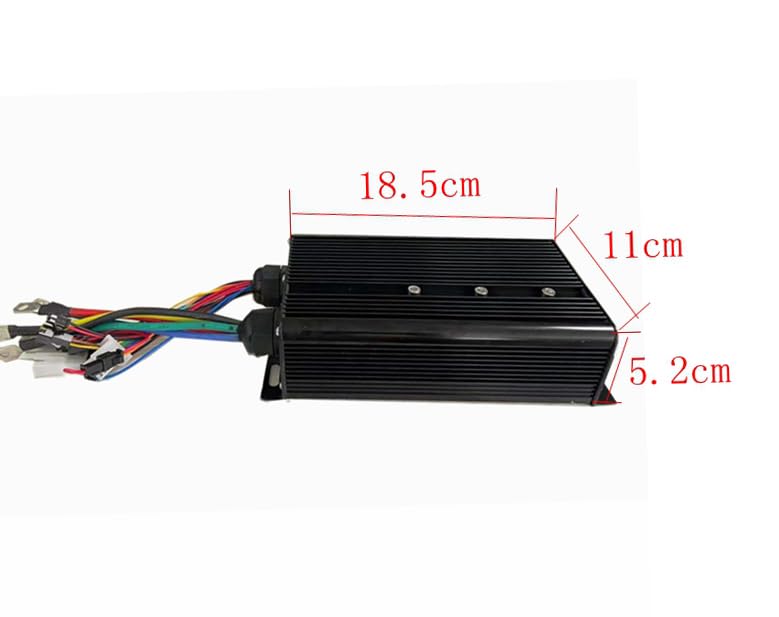
Image: Dimensions of the NB POWER 60A Brushless DC Sine Wave Ebike Controller.
The VM960 display measures approximately 87mm in width, 111mm in height, and 15mm in depth. The control buttons are approximately 39.35mm by 44mm.

Image: Dimensions of the VM960 Color Display and its control unit.
3. Installation Guide
Careful installation is crucial for optimal performance and safety. Refer to the wiring diagram below for correct connections.
Wiring Diagram:
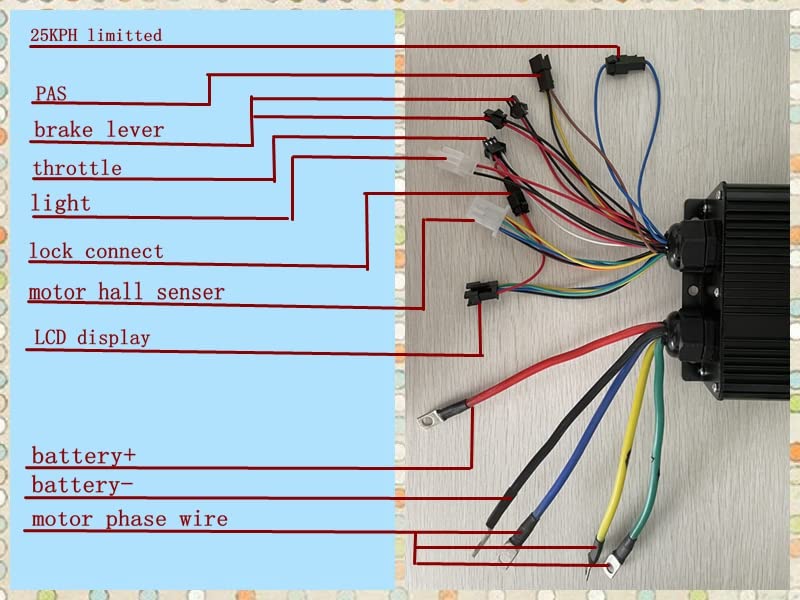
Image: Detailed wiring diagram for the NB POWER Ebike Controller.
Connection Points:
- 25KPH Limited: Connect this wire if speed limiting to 25 km/h is required.
- PAS (Pedal Assist System): Connect to your ebike's PAS sensor for pedal assistance.
- Brake Lever: Connect to the ebike's brake levers. This typically cuts motor power when brakes are applied.
- Throttle: Connect to the ebike's throttle for speed control.
- Light: Output for connecting an ebike light.
- Lock Connect: Connect to the ignition lock or power switch.
- Motor Hall Sensor: Connect to the motor's Hall sensors for proper motor commutation.
- LCD Display: Connect to the VM960 Color Display.
- Battery+: Positive terminal for battery connection.
- Battery-: Negative terminal for battery connection.
- Motor Phase Wire: Connect the three thick wires to the corresponding motor phase wires (usually Green, Blue, Yellow).
Terminal Block:
A terminal block is provided for secure and organized connection of the motor phase wires and battery connections. Ensure all connections are tight and insulated.

Image: Example of a terminal block for robust electrical connections.
4. Operating Instructions
The VM960 Color Display provides essential information and control over your ebike system.
VM960 Display Interface:

Image: Labeled interface of the VM960 Color Display.
Display Functions Explained:
- Headlight Indicator: Shows if the ebike's headlight is on.
- Speed Data: Displays current real-time speed (RT SPEED) in km/h.
- Battery Indicator: Shows the current battery charge level and voltage (e.g., 48.5V).
- Fault Indication: Alerts to system errors or malfunctions.
- Power Display: Shows current motor power output in Watts (e.g., 368W).
- Trip Data: Displays total mileage (TRIP/KM) and other trip-specific information.
- USB: Indicates USB connection status or availability.
- Brake Display: Shows when brakes are engaged.
- Assist Level: Indicates the current level of pedal assist (e.g., Level 2).
- Clock Display: Shows the current time.
- Logo and Error Code: Displays brand logo and specific error codes if a fault occurs.
Control and Settings:
- Power Switch: Press and hold to turn the display and system on/off.
- Front Light Control: Short press the light button to toggle the front light.
- 6km/h Inching Control: Activates a low-speed assist mode for walking alongside the bike.
- Wheel Diameter Setting: Adjust for accurate speed and distance readings.
- Top Speed Setting: Configure the maximum assisted speed.
- Idleness Time Setting for Auto-Hibernation: Sets the time before the display automatically turns off due to inactivity.
- Backlight Brightness Setting: Adjust the display's backlight intensity.
- Voltage Level Setting: Configure the battery voltage parameters.
Refer to the display's specific sub-menu navigation for detailed adjustments of these settings.
5. Maintenance
Regular maintenance ensures the longevity and reliable operation of your controller and display system.
- Cleaning: Keep the controller and display clean and free from dust and debris. Use a soft, dry cloth. Avoid using harsh chemicals or excessive moisture.
- Inspection: Periodically check all wiring connections for tightness and signs of wear or damage. Ensure no wires are pinched or exposed.
- Environmental Protection: While the controller is designed for outdoor use, avoid prolonged exposure to extreme weather conditions (heavy rain, direct sunlight, extreme temperatures) when possible.
- Battery Care: Follow your battery manufacturer's guidelines for charging and storage to ensure optimal system performance.
6. Troubleshooting
This section addresses common issues you might encounter. For problems not listed here, contact customer support.
| Problem | Possible Cause | Solution |
|---|---|---|
| System does not power on | Loose battery connection, faulty power switch, low battery voltage. | Check battery connections. Ensure battery is charged. Verify power switch functionality. |
| Motor not responding to throttle | Loose throttle connection, faulty throttle, motor hall sensor issue, controller fault. | Check throttle wiring. Inspect motor hall sensor connections. Consult wiring diagram. |
| Display shows an error code | Specific system malfunction (e.g., motor, controller, sensor). | Note the error code and refer to the display's specific error code list (if available) or contact support with the code. |
| Inaccurate speed/distance readings | Incorrect wheel diameter setting on the display. | Adjust the wheel diameter setting in the VM960 display menu. |
7. Warranty and Support
This product is covered by a standard manufacturer's warranty against defects in materials and workmanship. The warranty period typically begins from the date of purchase. Please retain your proof of purchase for warranty claims.
For technical assistance, warranty claims, or further inquiries, please contact your retailer or the manufacturer directly. Provide your product model number and a detailed description of the issue to facilitate support.