
SKMEI 1339
SKMEI Digital Watch Model 1339 User Manual
Your comprehensive guide to operating and maintaining your SKMEI 1339 watch.
Product Overview
The SKMEI Digital Watch Model 1339 is a multi-functional timepiece designed for daily use and sports activities. It features a digital display, pedometer, alarm, stopwatch, and is water-resistant up to 50 meters. This manual provides detailed instructions for setup, operation, and maintenance.
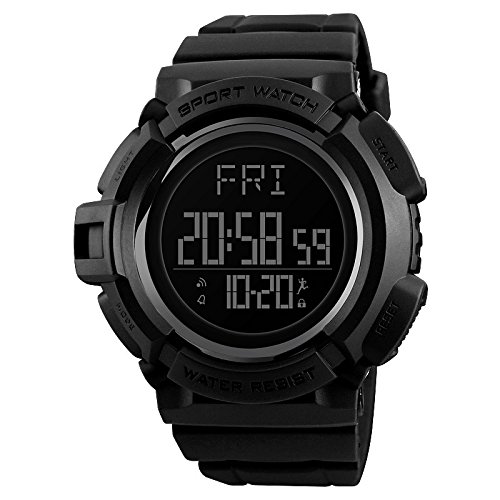
Image: Front view of the SKMEI Digital Watch Model 1339, displaying time, day, and date.
Button Functions
Your SKMEI 1339 watch features four buttons for various operations. Understanding their functions is key to utilizing all features.
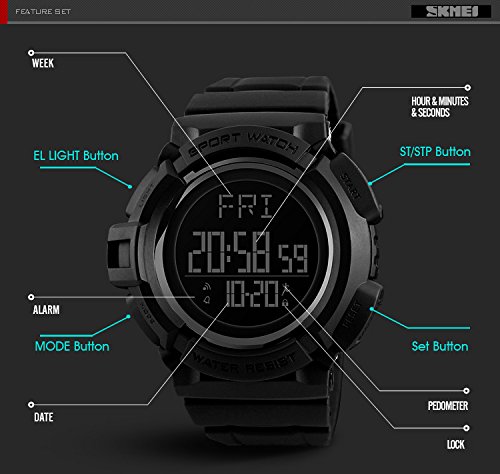
Image: Diagram illustrating the location and function of each button on the SKMEI 1339 watch.
- EL LIGHT Button: Activates the electroluminescent backlight for improved visibility in low-light conditions.
- MODE Button: Cycles through different operational modes such as Time, Pedometer, Calorie/Kilometer, Storage, Alarm, and Second Time Zone (T2).
- ST/STP Button (Start/Stop): Used to start and stop functions like the stopwatch or to adjust settings during setup.
- Set Button: Used to confirm settings or to enter/exit setting modes.
Setup and Initial Configuration
Setting Time and Date
- In Time Mode, press and hold the Set Button until the seconds begin to flash. This indicates you are in setting mode.
- Press the MODE Button to cycle through the settings: seconds, hours, minutes, year, month, day, 12/24-hour format.
- Use the ST/STP Button to adjust the flashing value.
- Once all settings are correct, press the Set Button again to exit the setting mode.
12/24 Hour Format
During time setting, you can select either 12-hour (with AM/PM indicator) or 24-hour format using the ST/STP Button when the hour setting is flashing.
Operating Modes
The watch offers several modes accessible via the MODE Button. Press the MODE Button repeatedly to cycle through them.
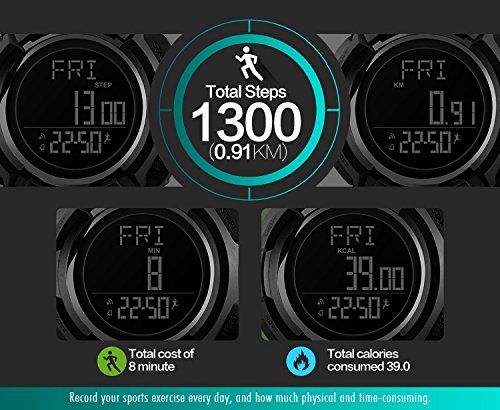
Image: The watch display cycling through Time mode, Pedometer mode, Calorie/Kilometer mode, Storage mode, Alarm mode, and Second Time Zone (T2) mode.
1. Time Mode
Displays the current time, day of the week, and date. This is the default mode.
2. Pedometer Mode
Tracks your steps, distance traveled, and calories burned. The watch can store up to 20 days of data. Ensure the watch is worn securely on your wrist for accurate readings.

Image: The watch display showing total steps, distance in kilometers, and calories consumed in Pedometer mode.
3. Alarm Mode
Allows you to set a daily alarm. To set the alarm:
- In Alarm Mode, press and hold the Set Button until the alarm hour flashes.
- Use the ST/STP Button to adjust the hour.
- Press the MODE Button to switch to minutes, then use the ST/STP Button to adjust.
- Press the Set Button to confirm and exit.
- To activate/deactivate the alarm, press the ST/STP Button while in Alarm Mode. An alarm icon will appear/disappear on the display.
4. Stopwatch Mode
Use the stopwatch to measure elapsed time.
- In Stopwatch Mode, press the ST/STP Button to start the timer.
- Press the ST/STP Button again to pause the timer.
- Press the Set Button to reset the stopwatch to zero.
5. EL Light Function
Press the EL LIGHT Button to illuminate the display for a few seconds, making it readable in the dark.

Image: Comparison of the watch display in normal mode and with the EL light activated, showing enhanced visibility.
Maintenance and Care
Water Resistance
The SKMEI 1339 watch is water-resistant up to 50 meters (5 ATM). This means it is suitable for showering, swimming in shallow water, and general water exposure. It is not suitable for diving, snorkeling, or exposure to hot water (e.g., hot tubs, saunas) as steam can penetrate the seals. Do not operate buttons while the watch is wet or submerged.
Battery Replacement
The watch uses a Japanese battery for reliable power. When the display dims or functions become erratic, it may be time for a battery replacement. It is recommended to have the battery replaced by a qualified watch technician to ensure proper sealing and maintain water resistance.
Cleaning
To clean your watch, wipe it with a soft, damp cloth. Avoid using harsh chemicals, solvents, or abrasive cleaners, as these can damage the watch case or strap.
Troubleshooting
- Watch not functioning or displaying incorrect time: Check if the battery needs replacement. If recently replaced, ensure it was installed correctly. Try resetting the watch by pressing all four buttons simultaneously for a few seconds (if applicable, consult a technician if unsure).
- Buttons not responding: Ensure the watch is not wet. If the issue persists, there might be a mechanical fault; contact support.
- Pedometer readings are inaccurate: Ensure the watch is worn snugly on your wrist. Movement during driving or other non-walking activities can sometimes be misinterpreted as steps.
- Display is dim: The battery may be low. Replace the battery.
Specifications

Image: Detailed product parameters including dimensions, materials, and functions of the SKMEI 1339 watch.
| Feature | Detail |
|---|---|
| Brand | SKMEI |
| Model Number | 1339 |
| Dial Color | White (Digital Display) |
| Case Shape | Round |
| Dial Glass Material | Mineral |
| Band Color | Black |
| Band Material | Plastic |
| Movement Type | Digital (Quartz) |
| Display Type | Digital |
| Case Material | Plastic |
| Case Diameter | 53 millimeters |
| Water Resistance Depth | 50 meters (5 ATM) |
| Functions | 2 Time, Pedometer, Calorie, Mileage, Data storage (20 days), Stopwatch, Countdown, Alarm, Week, Date, EL Light, 12/24 hours, Lock |
| Item Weight | 70 grams |
| Band Width | 22 millimeters |
| Watch Length | 260 millimeters |
| Max Perimeter | 240 millimeters |
| Min Perimeter | 170 millimeters |
Warranty and Support
This SKMEI watch comes with a manufacturer's warranty. For warranty claims, technical support, or service inquiries, please contact the retailer or the official SKMEI customer service channels. Keep your proof of purchase for warranty validation.