
Around The Office CP-13 Black & Red Ink Roll (Compatible with CASIO HR-100-TE)
Around The Office Compatible Ink Rolls for CASIO HR-100-TE Calculator
User Instruction Manual
Product Overview
This manual provides instructions for the Around The Office Compatible Ink Rolls, designed as a replacement for the CASIO HR-100-TE Calculator. These ink rolls ensure dark, long-lasting printing for your calculator.
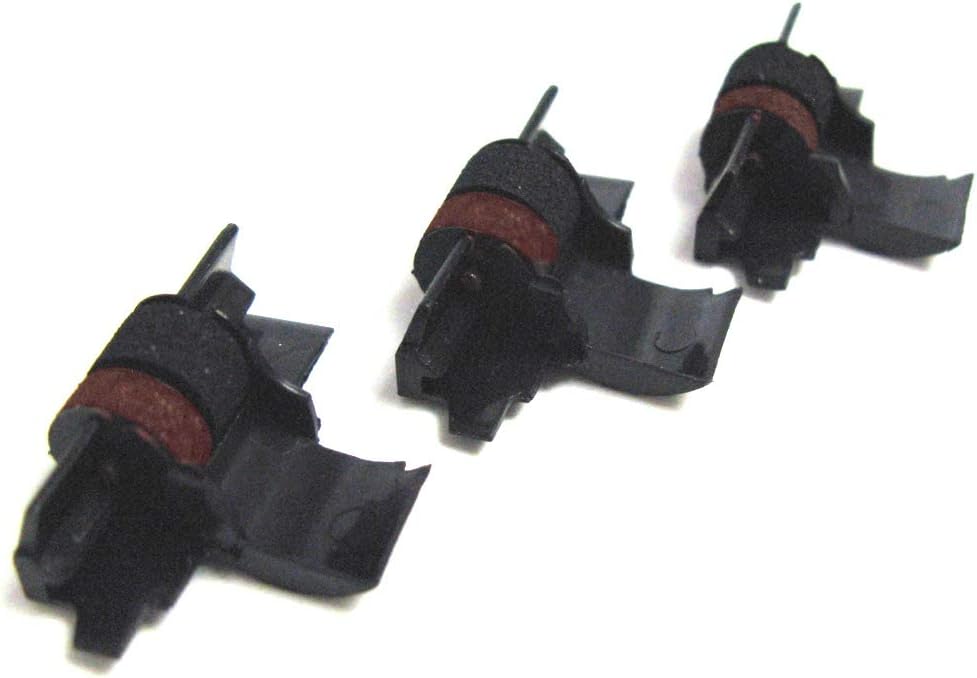
Image: A package containing three individually sealed ink rolls. Each roll consists of a black plastic housing with a red and black ink ribbon visible, designed for easy installation into compatible calculators.
Setup and Installation
Proper installation of the ink roll is crucial for optimal printing performance. Follow these steps carefully:
- Power Off: Ensure your CASIO HR-100-TE calculator is turned off and unplugged from any power source before beginning the installation.
- Open Printer Cover: Locate and open the printer cover on your calculator. Refer to your calculator's specific user manual if you are unsure how to access the ink roll compartment.
- Remove Old Ink Roll (if applicable): Gently remove the old ink roll by lifting it out of its housing. Dispose of the old roll responsibly.
- Unpack New Ink Roll: Open one of the individually sealed packages containing the new ink roll. Handle the ink roll by its plastic housing to avoid touching the ink ribbon directly.
- Insert New Ink Roll: Carefully align the new ink roll with the designated slots in the calculator's printer mechanism. Press down gently until it clicks securely into place. Ensure the ribbon is properly threaded according to your calculator's design.
- Close Printer Cover: Close the printer cover firmly.
- Test Printing: Turn on your calculator and perform a test print to verify that the ink roll is installed correctly and producing clear, legible output.
Operating Instructions
Once the ink roll is installed, the calculator will utilize it automatically for printing operations. No special operating procedures are required for the ink roll itself.
- Print Function: Use your calculator's standard print function to generate paper records of calculations.
- Paper Type: For best results, use standard calculator paper rolls compatible with the CASIO HR-100-TE.
Maintenance
These ink rolls are designed for maintenance-free operation until they are depleted. However, general calculator maintenance can prolong the life of your printing mechanism:
- Storage: Store unused ink rolls in their original, individually sealed packaging in a cool, dry place away from direct sunlight to preserve ink quality.
- Cleaning: Periodically clean the exterior of your calculator and the paper path area with a soft, dry cloth. Avoid using harsh chemicals or abrasive materials.
- Ink Depletion: Replace the ink roll when print quality begins to fade or becomes inconsistent.
Troubleshooting
If you encounter issues with printing after installing a new ink roll, consider the following:
- Faint or No Print:
- Ensure the ink roll is seated correctly and fully engaged in its mechanism.
- Check if the ink ribbon is properly threaded and not twisted or jammed.
- Verify that the paper roll is loaded correctly and not upside down.
- The ink roll may be depleted. Replace with a new one.
- Paper Jams:
- Ensure the paper roll is inserted straight and not skewed.
- Remove any torn paper fragments from the paper path.
- Inconsistent Print Quality:
- This can indicate a partially depleted ink roll or an issue with the calculator's print head.
- Ensure the ink roll is an Around The Office compatible replacement for the CASIO HR-100-TE.
For further assistance, please refer to the "Customer Support" section.
Specifications
| Product Name | Around The Office Compatible Ink Rolls |
| Compatibility | CASIO HR-100-TE Calculator |
| Quantity | 3 Individually Sealed Ink Rolls per Package |
| Ink Color | Black & Red (CP-13 type) |
| Manufacturer | Around The Office |
| UPC | 074927779394 |
| ASIN | B07B4MKMMV |
Warranty and Guarantee
Around The Office provides an Unconditional Guarantee on these compatible ink rolls. If you experience any issues or are not completely satisfied with the product, please contact customer support for assistance.
Customer Support
For installation assistance or any other inquiries regarding your Around The Office Compatible Ink Rolls, live customer support is available. Please refer to the contact information provided with your purchase or visit the official Around The Office website for support details.
Note: This product is a compatible replacement part and not an original CASIO product.
Ask a question about this manual
Ask about setup, troubleshooting, compatibility, parts, safety, or missing instructions. Manuals+ will review the question and use this page’s manual context to help answer it.