Introduction
This manual provides essential instructions for the safe and effective use of your Technical Precision replacement battery for the Nokia 6133 mobile phone. Please read this manual thoroughly before installation and use to ensure optimal performance and longevity of your battery.
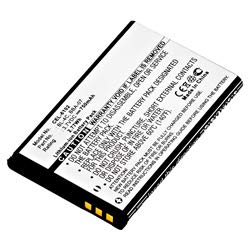
Image: Technical Precision replacement battery for Nokia 6133. This image shows the compact, rectangular battery designed to fit the Nokia 6133 model, featuring connection points and product labeling.
1. Setup and Installation
Before installing the new battery, ensure your Nokia 6133 phone is powered off. Refer to your phone's original user manual for specific instructions on opening the battery compartment if needed.
- Power Off: Completely power off your Nokia 6133 phone.
- Remove Back Cover: Carefully remove the back cover of your Nokia 6133 phone. This usually involves sliding or prying it off.
- Remove Old Battery: Gently lift and remove the existing battery from its compartment.
- Insert New Battery: Align the contacts of the Technical Precision replacement battery with the contacts in the phone's battery compartment. Insert the battery firmly but without excessive force.
- Replace Back Cover: Reattach the back cover of your phone, ensuring it clicks securely into place.
- Initial Charge: It is recommended to fully charge the new battery before its first use.
2. Operating Instructions
Once installed, the battery operates like the original. Follow these guidelines for optimal performance:
- Charging: Use the original Nokia 6133 charger or a compatible charger to charge the battery. Avoid using damaged or non-standard chargers.
- First Use: For the first few charge cycles, allow the battery to fully discharge and then fully charge to calibrate its capacity.
- Normal Use: The battery can be charged at any time, regardless of its current charge level. Modern lithium-ion batteries do not suffer from a "memory effect."
3. Maintenance and Care
Proper maintenance can extend the life of your replacement battery:
- Temperature: Avoid exposing the battery to extreme temperatures (below 0°C or above 45°C). High temperatures can degrade battery performance and lifespan.
- Storage: If storing the battery for an extended period, ensure it is charged to approximately 50% and stored in a cool, dry place.
- Physical Damage: Protect the battery from physical damage, punctures, or crushing. Do not disassemble the battery.
- Cleaning: Keep the battery contacts clean. Use a dry, soft cloth to wipe them if necessary.
4. Troubleshooting
If you encounter issues with your replacement battery, consider the following:
- Battery Not Charging:
- Ensure the charger is properly connected to both the phone and a power source.
- Try a different charger or charging cable to rule out charger malfunction.
- Check the battery contacts on both the battery and the phone for dirt or damage.
- Restart the phone.
- Short Battery Life:
- Ensure the battery has been fully charged.
- Reduce screen brightness and disable unnecessary background applications or features (e.g., Bluetooth, Wi-Fi if not in use).
- Avoid extreme temperatures during use.
- If the issue persists after several charge cycles, the battery may be faulty.
- Phone Not Powering On:
- Ensure the battery is correctly inserted and fully charged.
- Connect the phone to a charger and wait a few minutes before attempting to power it on.
- If possible, test with another known-good battery to determine if the issue is with the battery or the phone.
5. Specifications
| Feature | Detail |
|---|---|
| Model Name | 6133-AZ-T9RH-5 |
| Compatibility | Nokia 6133 |
| Brand | Technical Precision |
| Reusability | Rechargeable |
| Special Feature | High Efficiency, Instant On |
| ASIN | B07B45PXCG |
6. Support and Contact Information
For further assistance or inquiries regarding your Technical Precision replacement battery, please contact the manufacturer or your retailer.
- Manufacturer: Technical Precision
- Online Support: Refer to the Technical Precision Store on Amazon for product information and support.
Please have your product model number (6133-AZ-T9RH-5) and ASIN (B07B45PXCG) available when contacting support.