
Max-Torque 12-35
Max-Torque 12 Tooth Drive Sprocket - 35 Chain User Manual
Model: 12-35
1. Introduction
This manual provides essential information for the proper installation, operation, and maintenance of your Max-Torque 12 Tooth Drive Sprocket, designed for use with a 35 chain. This component is a direct replacement part engineered for reliable power transmission in various applications. Adhering to the guidelines in this manual will help ensure optimal performance and longevity of the sprocket.
2. Setup and Installation
Proper installation is crucial for the safe and efficient operation of the drive sprocket. Always ensure the equipment is powered off and secured before beginning any installation or maintenance procedures.
2.1 Safety Precautions
- Always wear appropriate personal protective equipment (PPE), including safety glasses and gloves.
- Ensure the equipment is completely shut down and de-energized to prevent accidental startup.
- Secure the equipment to prevent movement during installation.
2.2 Tools Required (Typical)
- Wrench set or socket set
- Screwdriver (flathead or Phillips, as needed)
- Pliers
- Chain breaker/master link tool (if replacing chain)
- Lubricant (for chain and shaft)
2.3 Installation Steps
- Remove Old Sprocket: If replacing an existing sprocket, carefully remove any retaining clips, bolts, or set screws. Slide the old sprocket off the shaft. Note the orientation for proper installation of the new sprocket.
- Clean Shaft: Thoroughly clean the shaft where the new sprocket will be mounted. Remove any rust, dirt, or old lubricant.
- Install New Sprocket: Slide the Max-Torque 12 Tooth Drive Sprocket onto the shaft. Ensure it is fully seated and aligned with the mating component (e.g., another sprocket or driven component).
- Secure Sprocket: Reinstall any retaining clips, bolts, or set screws. Tighten fasteners to the manufacturer's recommended torque specifications, if available. Ensure the sprocket is firmly secured and does not wobble.
- Chain Installation/Adjustment: If installing a new chain or re-installing an existing one, ensure it is properly routed around the sprocket. Adjust chain tension according to the equipment manufacturer's guidelines. The chain should have a small amount of slack, but not be excessively loose or tight.
- Final Check: Manually rotate the shaft to ensure the sprocket and chain move freely without binding or excessive noise. Verify all fasteners are secure.
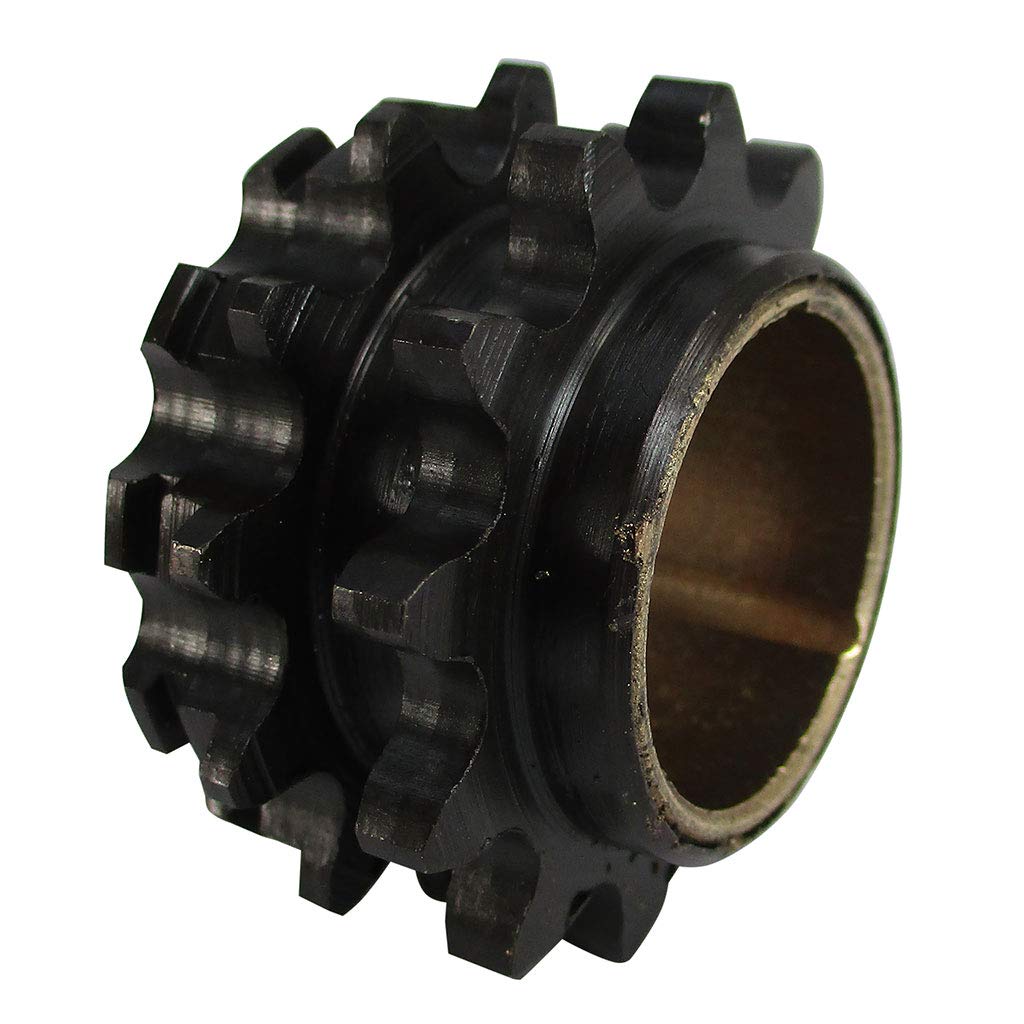
An image showing the Max-Torque 12 Tooth Drive Sprocket. The sprocket is black, featuring 12 teeth designed for a 35 chain, with a central bore for shaft mounting. This image illustrates the product's physical appearance and tooth configuration.
3. Operating Considerations
Once installed, the Max-Torque 12 Tooth Drive Sprocket operates as a passive component in the power transmission system. Its proper function relies on correct installation and the health of the entire chain drive system.
- Chain Tension: Maintain proper chain tension as specified by the equipment manufacturer. Incorrect tension can lead to premature wear of both the sprocket and chain, or even chain derailment.
- Alignment: Ensure the drive sprocket is correctly aligned with the driven sprocket. Misalignment causes uneven wear and can lead to chain jumping or breakage.
- Lubrication: Regularly lubricate the chain according to the chain manufacturer's recommendations. Proper lubrication reduces friction and wear on the sprocket teeth.
4. Maintenance
Regular maintenance extends the life of your Max-Torque sprocket and the entire drive system.
- Inspection: Periodically inspect the sprocket teeth for signs of wear, such as hook-shaped teeth, thinning, or breakage. Also, check for any cracks or damage to the sprocket body.
- Cleaning: Keep the sprocket and chain free from excessive dirt, debris, and rust. Accumulated foreign material can accelerate wear.
- Lubrication: As mentioned in the operating section, consistent and appropriate chain lubrication is vital for sprocket health.
- Chain Condition: The life of the sprocket is directly related to the condition of the chain. Replace worn or stretched chains promptly to prevent damage to the sprocket.
5. Troubleshooting
Addressing common issues can prevent further damage and ensure continuous operation.
| Problem | Possible Cause | Solution |
|---|---|---|
| Chain slipping or jumping teeth | Worn sprocket teeth, stretched chain, incorrect chain tension, misalignment | Inspect sprocket and chain for wear; adjust chain tension; check and correct alignment; replace worn components. |
| Unusual noise (grinding, squealing) | Lack of lubrication, misalignment, worn components, foreign object | Lubricate chain; check alignment; inspect for wear or obstructions; clean system. |
| Excessive wear on sprocket teeth | Misalignment, insufficient lubrication, worn chain, abrasive environment, incorrect chain type | Correct alignment; ensure proper lubrication; replace worn chain; protect from abrasive elements; verify chain compatibility. |
6. Specifications
Key specifications for the Max-Torque 12 Tooth Drive Sprocket - 35 Chain:
- Brand: Max-Torque
- Part Number: MT12
- Item Model Number: 12-35
- Number of Teeth: 12
- Compatible Chain Type: 35 Chain (often associated with Semi-Chisel type chains)
- Item Package Quantity: 1
- UPC: 654329041000
Ask a question about this manual
Ask about setup, troubleshooting, compatibility, parts, safety, or missing instructions. Manuals+ will review the question and use this page’s manual context to help answer it.