
1. Introduction
This manual provides essential information for the setup, operation, and maintenance of your Samsung 9 Series QN75Q9FNAFXZA 75-inch QLED 4K UHD Smart TV. Please read this manual thoroughly before using your television to ensure proper and safe operation.
1.1. Package Contents
Verify that all items are present in the product packaging:
- One Samsung 9 Series 75" QLED 4K UHD Smart TV (Model: QN75Q9FNAFXZA)
- One Remote Control (TM1890A)
- Remote Control Batteries (2 AAA)
- One Power Cable
- User Manual (this document)
- E-Manual (digital version)
1.2. Product Overview
The Samsung 9 Series QN75Q9FNAFXZA 75-inch QLED 4K UHD Smart TV features advanced quantum color technology and full array backlighting for detailed picture quality. Its design incorporates clutter-free cabling and an Ambient Mode for seamless integration into your living space.
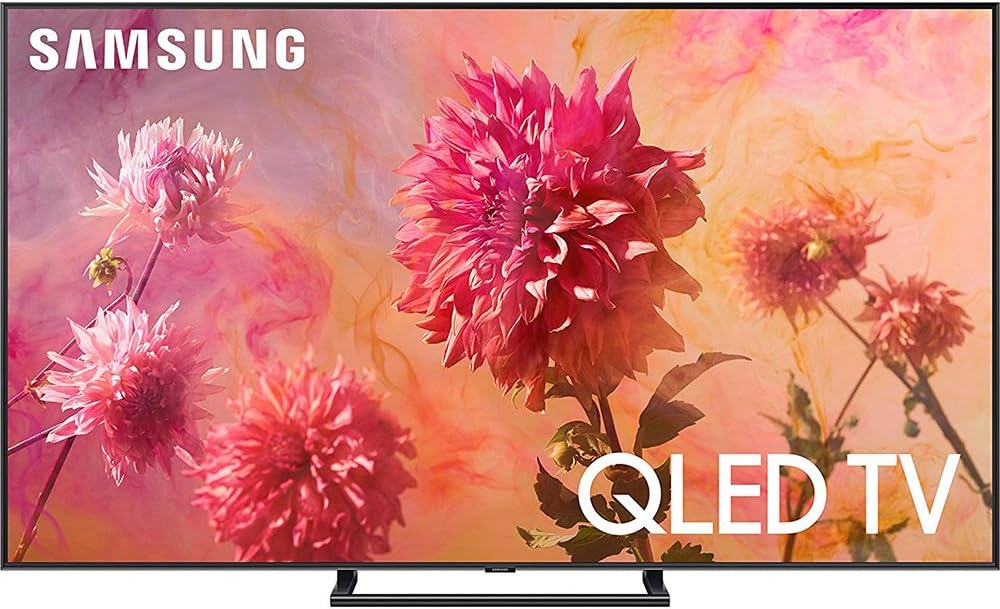
Figure 1: Front view of the Samsung 9 Series 75-inch QLED 4K UHD Smart TV.
2. Setup
2.1. Physical Dimensions and Weight
- TV Dimensions (Without Stand): 66" W x 37.9" H x 1.6" D
- TV Dimensions (With Stand): 66" W x 39.2" H x 14.4" D
- Display Size: 74.5" Measured Diagonally
- Resolution: 3,840 x 2,160 (4K UHD)
- TV Weight: 86.6 lbs
2.2. Connecting Devices with One Invisible Connection
The TV utilizes a single, transparent cable for power and data, connecting to the One Connect Box. This system minimizes cable clutter, allowing for a cleaner installation. Multiple external devices can be connected to the One Connect Box, which then transmits signals to the TV via the single cable.

Figure 2: Rear view of the TV, highlighting the One Invisible Connection port.
2.3. Wall Mounting
The Samsung 9 Series TV supports a No Gap Wall Mount (sold separately) designed to position the screen flush against the wall, creating a seamless appearance. Ensure proper installation by following the wall mount's instructions and consulting a professional if necessary.
2.4. Setup Demonstration Video
The following video demonstrates the setup process, including the One Connect Box and wall mounting options for the Samsung 9 Series QLED TV.
Video 1: Samsung Flat QLED 4K UHD 9 Series Smart TV 2018 - Setup and Features Overview. This video provides a visual guide to the TV's design, connectivity, and key picture technologies.
3. Key Features
3.1. QLED Display Technology
The QLED display utilizes Quantum Dot technology to produce over a billion shades of color, ensuring vibrant and realistic images. This technology enhances color volume, preventing colors from appearing washed out in bright scenes.
3.2. Q Contrast EliteMax & Full Array Elite
The Q Contrast EliteMax feature, combined with Direct Full Array LED backlighting, precisely controls individual zones of light. This results in deep blacks and bright whites, enhancing contrast and detail in both dark and bright scenes. An anti-reflective screen further reduces glare for optimal viewing.
3.3. Q HDR EliteMax
Q HDR EliteMax delivers a high dynamic range experience, revealing fine details in the brightest and darkest parts of an image. This technology is specifically engineered for the 9 Series to provide exceptional picture quality.
3.4. Q Engine
The Q Engine is a powerful processor that optimizes content for 4K clarity. It employs contrast mastering and HDR enhancement to ensure images are consistently stunning and detailed, regardless of the source content.
3.5. Q Style Elite & Ambient Mode
Q Style Elite offers revolutionary design solutions, including the Ambient Mode. When the TV is off, Ambient Mode allows the screen to display decorative content, useful information, personal photos, or blend seamlessly with your wall's pattern, making the TV appear to disappear into its surroundings.
Video 2: Samsung The Frame Pro TV Product Review - Ambient Mode and Wireless One Connect. This video, while showcasing a related product, illustrates the concept of Ambient Mode and the Wireless One Connect feature, which are also present in the QN75Q9FNAFXZA model.
3.6. Audio Features
The TV provides excellent sound quality with a built-in woofer and a 4.2CH speaker system. It supports Dolby audio, Multiroom Link, and TV Sound Connect. Bluetooth Headset Support is also included for wireless audio connectivity.
4. Operating the TV
4.1. Smart Hub Navigation
The Smart Hub provides a centralized interface for accessing streaming services, live TV, apps, and other content. Navigate using the included One Remote Control.
4.2. Using Bixby Voice
The TV features Bixby Voice, allowing you to control the TV and search for content using voice commands. Simply press the voice command button on your One Remote Control and speak your request.
4.3. Universal Remote Control
The One Remote Control is designed to simplify your entertainment experience by controlling not only the TV but also compatible external devices connected via the One Connect Box.
5. Maintenance
5.1. Cleaning the Screen
To clean the screen, gently wipe it with a soft, dry microfiber cloth. For stubborn smudges, lightly dampen the cloth with distilled water or a specialized screen cleaner. Avoid using harsh chemicals, abrasive materials, or spraying liquid directly onto the screen.
5.2. General Care
Keep the TV in a well-ventilated area, away from direct sunlight, heat sources, and excessive dust. Ensure all cables are securely connected and not under strain. Regularly check for software updates to maintain optimal performance and security.
6. Troubleshooting
6.1. No Power
Ensure the power cable is securely connected to both the TV/One Connect Box and a working power outlet. Test the outlet with another device. If using a power strip, ensure it is turned on.
6.2. No Picture/Sound
Verify that the correct input source is selected on the TV. Check all HDMI or other input cables for secure connections. If using external audio devices, ensure they are properly connected and powered on.
6.3. Remote Control Not Working
Check the batteries in the remote control and replace them if necessary. Ensure there are no obstructions between the remote and the TV. If the issue persists, try re-pairing the remote with the TV according to the E-Manual instructions.
6.4. Smart Features Not Working
Ensure the TV is connected to the internet. Check your Wi-Fi connection or Ethernet cable. Restart the TV and your router. If specific apps are not working, try clearing their cache or reinstalling them.
7. Specifications
| Feature | Specification |
|---|---|
| Brand | Samsung |
| Model Number | QN75Q9FNAFXZA |
| Screen Size | 74.5 Inches |
| Display Technology | QLED |
| Resolution | 4K (3,840 x 2,160) |
| Refresh Rate | 240 Hz |
| Aspect Ratio | 16:9 |
| Item Weight | 90.4 Pounds |
| Product Dimensions (with stand) | 66 x 14.2 x 39.3 inches |
| Color Name | Midnight Black |
| Speaker Type | 4.2CH |
| Special Features | Flat |
| Connectivity Technology | HDMI, Wi-Fi |
| Batteries Required | 2 AAA batteries (for remote) |
| Energy Efficiency | Energy Star Certified |
| Date First Available | March 19, 2018 |
8. Warranty and Support
8.1. Product Warranty
Your Samsung TV is covered by a limited warranty. Please refer to the warranty card included in your product packaging or visit the official Samsung website for detailed terms and conditions regarding warranty coverage and duration.
8.2. Customer Support
For technical assistance, troubleshooting, or service inquiries, please contact Samsung Customer Support. You can find contact information on the official Samsung website or in the E-Manual provided with your TV.