1. Introduction
Welcome to the world of adventure with your new Rollplay Chevy Silverado 12-Volt Battery Ride-On Vehicle. This manual provides essential information for the safe assembly, operation, and maintenance of your ride-on truck. Please read it thoroughly before use and retain it for future reference.

Image: Two children in construction vests and hard hats are seated in the black Rollplay Chevy Silverado ride-on truck. Text overlays indicate "2.5-5 MPH FORWARD SPEED" and "2.5 MPH REVERSE SPEED", highlighting the vehicle's operational capabilities. The truck is a two-seater.
2. Important Safety Information
For the safety of the rider, always adhere to the following guidelines:
- Age Recommendation: This vehicle is designed for children aged 3 years and older.
- Weight Limit: The maximum weight capacity for this ride-on vehicle is 130 lbs (59 kg).
- Adult Supervision: Constant adult supervision is required during operation.
- High-Speed Lockout: A high-speed lockout feature is included to allow parents to set a lower maximum speed for younger or less experienced drivers. Ensure this is set appropriately for the child's skill level.
- Operating Environment: Use on flat, dry surfaces away from traffic, swimming pools, or other hazards.
- Protective Gear: Always ensure the rider wears appropriate safety gear, including a helmet.
3. What's in the Box
Upon opening your package, please ensure all the following components are present:
- Ride-On Vehicle (unassembled)
- 12-Volt Battery
- Battery Charger
- Instruction Manual
4. Assembly
The Rollplay Chevy Silverado ride-on vehicle requires some assembly. While generally straightforward, it is recommended to follow the detailed step-by-step instructions provided in the included printed manual. Ensure all parts are securely fastened before initial use.
5. Battery Charging
Before the first use, the battery must be fully charged. Subsequent charging should be performed as needed.
- Locate the external charging port on the vehicle.
- Connect the charger to the charging port and then plug the charger into a standard wall outlet.
- Allow the battery to charge for the recommended duration as specified in the printed manual.
- The built-in battery life indicator on the dashboard will help you monitor the charge level and determine when it's time to recharge.

Image: The image displays the front of the ride-on truck with bright LED headlights. An inset shows a close-up of the rear wheel with rubber traction strips for enhanced grip. Another inset points to the external charging socket, indicating its location for convenient battery charging.
6. Operating the Vehicle
Familiarize yourself with the controls and features for an enjoyable and safe driving experience.
6.1 Driving Controls
- Speeds: The vehicle offers two forward speeds (2.5 mph and 5 mph) and one reverse speed (2.5 mph).
- High-Speed Lockout: Use the high-speed lockout feature to limit the maximum speed for younger drivers.
- Start/Stop Switch: Located on the dashboard for easy control.
6.2 Realistic Features
- LED Headlights: Functional LED headlights illuminate the path.
- Horn & Engine Noises: Press the buttons on the steering wheel for realistic horn and engine sounds.
- MP3 Connector: Connect your MP3 device to the dashboard jack to play music through the vehicle's speakers.
- Opening Doors: Both front doors open and close for easy access.
- Opening Tailgate: The rear tailgate opens, providing extra storage space.
- Rubber Traction Strips: Located on the wheels to provide enhanced grip on various terrains.
- Cup Holders: Built-in cup holders are available for beverages.

Image: A front view of the black Rollplay Chevy Silverado ride-on truck with both doors open, showing easy access. The tailgate is also open, revealing a storage area in the truck bed, which contains various sports balls.
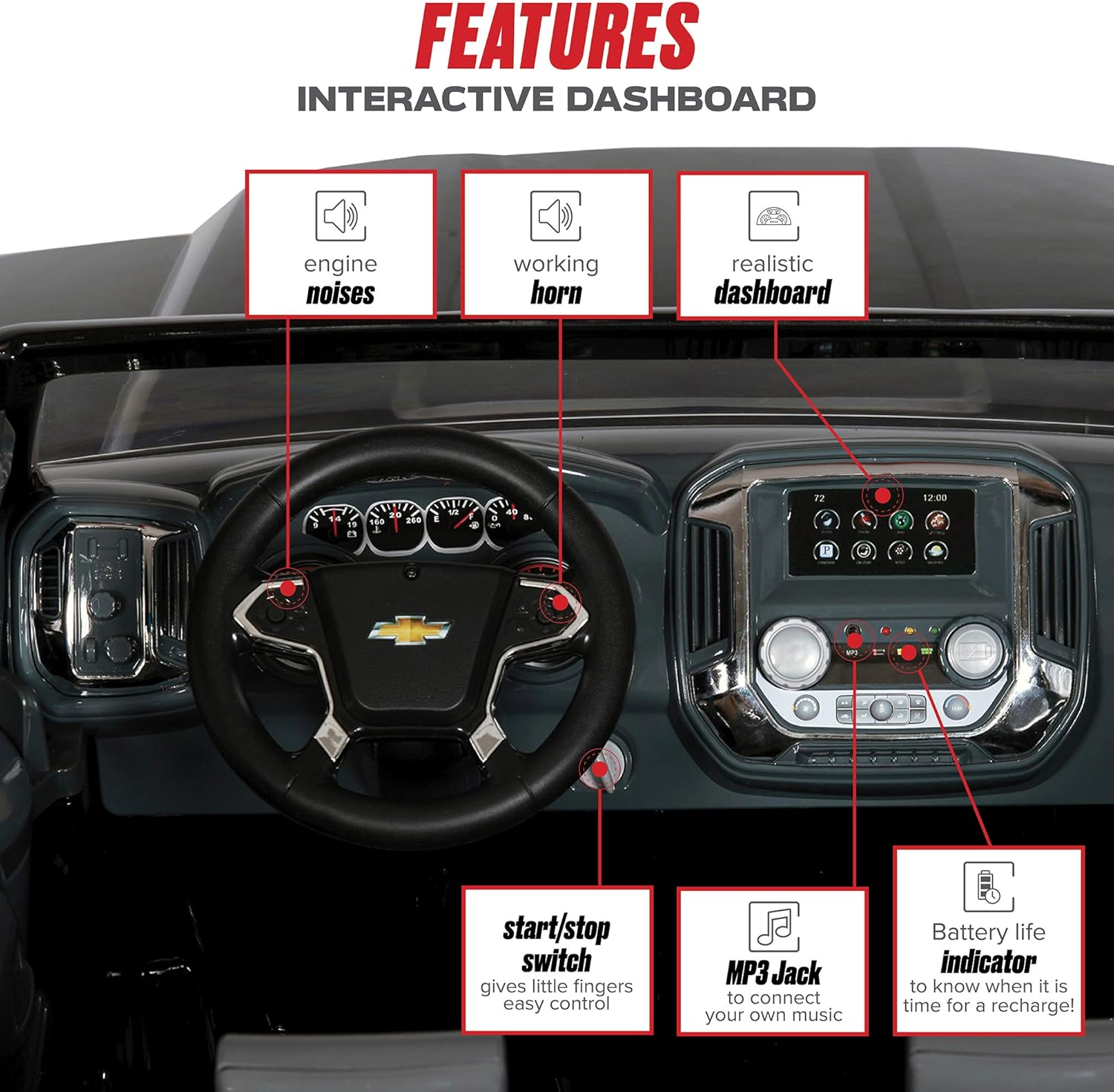
Image: A detailed view of the interactive dashboard of the ride-on truck. Labels point to features such as engine noises, a working horn, the realistic dashboard design, the start/stop switch, an MP3 jack for connecting external music devices, and a battery life indicator.
Video: This video demonstrates the features and operation of the Rollplay 12V Chevy Silverado Kid's Truck. It shows children interacting with the vehicle, highlighting its forward and reverse capabilities, rubber traction strips, folding mirrors, opening tailgate, LED headlights, cup holders, horn, engine sounds, MP3 jack, and battery life indicator.
7. Maintenance
Regular maintenance will ensure the longevity and optimal performance of your ride-on vehicle.
- Cleaning: Wipe the vehicle with a damp cloth. Avoid using harsh chemicals or abrasive cleaners.
- Storage: Store the vehicle in a dry, protected area when not in use. Protect it from direct sunlight and moisture.
- Battery Care: Always fully charge the battery after each use and before long-term storage. Do not allow the battery to fully discharge for extended periods.
- Inspections: Periodically check all screws, nuts, and connections to ensure they are tight and secure.
8. Troubleshooting
If you encounter issues with your Rollplay Chevy Silverado, refer to the following common problems and solutions:
| Problem | Possible Cause | Solution |
|---|---|---|
| Vehicle does not move or has low power. | Battery is not charged or is faulty. | Ensure the battery is fully charged. Check all battery connections. If the battery is old or not holding a charge, it may need replacement. |
| Lights or sounds are not working. | Loose wiring or low battery. | Check all electrical connections. Ensure the battery is charged. |
| Vehicle makes unusual noises. | Loose components or debris in moving parts. | Inspect the vehicle for any loose parts and tighten them. Remove any debris from the wheels or motor area. |
If the problem persists after attempting these solutions, please contact customer support.
9. Specifications
| Feature | Detail |
|---|---|
| Product Dimensions | 61.6 x 35.4 x 27.9 inches |
| Item Weight | 69.5 pounds |
| Model Number | W461-P |
| Recommended Age | 3 months - 10 years (Note: Product description states 3+ years, please refer to product packaging for definitive age range) |
| Battery | 12-Volt |
| Forward Speeds | 2.5 mph, 5 mph |
| Reverse Speed | 2.5 mph |
| Maximum Weight Capacity | 130 lbs |

Image: Technical diagrams showing the dimensions of the Rollplay Chevy Silverado ride-on truck. The length is indicated as 61.6 inches, height as 27.9 inches, and width as 35.4 inches. The image also reiterates the age recommendation of 3+ and a weight capacity of 130 lbs.
10. Warranty and Support
Your Rollplay Chevy Silverado 12-Volt Ride-On Vehicle is backed by a 1-year warranty. For any questions, technical assistance, or warranty claims, please contact the dedicated U.S. Customer Service team. Refer to the contact information provided in your product packaging or on the official Rollplay website.