
Honeywell CL30XCWW
Honeywell Indoor Portable Evaporative Air Cooler
Model: CL30XCWW - Instruction Manual
Brand: Honeywell
Product Overview
The Honeywell CL30XCWW is an indoor portable evaporative air cooler designed to provide energy-efficient cooling for your living space. Unlike traditional air conditioners, this unit utilizes the natural process of water evaporation to cool and humidify the air, making it ideal for hot and dry climates where humidity levels are typically below 60%.
This versatile appliance functions as an air cooler, fan, and humidifier, offering a multi-functional solution for maintaining comfort. It features a powerful 525 CFM airflow, suitable for rooms up to 320 square feet, and includes a carbon dust filter for cleaner air. Its portable design with wheels allows for easy relocation within your home.

The Honeywell CL30XCWW Portable Evaporative Air Cooler, showcasing its compact and mobile design.
Setup and Placement
Setting up your Honeywell Evaporative Air Cooler is straightforward. After unpacking, ensure the unit is placed on a flat, stable surface. For optimal performance, position the cooler near an open door or window to allow for adequate cross-ventilation. This helps to prevent moisture buildup and maximizes the cooling effect.
The unit is designed for indoor use in open environments. It is not an air conditioner and requires fresh air circulation to operate effectively. Avoid using it in enclosed spaces without ventilation, as this can increase humidity levels excessively.
Initial Fill:
- Locate the water reservoir.
- Fill the reservoir with clean water. For enhanced cooling, you may add ice to the dedicated ice compartment.
- Plug the unit into a standard 115V electrical outlet.

Proper placement and airflow for efficient room cooling. The unit is shown in various residential settings.
Operating Instructions
Your Honeywell Evaporative Air Cooler is equipped with user-friendly controls and a remote for convenient operation.
Control Panel and Remote:
- Power Button: Turns the unit On/Off.
- Fan Speed: Select from four fan speeds to adjust airflow intensity.
- Mode Selection: Choose between cooling (evaporative), fan-only, and humidification modes.
- Oscillation: Activate oscillating louvers for wider air distribution.
- Timer: Set an energy-saving timer for automatic shut-off.
- Low Water Alarm: An indicator will alert you when the water reservoir needs refilling.

Designed for convenience: easy water and ice filling, and remote control operation.
Official Honeywell video explaining how evaporative air coolers work, their benefits, and ideal usage conditions. This video also highlights the differences between air coolers, fans, and air conditioners, and provides guidance on humidity levels and suitable environments for use.
Maintenance
Regular maintenance ensures the longevity and efficient operation of your evaporative air cooler.
Cleaning the Carbon Dust Filter and Honeycomb Cooling Media:
- The built-in carbon dust filter and honeycomb cooling media should be cleaned periodically to maintain air quality and cooling efficiency.
- Refer to the detailed instructions in the full user manual for specific cleaning procedures. Generally, these components can be rinsed with water.
- Ensure components are completely dry before reinserting them into the unit.
Water Reservoir:
- The detachable water tank allows for easy maintenance and cleaning.
- Regularly drain and clean the water reservoir to prevent mineral buildup and maintain hygiene.

The detachable tank design facilitates easy cleaning and maintenance of the water reservoir.
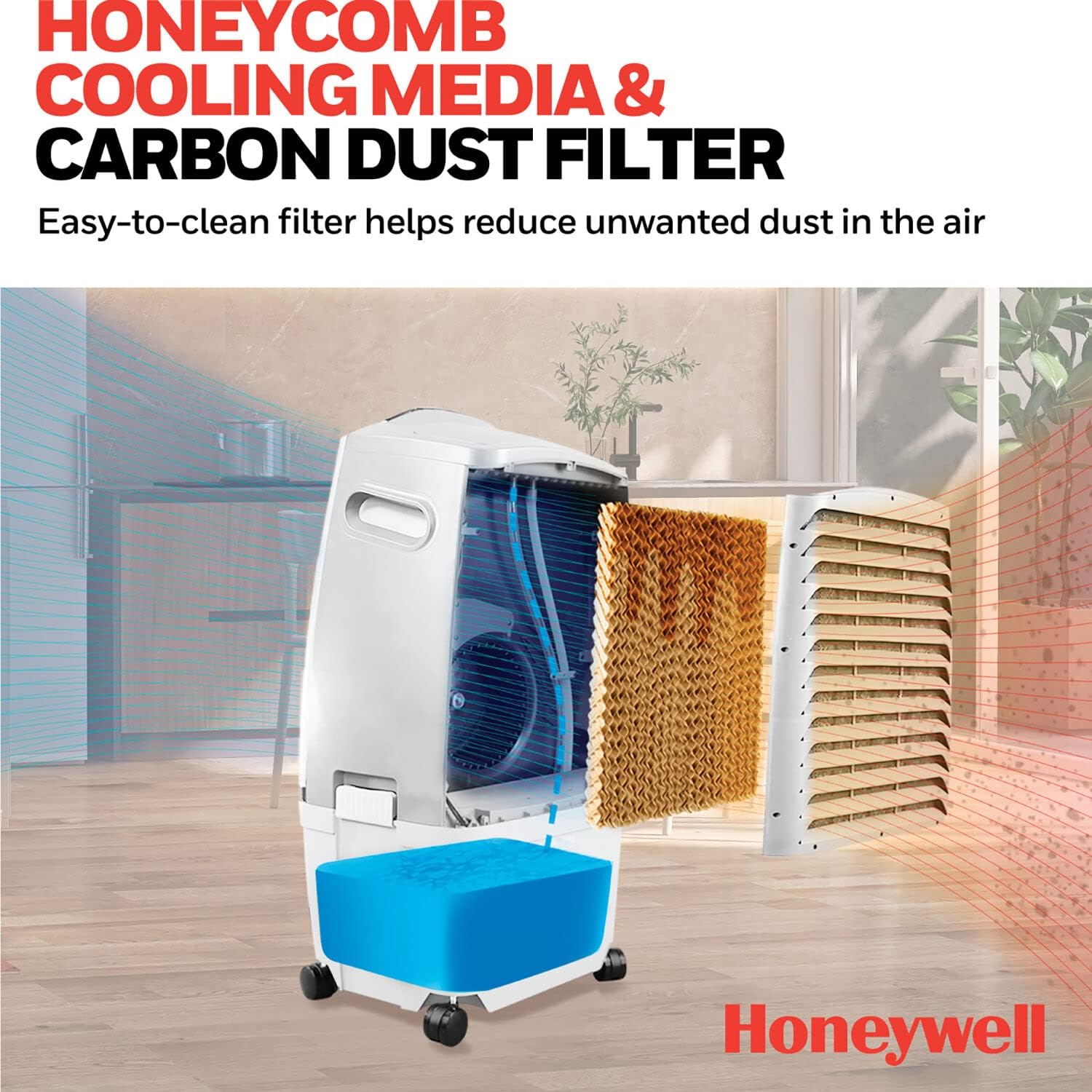
The honeycomb cooling media and carbon dust filter are designed for easy cleaning to reduce dust in the air.
Troubleshooting
If you encounter issues with your Honeywell Evaporative Air Cooler, consult the following common troubleshooting tips before contacting support.
| Problem | Possible Cause | Solution |
|---|---|---|
| Unit does not turn on. | No power supply; power cord not properly connected. | Ensure the unit is plugged into a working electrical outlet. Check the power cord connection. |
| Weak or no cooling. | Low water level; dirty cooling media/filter; high room humidity; insufficient ventilation. | Refill water reservoir. Clean the carbon dust filter and honeycomb cooling media. Ensure room humidity is below 60% and provide adequate cross-ventilation by opening doors/windows. |
| Increased room humidity. | Insufficient cross-ventilation. | Ensure doors and windows are open to allow moist air to escape and dry air to enter. |
| Unusual noise. | Unit not on a level surface; foreign object inside. | Place the unit on a flat, stable surface. Unplug and check for any obstructions. |
Specifications
| Brand: | Honeywell |
| Model Name: | Honeywell 525 CFM Indoor Portable Evaporative Air Cooler, Fan & Humidifier with Ice Compartment & Remote, White |
| Model Number: | CL30XCWW |
| Mounting Type: | Freestanding |
| Color: | White |
| Air Flow Capacity: | 525 Cubic Feet Per Minute (CFM) |
| Controls Type: | Remote |
| Reservoir Capacity: | 7.9 Gallons |
| Floor Area Coverage: | Up to 491 Square Feet |
| Power Consumption: | 288 Watts |
| Noise Level: | 64 dB |
| Number of Speeds: | 4 |
| Product Dimensions (D x W x H): | 13.8"D x 18"W x 33.7"H |
| Voltage: | 120 Volts |
| Item Weight: | 24.9 pounds |
| Included Components: | Swamp cooler, remote control, manual, warranty |

Detailed dimensions of the Honeywell CL30XCWW Evaporative Air Cooler.
Warranty and Support
Warranty Information:
The Honeywell CL30XCWW Evaporative Air Cooler comes with a 1-year warranty covering parts and labor. Please retain your proof of purchase for warranty claims.
Customer Support:
For further assistance, technical support, or warranty inquiries, please refer to the contact information provided in your full user guide or visit the official Honeywell support website. You can also visit honeywellaircoolers.com/cooling-guide to find out which air cooler best fits your needs by entering your room size and ceiling height.
Note: Batteries are required for the remote control.
Ask a question about this manual
Ask about setup, troubleshooting, compatibility, parts, safety, or missing instructions. Manuals+ will review the question and use this page’s manual context to help answer it.