Important Safety Information
Please read all instructions carefully before operating this device. Keep this manual for future reference.
Warning: This product contains chemicals known to the State of California to cause cancer and birth defects or other reproductive harm.
Introduction
The Blaupunkt SEATTLE 660 is a 6.2-inch in-dash touch screen multimedia car stereo receiver designed to enhance your in-car entertainment experience. It features built-in Bluetooth for hands-free calling and audio streaming, a touch screen display for intuitive control, and multiple media playback options including USB, SD card, CD, and DVD. This unit allows you to save up to 40 AM/FM radio stations and connect various external devices via its auxiliary input.
Product Overview
Familiarize yourself with the components and controls of your SEATTLE 660 receiver.

Figure 1: Front Panel and Touch Screen Display
This image displays the front of the SEATTLE 660 unit, highlighting the 6.2-inch touch screen. The screen shows a user interface with large, clear icons for different functions such as Radio, Disc, USB, SD, Bluetooth, AUX, F-CAM (Front Camera), Settings, and Wallpaper. On the left side of the unit, physical buttons for Menu/Navigation, DVD eject, and Band selection are visible, along with a rotary knob for volume and selection. A USB port is also located on the lower left.

Figure 2: Rear Panel Connections
The rear view of the SEATTLE 660 unit reveals its comprehensive connectivity options. Key connections include multiple RCA jacks for audio output (FR, FL, RR, RL, SW for subwoofer), video input (V-IN) and output (V1, V2), and dedicated inputs for front camera (F-CAM) and rear camera (R-CAM). A main power harness connector is prominently featured, along with an antenna input and a cooling fan. These ports allow for integration with external amplifiers, monitors, and cameras.
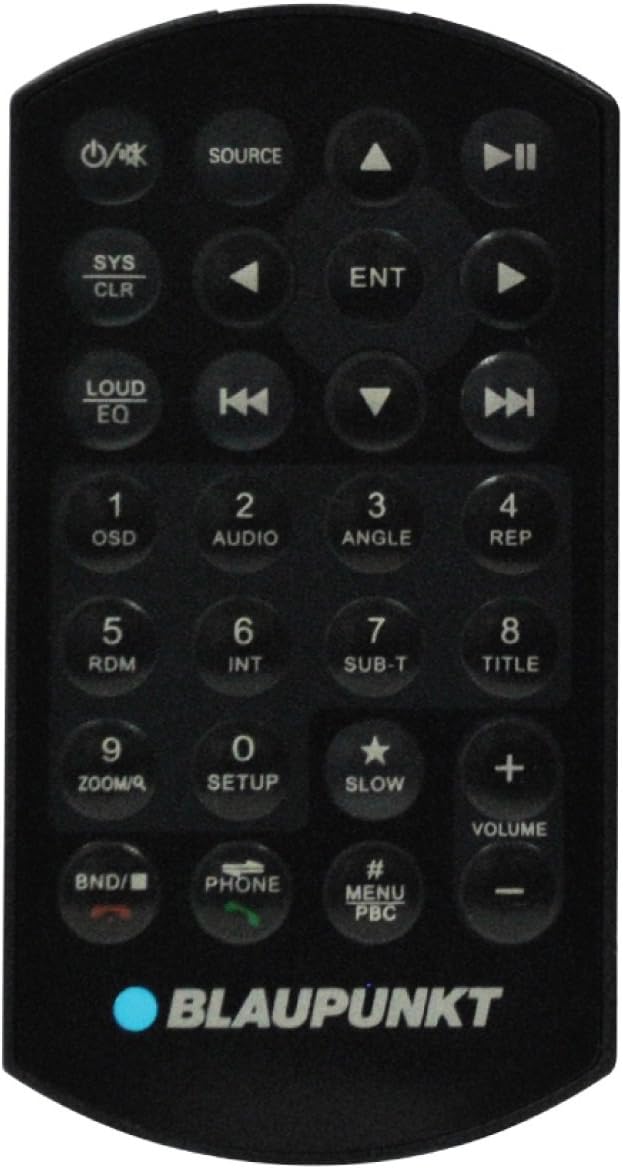
Figure 3: Remote Control
This image shows the included infrared remote control for the SEATTLE 660. The remote provides convenient access to various functions, including power on/off, source selection (Source), system clear (SYS CLR), audio settings (LOUD EQ), navigation buttons, numeric keypad for direct input, volume up/down, and dedicated buttons for Bluetooth phone calls (Phone, BND/Answer, Hang Up). This allows for control of the unit without directly interacting with the touch screen.
Setup and Installation
Proper installation is crucial for optimal performance and safety. It is highly recommended that installation be performed by a qualified professional car audio technician.
Wiring Diagram
Refer to the detailed wiring diagram provided in the separate installation guide for specific connections. Ensure all connections are secure and properly insulated to prevent short circuits and damage to the unit or vehicle's electrical system.
Mounting
The SEATTLE 660 is designed for standard double-DIN dash openings. Ensure adequate clearance for ventilation and cable routing. Secure the unit using the provided mounting hardware.
Operating Instructions
Power On/Off
- Press the M/N button on the front panel or the Power button on the remote control to turn the unit on or off.
Volume Control
- Rotate the large knob on the front panel clockwise to increase volume, counter-clockwise to decrease.
- Use the + and - buttons on the remote control for volume adjustment.
Source Selection
- From the main menu on the touch screen, tap the desired source icon (Radio, Disc, USB, SD, Bluetooth, AUX, F-CAM).
- Alternatively, press the SOURCE button on the remote control to cycle through available sources.
Bluetooth Operation
- Pairing:
- Ensure Bluetooth is enabled on your mobile device.
- On the SEATTLE 660, select the Bluetooth source.
- Search for available devices on your mobile phone. The unit will appear as "SEATTLE 660" or "BLAUPUNKT".
- Select the unit and enter the PIN (usually "0000" if prompted).
- Once paired, the Bluetooth icon on the unit's screen will indicate a successful connection.
- Hands-Free Calling:
- When a call comes in, the unit will display the caller ID. Tap the green phone icon on the screen or press the Phone button on the remote to answer.
- Tap the red phone icon or press the Hang Up button on the remote to end a call.
- Audio Streaming:
- Once paired, audio from your mobile device will automatically stream to the SEATTLE 660 when the Bluetooth source is selected.
- Control playback (play/pause, skip tracks) via the touch screen or remote control.
Radio Operation
- Select the Radio source.
- Tap AM or FM to switch bands.
- Use the Seek buttons on the screen or remote to automatically tune to the next strong station.
- Saving Presets: Tune to your desired station, then press and hold one of the numbered preset buttons on the screen to save it. The unit supports up to 40 station presets.
Disc Playback (CD/DVD)
- Insert a CD or DVD into the disc slot. The unit will automatically switch to the Disc source and begin playback.
- Use the on-screen controls or remote for playback functions (play/pause, skip, fast forward/rewind).
USB/SD Card Playback
- Insert a USB drive into the USB port or an SD card into the SD card slot.
- Select the USB or SD source.
- The unit will display the file browser. Navigate through folders and select your desired audio, video, or image files for playback.
Maintenance
Cleaning the Unit
- Use a soft, dry cloth to clean the unit's exterior.
- For the touch screen, use a soft, lint-free cloth specifically designed for electronic screens. Do not use abrasive cleaners or solvents.
Disc Care
- Handle discs by their edges to avoid fingerprints.
- Keep discs in their cases when not in use to prevent scratches.
- Clean dirty discs with a soft, lint-free cloth wiping from the center outwards.
Troubleshooting
| Problem | Possible Cause | Solution |
|---|---|---|
| No power | Loose wiring connection; Blown fuse | Check power and ground connections. Replace fuse if necessary (refer to wiring diagram for fuse location and rating). |
| No sound | Volume too low; Mute function active; Speaker wiring issue | Increase volume. Check if mute is active. Verify speaker connections. |
| Bluetooth not connecting | Device not in pairing mode; Incorrect PIN; Interference | Ensure both devices are in pairing mode. Re-enter PIN. Move closer to the unit. Try restarting both devices. |
| Disc error / Disc not playing | Dirty or scratched disc; Incorrect disc format | Clean the disc. Try a different disc. Ensure the disc format is supported (CD-Audio, DVD-Video, MP3/WMA on CD/DVD). |
| Touch screen unresponsive | Temporary software glitch | Perform a soft reset (consult the full manual for reset procedure, usually a small reset button). If issue persists, contact support. |
Specifications
| Feature | Detail |
|---|---|
| Model Number | SEATTLE 660 |
| Screen Size | 6.2-Inch |
| Display Type | Touch Screen |
| Connectivity | Bluetooth, USB, SD Card, 3.5mm Aux Jack |
| Radio Presets | 40 AM/FM Stations |
| Compatible Media | CD, DVD, MP3, Video files, Photo files |
| Product Dimensions | 9.88 x 9.5 x 6.88 inches |
| Item Weight | 4.1 pounds |
| Visible Screen Diagonal | 7" / 16 cm |
Warranty and Support
For warranty information and technical support, please refer to the warranty card included with your product or visit the official Blaupunkt website. Keep your proof of purchase for warranty claims.
Manufacturer: Blaupunkt
For further assistance, please contact Blaupunkt customer service.


