Introduction
The House of Marley No Bounds portable Bluetooth speaker is designed for outdoor use, featuring a rugged construction with sustainable materials. It offers wireless audio streaming, speakerphone functionality, and is built to withstand water and dust exposure.
Package Contents
- No Bounds Portable Bluetooth Speaker
- USB Charging Cable
- Carabiner
Product Overview
Familiarize yourself with the speaker's components and controls.
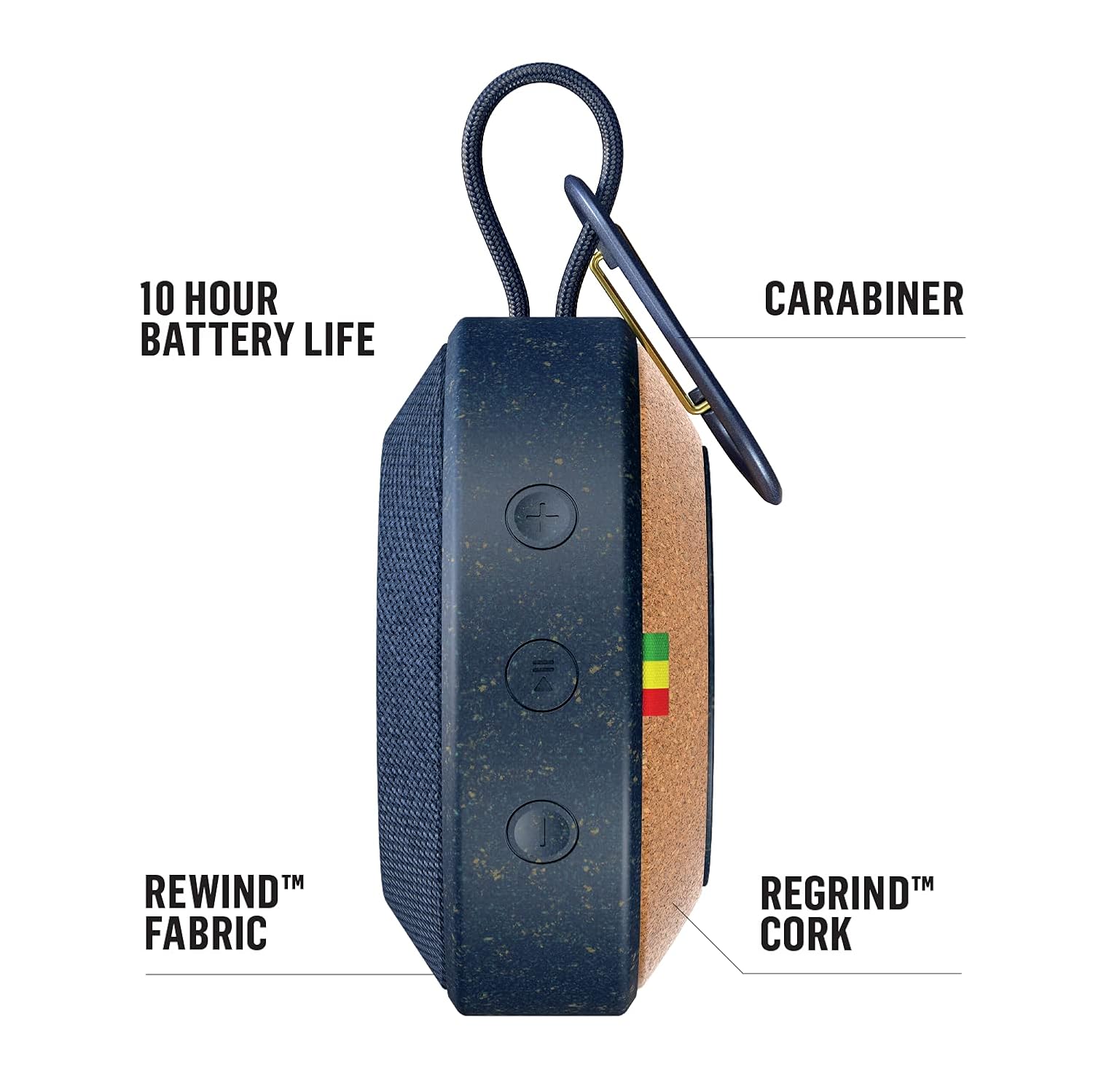

Controls and Ports:
- Power Button: Press and hold to turn the speaker on or off.
- Volume Buttons (+/-): Adjust audio volume.
- Bluetooth Pairing Button: Initiates Bluetooth pairing mode.
- Aux-in Port: For wired audio connection using a 3.5mm audio cable (not included).
- USB Charging Port: For charging the internal battery.
Setup
1. Charging the Speaker
- Connect the provided USB charging cable to the speaker's USB charging port.
- Connect the other end of the USB cable to a USB power adapter (not included) or a computer's USB port.
- The charging indicator light will illuminate. Allow approximately 2-3 hours for a full charge.
- Once fully charged, the indicator light will change or turn off. Disconnect the charging cable.
2. Powering On/Off
- To power on, press and hold the Power button until you hear an audible tone and the indicator light illuminates.
- To power off, press and hold the Power button again until you hear an audible tone and the indicator light turns off.
3. Bluetooth Pairing

- Ensure the speaker is powered on.
- Press the Bluetooth pairing button. The Bluetooth indicator light will flash, indicating it is in pairing mode.
- On your device (smartphone, tablet, etc.), enable Bluetooth and search for available devices.
- Select "No Bounds" from the list of devices.
- Once paired, the Bluetooth indicator light will become solid, and you will hear a confirmation tone.
4. Wireless Dual Speaker Pairing
The No Bounds speaker supports pairing with another No Bounds speaker for a stereo audio experience.
- Ensure both No Bounds speakers are powered on and not connected to any other Bluetooth device.
- On one speaker, press and hold the Bluetooth button for 3 seconds until you hear a tone. This speaker will be the primary speaker.
- On the second speaker, press the Bluetooth button briefly. This speaker will connect as the secondary speaker.
- Once connected, the indicator lights on both speakers will confirm the successful pairing.
- Connect your device to the primary speaker via Bluetooth as described in step 3.
Operation
1. Playing Audio
- Bluetooth: After successful pairing, play audio from your connected device. The sound will stream wirelessly to the speaker.
- Aux-in: Connect a 3.5mm audio cable from your audio source to the speaker's Aux-in port. The speaker will automatically switch to Aux-in mode.
2. Speakerphone Function
When connected via Bluetooth to a smartphone, the built-in microphone allows you to answer calls directly through the speaker.
- To answer an incoming call, press the Play/Pause button.
- To end a call, press the Play/Pause button again.
- To reject an incoming call, press and hold the Play/Pause button.
3. Using the Carabiner
The integrated metal carabiner allows for convenient portability. Clip the speaker to your bag, belt loop, or other secure points for easy transport.
4. Water and Dust Resistance (IP67)

The No Bounds speaker is rated IP67, meaning it is protected against dust ingress and can withstand immersion in water up to 1 meter for 30 minutes. This makes it suitable for use by the pool, at the beach, or in other outdoor environments. Ensure all ports are securely closed before exposing the speaker to water or dust.
Maintenance
1. Cleaning
- Wipe the speaker with a soft, damp cloth.
- Do not use abrasive cleaners, solvents, or harsh chemicals.
- Ensure the speaker is dry before charging or using.
2. Storage
- Store the speaker in a cool, dry place away from extreme temperatures.
- Avoid prolonged exposure to direct sunlight.
3. Battery Care
- To prolong battery life, fully charge the speaker before first use.
- Avoid completely draining the battery frequently.
- If storing for an extended period, charge the battery to approximately 50% every few months.
Troubleshooting
| Problem | Possible Cause | Solution |
|---|---|---|
| Speaker does not turn on | Low battery | Charge the speaker fully. |
| No sound | Volume too low; Not paired; Incorrect input source | Increase volume on speaker and device; Re-pair Bluetooth; Ensure correct input (Bluetooth/Aux) is selected. |
| Bluetooth pairing fails | Speaker not in pairing mode; Device too far; Interference | Ensure speaker is in pairing mode; Move device closer; Turn off other Bluetooth devices. |
| Poor audio quality | Device too far; Obstructions; Low battery | Move device closer to speaker; Remove obstructions; Charge the speaker. |
Specifications

| Feature | Detail |
|---|---|
| Model Name | EM-JA015-BL |
| Brand | Marley |
| Speaker Type | Outdoor, Portable |
| Connectivity Technology | Bluetooth, Auxiliary |
| Wireless Communication | Bluetooth |
| Waterproof Rating | IP67 |
| Power Source | Battery Powered (1 Lithium Ion battery required) |
| Battery Life | Up to 10 hours |
| Speaker Maximum Output Power | 10 Watts |
| RMS Power Range | 3 Watts |
| Audio Output Mode | Stereo |
| Material | Aluminum, Metal, Rewind Fabric, Regrind Silicone, Regrind Cork |
| Item Weight | 227 g (0.5 Pounds) |
| Control Method | App, On-device buttons |
| Compatible Devices | Laptop, MP3 Player, Smartphone, Tablet |
Warranty and Support
For warranty information and customer support, please refer to the official House of Marley website or contact your retailer. You can also visit the Marley Store on Amazon for additional product details and support resources.


