
Introduction
The SPROMISE S328 is a high-performance trail camera designed for discreet wildlife monitoring, hunting, and surveillance. It features invisible infrared LEDs for clear night vision, 12-megapixel photo resolution, Full HD video recording, and a rapid 0.6-second trigger speed. Its robust, IP66-rated weatherproof design ensures reliable operation in various outdoor conditions, making it an ideal tool for capturing detailed observations.
Product Features
- 12 MP Photos & Full HD Videos: Capture high-resolution 12 MP images and Full HD (1920x1080, 30fps) videos with sound. Features a 2-inch color LCD for convenient playback.
- Invisible 940nm IR LEDs: Equipped with 44 invisible 940nm infrared LEDs, providing night illumination up to 18-20 meters without startling wildlife or revealing the camera's presence.
- Fast Trigger Speed: Detects motion and captures images in just 0.6 seconds.
- Motion Sensor: PIR sensor with up to 18m range and adjustable sensitivity.
- Email Photo Transmission: Supports immediate photo transmission to email via a SIM card with internet connectivity (SIM card not included).
- Weatherproof Design: IP66 rated for robust resistance against water, snow, and wind.
- Long Battery Life: Up to 6 months standby time with 12 AA batteries (not included), extendable with an external solar panel (not included).
- Programmable Functions: Includes time-lapse photography (1 second to 24 hours interval), programmable active hours (timer), and adjustable trigger intervals (1 to 60 minutes).
- Security: Features 6-digit numeric PIN code protection.
- Photo Information: Photos include timestamp, date, temperature, and moon phase.
- Simultaneous Capture: Ability to capture both photos and videos sequentially (photos first, then video).
Package Contents
- 1 x SPROMISE S328 Trail Camera
- 1 x Nylon Mounting Strap
- 1 x USB Connection Cable
Setup
1. Battery Installation
The SPROMISE S328 requires 12 AA batteries for operation. Ensure you use high-quality batteries for optimal performance and longevity.
- Open the camera casing by unlatching the side clips.
- Locate the battery compartments inside the camera.
- Insert 12 AA batteries, paying close attention to the correct polarity (+/-) indicated in the compartments.
- Close the battery compartment covers securely to maintain the camera's weatherproof seal.
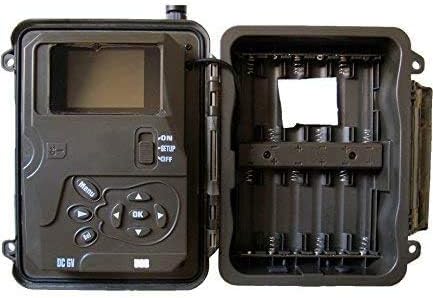
Image: Inside the SPROMISE S328 camera, displaying the internal LCD screen and the empty battery compartments ready for AA battery insertion.
2. SD Card and SIM Card Installation
A 32GB SD/SDHC card (not included) is required for storing photos and videos. For photo transmission features, a SIM card with active internet connectivity is also needed (not included).
- With the camera open, locate the SD card slot.
- Insert the SD card into the slot until it clicks into place. Ensure it is inserted in the correct orientation.
- Locate the SIM card slot (if applicable for your model's cellular features).
- Insert the SIM card as directed by the slot's diagram, ensuring it is fully seated.

Image: The interior of the SPROMISE S328 camera, featuring the LCD screen, battery slots, and dedicated slots for an SD card and a SIM card, with an external antenna connected.
3. Mounting the Camera
Use the provided nylon strap to securely fasten the camera to a tree or pole. Proper mounting ensures stable footage and reliable motion detection.
- Thread the nylon strap through the mounting brackets located on the back of the camera.
- Wrap the strap around the desired mounting object (e.g., tree trunk, post).
- Securely fasten the strap, ensuring the camera is stable, level, and pointed in the desired direction for optimal coverage.
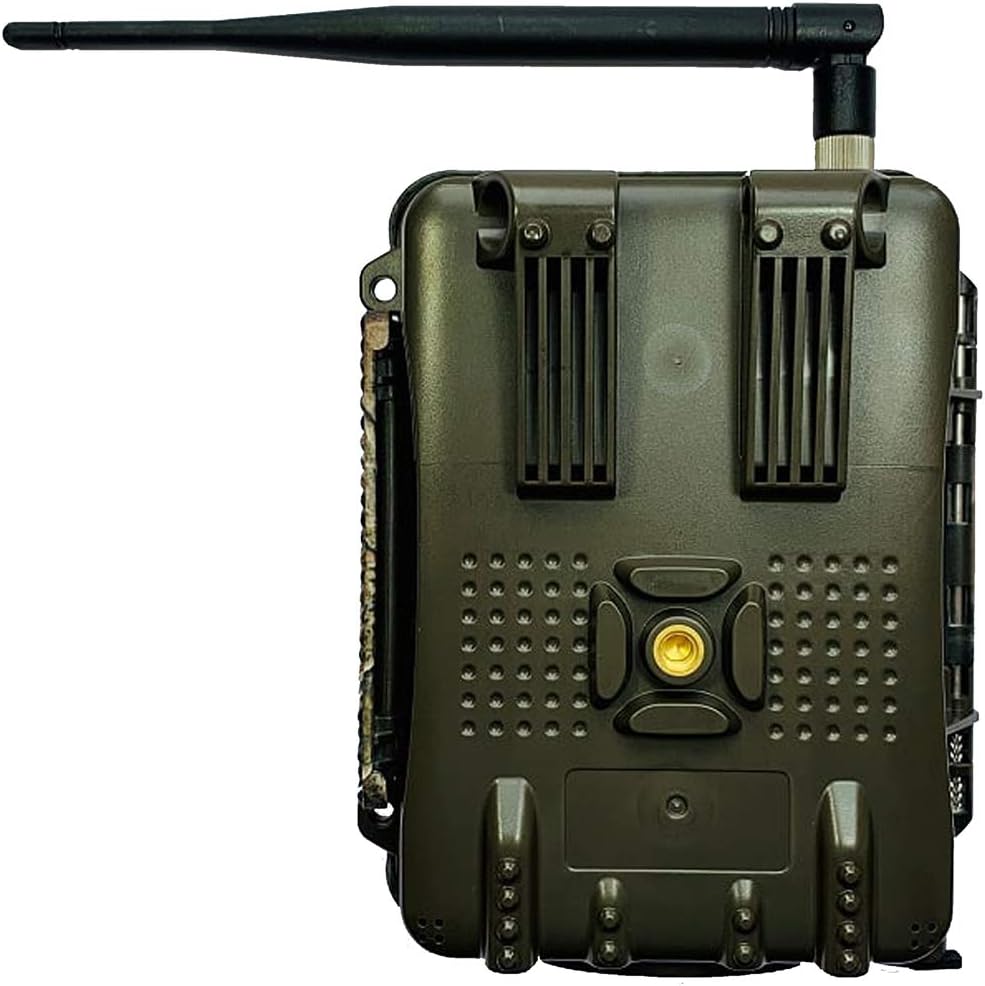
Image: Rear view of the SPROMISE S328 trail camera, highlighting the robust casing and the slots designed for the nylon mounting strap. An antenna is visible at the top.
Operating Instructions
1. Powering On/Off and Mode Selection
The camera features a three-position switch for power control and mode selection:
- OFF: The camera is completely powered off.
- SETUP: This mode allows you to access the camera's menu for configuring settings, reviewing captured photos and videos, and testing the camera's functionality.
- ON: In this mode, the camera is fully active, ready to detect motion and capture media according to your programmed settings.

Image: Front view of the SPROMISE S328 trail camera, showcasing its camouflage design and main lens, ready for deployment.
2. Basic Settings Configuration (SETUP Mode)
While in SETUP mode, use the navigation buttons (Menu, Up, Down, Left, Right, OK) to navigate through the camera's menu and adjust various settings. Please note that the menu interface is in Spanish.
- Resolution: Set desired photo resolution (3MP, 5MP, 12MP) and video resolution (1280x720, 1920x1080).
- Trigger Interval: Define the delay between consecutive captures after a trigger event (programmable from 1 to 60 minutes).
- Video Length: Set the duration for video recordings (programmable from 1 to 30 seconds).
- Time-Lapse: Enable time-lapse photography and set the interval (programmable from 1 second to 24 hours).
- Timer: Program specific active hours during which the camera will operate.
- PIN Code: Set a 6-digit numeric PIN for enhanced security.
- Date/Time: Set the current date and time for accurate timestamps on captured media.
3. Photo and Video Capture
Once all settings are configured, switch the camera to the 'ON' position. The camera will automatically detect motion within its sensor range and capture images or videos based on your programmed settings.
The camera supports simultaneous capture of both photos and videos; it will first take the programmed number of photos, then proceed to record video.

Image: A wild boar captured in daylight by the SPROMISE S328 trail camera, demonstrating the camera's ability to capture clear images of wildlife in its natural habitat.
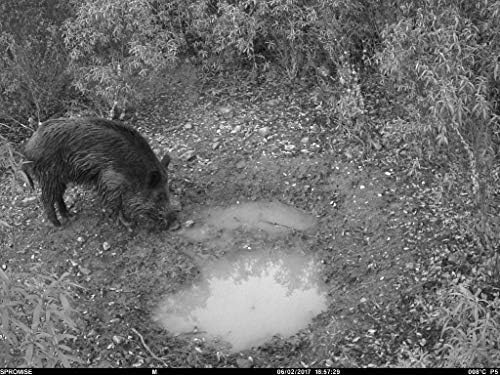
Image: A monochrome night vision image of a wild boar drinking from a puddle, captured by the SPROMISE S328 camera, illustrating its invisible IR LED capabilities for discreet nighttime observation.
Maintenance
- Cleaning: Use a soft, dry cloth to gently clean the camera lens and casing. Avoid using abrasive cleaners or solvents that could damage the camera's surfaces or weatherproof seals.
- Battery Replacement: Replace all batteries when the low battery indicator appears on the screen or when you notice a decrease in camera performance. Always replace with a fresh set of high-quality AA batteries.
- SD Card Management: Regularly format the SD card within the camera's menu to ensure optimal performance and prevent potential data corruption. Always back up any important files before formatting.
- Storage: When the camera is not in use for extended periods, remove all batteries to prevent leakage and store the camera in a cool, dry place away from direct sunlight and extreme temperatures.
Troubleshooting
- Camera not powering on:
- Ensure all 12 AA batteries are inserted correctly with proper polarity and are fully charged. Verify that the ON/OFF switch is in the 'ON' or 'SETUP' position.
- Poor image/video quality:
- Gently clean the camera lens with a soft cloth. Ensure the camera is mounted stably and not subject to vibrations. Check lighting conditions and adjust camera placement if necessary. For night images, ensure no obstructions are blocking the IR LEDs.
- No photos/videos captured:
- Verify that the SD card is inserted correctly and has sufficient free space. Check motion sensor sensitivity settings and ensure the camera is in 'ON' mode. Test the PIR sensor in SETUP mode.
- Email transmission not working:
- Ensure the SIM card has active internet connectivity and sufficient data. Check the network signal strength in the camera's location. Verify all email and cellular settings within the camera menu are correctly configured.
Specifications
| Feature | Detail |
|---|---|
| Image Sensor | 5 MP Color CMOS (interpolated to 12 MP) |
| Lens | F=3.1, FOV 52° |
| IR LEDs | 44 invisible 940nm LEDs |
| IR Flash Range | 18-20 meters |
| Trigger Speed | 0.6 seconds |
| Photo Resolution | 3 MP, 5 MP (2560x1920), 12 MP (4000x3000) |
| Video Resolution | 1280x720 (30 fps), 1920x1080 (30 fps) |
| LCD Screen | 2-inch Color LCD |
| Memory | SD/SDHC cards up to 32 GB (not included) |
| Weather Protection | IP66 |
| Power Source | 12 x AA batteries (not included) |
| Dimensions | 17.6 x 13.6 x 9.6 cm |
| Weight | 400 grams |
| Connectivity | Wireless (for photo transmission) |
| Menu Language | Spanish |
Warranty and Support
For detailed warranty information, technical assistance, or customer support, please refer to the official SPROMISE website or contact your authorized retailer. It is recommended to retain your purchase receipt as proof of purchase for any warranty claims.


