
1. Introduction
The Ace Instruments AI-DP1-LED is a digital differential pressure indicator and transmitter designed for precise measurement in critical environments such as clean rooms, laminar air flow cabinets, biosafety cabinets, and Air Handling Units (AHU). This device provides a clear 4-digit LED display for differential pressure readings and features an integrated sensor, making it a reliable replacement for traditional analog gauges. It includes a built-in buzzer alarm for process violation alerts and supports Modbus communication for integration into Building Management Systems (BMS), SCADA, or PLC systems.

Figure 1: The AI-DP1-LED unit, demonstrating its compact form factor when held in hand.
2. Key Features
- Differential Pressure Range: 0 to 100 Pascals, with an accuracy of +/-0.5% of Full Scale and 1 Pascal resolution.
- Display: Integrated 4-digit red LED 7-segment display (0.8").
- Sensor: Integrated high-speed differential pressure sensor.
- Power Supply: Operates on 24 Volts D.C. (adapter included).
- Alarm: In-built buzzer alarm for high and low set point violations, with an acknowledgment key.
- Enclosure: Durable Stainless Steel construction.
- Dimensions: Instrument enclosure measures 100mm (W) x 90mm (H) x 30mm (D).
- Connections: Two 4mm Stainless Steel hose nipples at the back for pressure lines.
- Medium: Suitable for air or non-corrosive gases.
- Communication: Isolated RS485 Modbus Protocols for BMS/SCADA/PLC integration.
- Unit Conversion: Key-press unit conversion between mm.w.c. and Pascals.
3. Package Contents
Upon unpacking, please verify that all items listed below are present and undamaged:
- 1 x Ace Instruments AI-DP1-LED Digital Differential Pressure Indicator Transmitter
- 1 x Power Adapter (24V D.C.)
- 1 x Instruction Manual (this document)
- 1 x Factory Calibration Certificate
4. Safety Information
Please read and understand all safety instructions before installing or operating the device. Failure to follow these instructions may result in equipment damage or personal injury.
- Installation and maintenance should only be performed by qualified personnel.
- Ensure the power supply is disconnected before making any electrical connections or performing maintenance.
- Do not expose the device to corrosive gases or liquids unless specified.
- Operate the device within its specified pressure and environmental limits.
- Avoid physical shock or excessive vibration to the unit.
5. Setup
5.1 Physical Installation
The AI-DP1-LED is designed for flush mounting, particularly suitable for clean room modular wall fitment with its 30mm depth. Ensure adequate space behind the mounting surface for connections.

Figure 2: Rear view of the AI-DP1-LED, illustrating the enclosure and connection points for mounting reference.
5.2 Electrical Connection
Connect the provided 24V D.C. power adapter to the designated power input port on the rear of the device. Ensure the connection is secure.

Figure 3: Side view showing the power input port and the two 4mm hose nipples.
5.3 Pressure Line Connection
Connect the pressure lines (tubing) to the two 4mm Stainless Steel hose nipples located at the back of the unit. Ensure that the tubing is appropriate for the application and securely fitted to prevent leaks. The device is designed for use with air or non-corrosive gases.
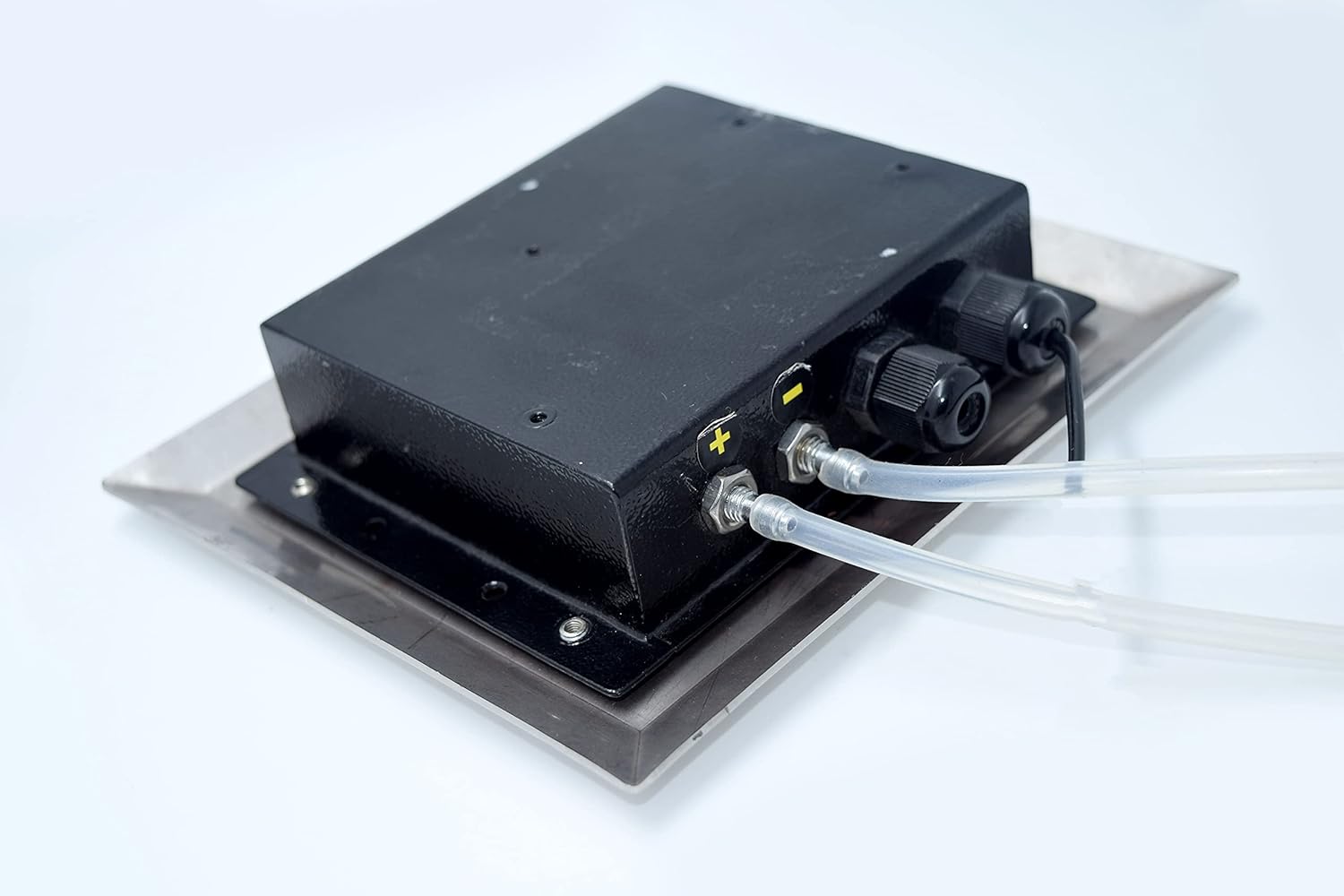
Figure 4: Rear view with pressure tubes connected, illustrating proper setup for differential pressure measurement.
6. Operating Instructions
6.1 Power On and Display
Once powered on, the 4-digit red LED display will illuminate, showing the current differential pressure reading in Pascals (Pa). The display will typically show '0' when no differential pressure is applied.

Figure 5: The AI-DP1-LED display showing a zero reading, indicating no differential pressure.
6.2 Unit Conversion
The device supports unit conversion between mm.w.c. (millimeters of water column) and Pascals. To switch between units, press the designated key on the front panel. Refer to the specific button labeled for unit conversion, if present, or consult the device's on-screen menu if applicable.
6.3 Alarm Function and Acknowledgment
The AI-DP1-LED features an in-built buzzer alarm that activates when the measured differential pressure exceeds or falls below pre-set high and low limits. To acknowledge and silence the alarm, press the 'ACK' (Acknowledgment) button located on the front panel.

Figure 6: Front panel detail, highlighting the 'ALM COM' indicator and the 'ACK' button for alarm management.
6.4 Modbus Communication
For integration with Building Management Systems (BMS), SCADA, or PLC systems, the device provides isolated RS485 Modbus communication protocols. Refer to the Modbus communication protocol documentation for detailed setup and data mapping instructions.
7. Maintenance
Regular maintenance ensures the longevity and accuracy of your AI-DP1-LED unit.
- Cleaning: Periodically wipe the display and enclosure with a soft, damp cloth. Do not use abrasive cleaners or solvents.
- Calibration: Regular calibration is recommended to maintain measurement accuracy, especially in critical applications. Refer to your facility's calibration schedule or contact Ace Instruments for service.
- Connection Check: Periodically inspect pressure tubing and electrical connections for wear, damage, or looseness.
8. Troubleshooting
This section addresses common issues you might encounter with the AI-DP1-LED.
- No Display:
- Check if the power adapter is securely connected and receiving power.
- Verify the power outlet is functional.
- Incorrect Reading:
- Ensure pressure lines are correctly connected to the high and low pressure ports.
- Check for any kinks, blockages, or leaks in the pressure tubing.
- Verify the device is calibrated.
- Alarm Constantly Active:
- Check the current pressure reading against the set high and low alarm limits.
- If the reading is within limits, the alarm settings may need adjustment (consult advanced configuration documentation or support).
- No Modbus Communication:
- Verify RS485 wiring connections.
- Check Modbus parameters (baud rate, parity, slave ID) in your BMS/SCADA/PLC system.
If issues persist after attempting these troubleshooting steps, please contact Ace Instruments support.
9. Specifications
| Parameter | Specification |
|---|---|
| Differential Pressure Range | 0 to 100 Pascals |
| Accuracy | +/-0.5% of Full Scale |
| Resolution | 1 Pascal |
| Frequency | 50-60Hz / 210-220V (Power Adapter Output: 24V D.C.) |
| Display | Integrated 4 Digit Red LED 7 Segment Display (0.8") |
| Sensor | Integrated High Speed Differential Pressure Sensor |
| Alarm | In-built buzzer for set point violation (High & Low) with Acknowledgment key |
| Enclosure Material | Stainless Steel |
| Dimensions (W×H×D) | 100mm × 90mm × 30mm |
| Connection | 2 Nos. Hose Nipples of 4mm Stainless Steel at the Back |
| Medium | Air or Gases (Non Corrosive) |
| Communication | Isolated RS485 Modbus Protocols |
| Item Weight | 400 Grams (14.11 ounces) |
10. Warranty Information
The Ace Instruments AI-DP1-LED Digital Differential Pressure Indicator Transmitter comes with a 12 Months Manufacturing Warranty from the date of purchase. This warranty covers defects in materials and workmanship under normal use. Please retain your purchase receipt for warranty claims. The warranty does not cover damage caused by misuse, unauthorized modifications, accidents, or improper installation.
11. Support
For technical assistance, troubleshooting beyond this manual, or warranty inquiries, please contact Ace Instruments customer support. Provide your product model number (AI-DP1-LED) and purchase details when contacting support to ensure efficient service.