
Woodpeckers 1281R-W
Woodpeckers Precision Woodworking Square 12-Inch (Model 1281R-W) User Manual
Brand: Woodpeckers | Model: 1281R-W
Introduction
This manual provides essential information for the proper use and care of your Woodpeckers 12-Inch Precision Woodworking Square, Model 1281R-W. Manufactured in the USA from high-quality aluminum, this tool is designed for exceptional accuracy in woodworking applications. Please read through these instructions to ensure optimal performance and longevity of your precision square.
Key Features
- Precision Construction: Crafted from a solid piece of stable, cast aluminum tool plate, ensuring a single-piece ruler and handle for accuracy within 0.001 inch along its full length.
- Robust Design: Features two precision-machined aluminum cheeks fitted with stainless steel dowel pins for bulletproof rigidity and perfect alignment.
- Shoulder Lip: The inside edge of the handle includes a shoulder, allowing the square to lay flat on the workpiece for accurate marking without tipping.
- Self-Standing Base: A thick base enables the square to stand upright, facilitating hands-free checking of squareness for machinery setup (table saw blade, jointer fence, band saw blade) and casework.
- Zero-Out Notch: A milled notch at the inside corner allows for precise layout lines to be extended all the way to the edge of your work.
- Laser Engraved Scales: Easy-to-read measurement scales are laser etched in 1/16th increments on both sides of the ruler.
- Storage: Includes a Rack-It wall mount for convenient and safe storage.
Setup
Your Woodpeckers Precision Woodworking Square comes ready for immediate use. No assembly is required for the square itself. The included Rack-It wall mount can be installed in your workshop for organized storage.
Initial Inspection
Upon receiving your square, inspect it for any signs of damage. While Woodpeckers tools are built for durability, a quick visual check ensures everything is in perfect order before use. The square is factory-calibrated to be accurate within 0.001 inch.
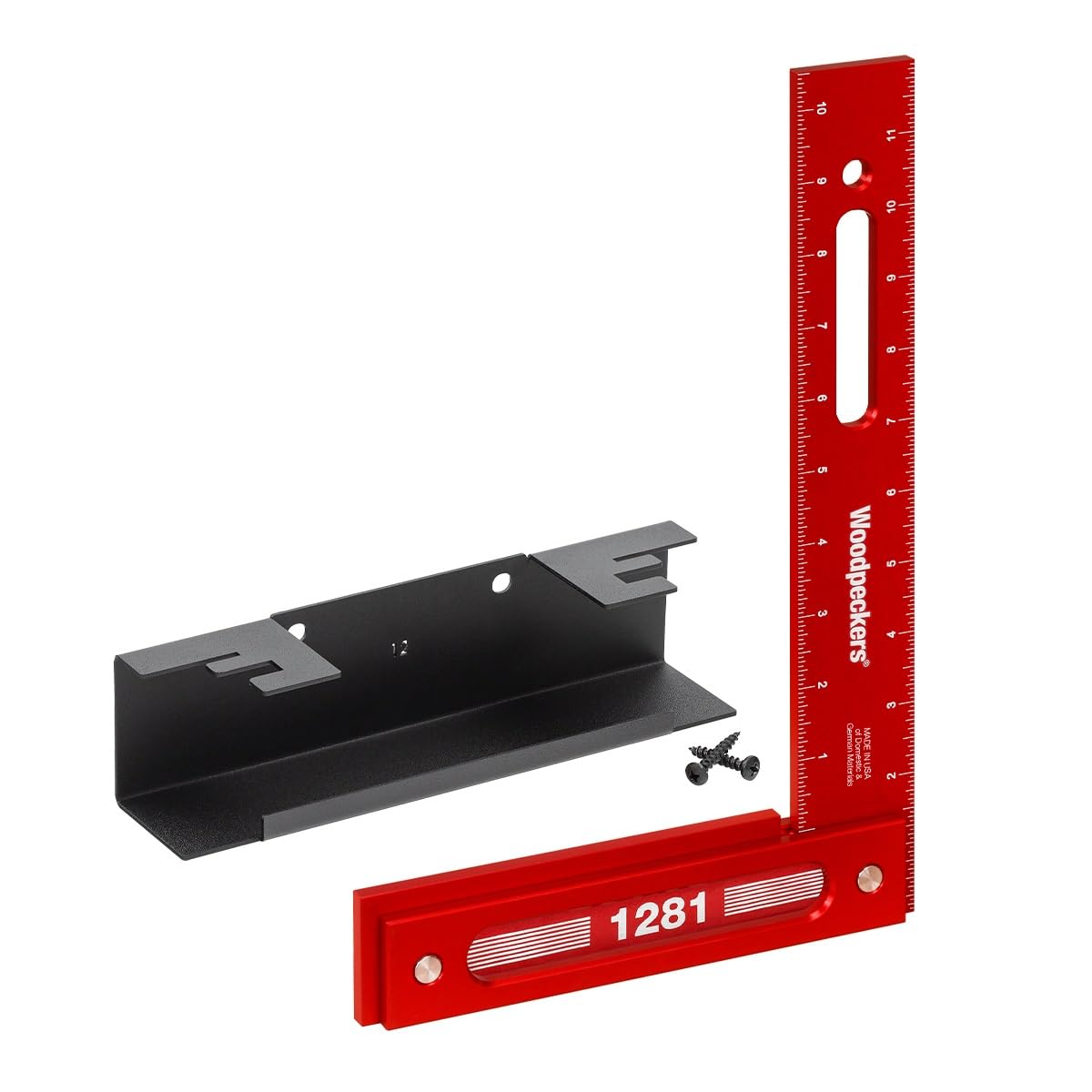
Image: The Woodpeckers 12-Inch Precision Woodworking Square, Model 1281R-W, showcasing its design and laser-engraved scales.
Operating Instructions
The Woodpeckers Precision Woodworking Square is a versatile tool for various measuring and layout tasks. Its design ensures accuracy and ease of use.
1. Marking Layout Lines
To mark a precise line, place the square firmly against the edge of your workpiece. The shoulder lip on the handle allows it to rest securely without tipping. Use a pencil or marking knife along the ruler's edge. The zero-out notch at the inside corner ensures your line extends fully to the workpiece edge.

Image: A detailed view of the square's notch being used to mark a line precisely to the edge of a wooden board.
2. Checking Squareness of Workpieces
For checking the squareness of board ends or assemblies, hold the square against the surfaces. The finger slot provides a convenient grip. For larger assemblies or casework, the thick base allows the square to stand upright, providing a hands-free reference.

Image: Demonstrating the use of the finger slot for a secure grip while checking the squareness of a board end.

Image: The square standing upright, demonstrating its self-standing capability for checking the internal squareness of a wooden box.
3. Setting Up Machinery
The self-standing feature is particularly useful for setting up machinery. Place the square upright on your table saw, jointer, or band saw to accurately check the 90-degree alignment of blades and fences.
Video: Official Woodpeckers video demonstrating various uses of their precision squares, including machinery setup and checking assemblies.
Video: A short preview from Woodpeckers showcasing the versatility and precision of their squares in a workshop setting.
Maintenance
To maintain the precision and appearance of your Woodpeckers square, follow these simple guidelines:
- Cleaning: Wipe the square clean with a soft, dry cloth after each use to remove dust, wood particles, and oils. For stubborn grime, a mild detergent solution can be used, followed by thorough drying.
- Storage: Store the square in its included Rack-It wall mount or a protective case to prevent accidental drops or impacts that could compromise its accuracy. Avoid storing it in environments with extreme temperature fluctuations or high humidity.
- Avoid Harsh Chemicals: Do not use abrasive cleaners, solvents, or harsh chemicals, as these can damage the anodized finish and laser-etched markings.
Troubleshooting
Woodpeckers Precision Woodworking Squares are built to last and maintain their accuracy. If you encounter any issues, consider the following:
- Inaccurate Readings: Ensure the square is clean and free of debris that might prevent it from sitting flush against your workpiece. Verify that the workpiece itself has a straight and clean edge for reference.
- Physical Damage: If the square has been dropped or subjected to significant impact, its accuracy may be compromised. While highly durable, extreme force can affect any precision tool. In such cases, contact Woodpeckers customer support for assistance.
Specifications
| Feature | Detail |
|---|---|
| Model | 1281R-W |
| Brand | Woodpeckers |
| Material | Aluminum |
| Color | Chrome, Red |
| Style | Inch - 12 |
| Graduation Range | 1/16 Inches |
| Accuracy | Within 0.001 inch along full length |
| Item Dimensions (L x W) | 14.5"L x 10"W |
| Included Components | Woodworking Square, Rack-It wall mount |
| UPC | 705105657301 |
Warranty & Support
Your Woodpeckers Precision Woodworking Square is backed by a LIFETIME Woodpeckers Guarantee, established in 1988. This commitment reflects the high quality and durability of their USA-made tools.
For any questions, concerns, or warranty claims, please contact Woodpeckers Inc. directly. Refer to their official website or product packaging for the most current contact information and detailed warranty terms.
Related documents1281R-W


Ask a question about this manual
Ask about setup, troubleshooting, compatibility, parts, safety, or missing instructions. Manuals+ will review the question and use this page’s manual context to help answer it.