Introduction
The Coleman 360° Sound and Light Lantern is a versatile device designed for outdoor and indoor use, combining a 360-degree LED light with a wireless Bluetooth speaker. This manual provides essential information for safe and effective operation of your lantern.
Key Features
- Provides 360 degrees of light for wide area illumination.
- Built-in Bluetooth speaker for wireless audio streaming.
- USB charging capability for the integrated rechargeable battery.
- IPX4 water-resistant design for protection against splashing water.
- Multiple light runtime settings: 7 hours on high, 16 hours on medium, 40 hours on low.
Package Contents
- Coleman 360° Sound and Light Lantern
- USB Charging Cable (Note: Wall adapter not included)
Setup
Initial Charging
Before using your Coleman 360° Sound and Light Lantern for the first time, ensure it is fully charged.
- Locate the USB charging port at the base of the lantern. It is typically covered by a rubber flap for protection.
- Connect the provided USB charging cable to the lantern's port.
- Plug the other end of the USB cable into a compatible USB power source (e.g., a computer USB port, a USB wall adapter, or a portable power bank).
- The charging indicator light will illuminate, typically red, to show that the lantern is charging. The light will change or turn off when charging is complete.

Image: The Coleman 360° Sound and Light Lantern being charged via its USB port. The port is located at the base, covered by a rubber flap, and a red indicator light is visible during charging.
Operating Instructions
Powering On/Off and Light Modes
The lantern features a multi-function control dial on the top for managing both light and audio functions.

Image: Close-up of the lantern's top control panel, showing the central dial for light adjustment and surrounding buttons for audio control (Bluetooth, volume, play/pause).
- To turn on the light, rotate the central dial clockwise from the 'off' position.
- Continue rotating the dial clockwise to cycle through the three available brightness settings: Low, Medium, and High.
- To turn off the light, rotate the dial counter-clockwise until it clicks into the 'off' position.

Image: Graphic illustrating the three light modes (Low, Medium, High) with corresponding lumen outputs (80, 175, 400 lumens) for the Coleman 360° Sound and Light Lantern.
Bluetooth Speaker Operation
The integrated Bluetooth speaker allows you to stream audio wirelessly from your compatible device.
- To activate Bluetooth pairing mode, press and hold the Bluetooth button (indicated by a Bluetooth symbol) on the top control panel. The indicator light will flash, signaling it is ready to pair.
- On your mobile device (smartphone, tablet, etc.), enable Bluetooth and search for available devices.
- Select "Coleman 360 Sound and Light Lantern" (or a similar name) from the list of found devices to establish a connection. A confirmation tone will sound upon successful pairing.
- Use the volume buttons (+/-) on the lantern's control panel to adjust the speaker volume.
- Use the play/pause button to control audio playback.
- To disconnect, turn off Bluetooth on your mobile device or press and hold the Bluetooth button on the lantern again.

Image: Graphic highlighting the built-in Bluetooth speaker feature of the Coleman 360° Sound and Light Lantern, showing musical notes emanating from the speaker.
Maintenance
- Cleaning: Wipe the exterior of the lantern with a soft, damp cloth. Do not use abrasive cleaners, solvents, or harsh chemicals, as these may damage the finish or internal components.
- Storage: When not in use, store the lantern in a cool, dry place away from direct sunlight and extreme temperatures. For long-term storage, ensure the battery is partially charged (around 50%) to maintain battery health.
- Battery Care: To prolong the lifespan of the integrated lithium-ion battery, recharge it regularly, even if the lantern is not in frequent use. Avoid fully discharging the battery for extended periods.
Troubleshooting
Light Not Turning On
- Ensure the battery is charged. Connect the lantern to a power source and check if the charging indicator light illuminates.
- Verify that the control dial is rotated past the "off" position to one of the brightness settings (Low, Medium, or High).
Bluetooth Speaker Not Connecting
- Ensure the lantern's Bluetooth is in pairing mode (the indicator light should be flashing).
- Check that Bluetooth is enabled on your mobile device and that the device is within range of the lantern.
- Try unpairing the lantern from your device's Bluetooth settings and then re-pairing it.
- Ensure the lantern's battery is sufficiently charged, as low battery can affect Bluetooth functionality.
Poor Sound Quality
- Adjust the volume on both the lantern and your connected mobile device.
- Ensure there are no physical obstructions between the lantern and your device that could interfere with the Bluetooth signal.
- Move your mobile device closer to the lantern to improve signal strength and clarity.
Specifications
| Feature | Detail |
|---|---|
| Water Resistance Level | IPX4 (Water Resistant) |
| Battery Life (Light - High) | 7 Hours |
| Battery Life (Light - Medium) | 16 Hours |
| Battery Life (Light - Low) | 40 Hours |
| Battery Life (Speaker) | Up to 20 Hours |
| Battery Type | Lithium Ion (included) |
| Voltage | 3.7 Volts |
| Wattage | 2.67 watts |
| Item Dimensions (LxWxH) | 11.25 x 6 x 5.62 inches |
| Item Weight | 1.3 Pounds |
| Light Source Type | Light Emitting Diode (LED) |
| Model Name | 2000033384 |
| UPC | 076501243789 |
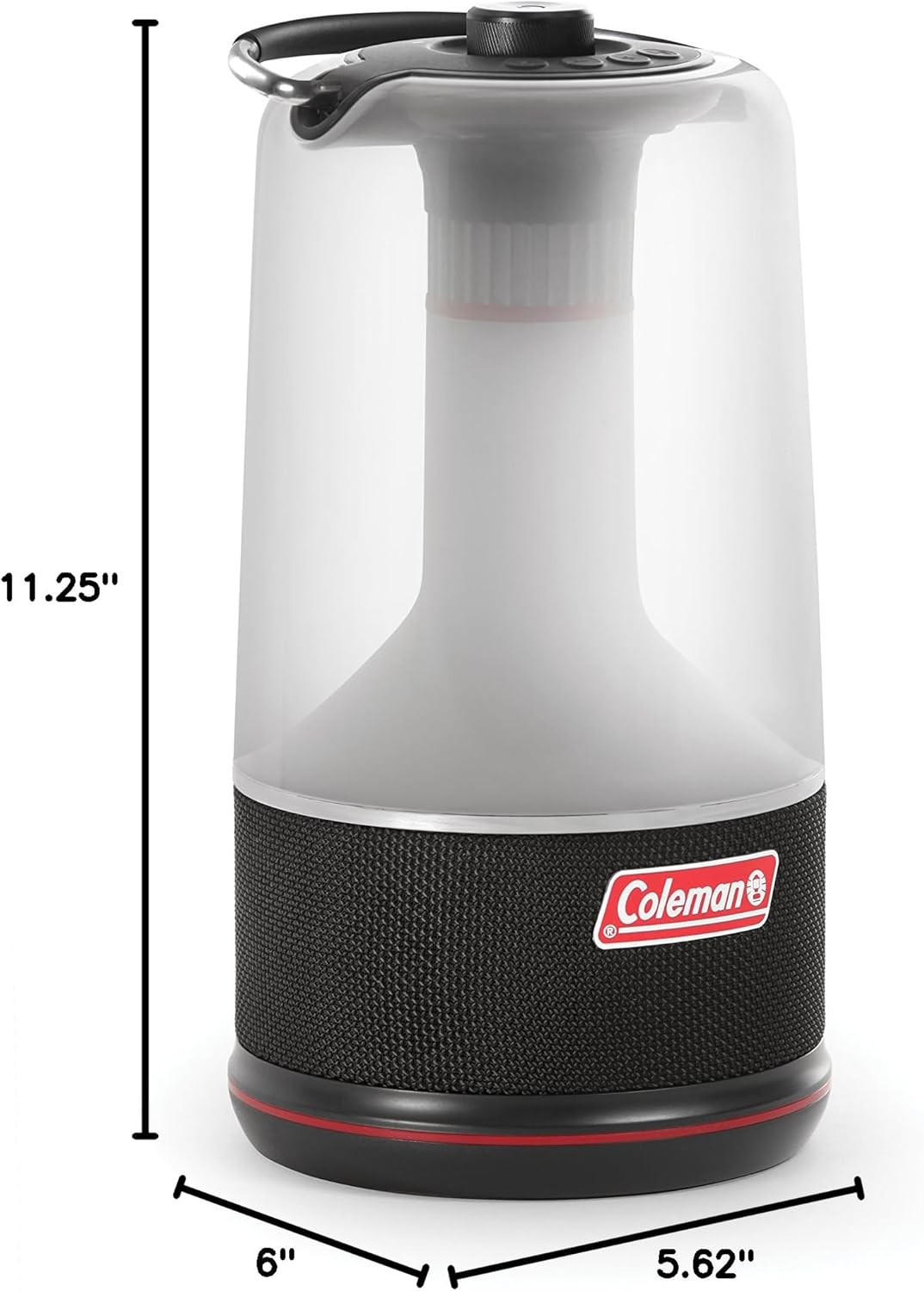
Image: Diagram showing the dimensions of the Coleman 360° Sound and Light Lantern, with a height of 11.25 inches and a base diameter of 6 inches by 5.62 inches.
Warranty and Support
This Coleman product comes with a manufacturer's warranty. For specific warranty details, terms, and conditions, please refer to the documentation included with your product. For further support or inquiries, visit the official Coleman website or contact their customer service.
Product Videos
Coleman 360° Sound and Light Lantern Overview
Video: An official overview of the Coleman 360° Sound and Light Lantern, demonstrating its features and functionality.


