
Introduction
This manual provides detailed instructions for the safe installation, operation, and maintenance of the Legrand 1597TRW Tamper Resistant GFCI Wall Outlet. This device is part of the radiant collection, designed to offer reliable electrical protection in residential and commercial environments. Please read these instructions thoroughly before beginning installation or use.
Safety Information
WARNING: Risk of electric shock. May cause serious injury or death. Turn off power at the circuit breaker or fuse box before installation.
- Always disconnect power at the service panel before working with electrical wiring.
- Installation must be performed by a qualified electrician or in accordance with all local and national electrical codes.
- Do not install in wet locations unless specifically rated for such use.
- Ensure all wire connections are secure and properly insulated.
- Test the GFCI outlet monthly to ensure proper operation.
Package Contents
Verify that all components are present before beginning installation:
- Legrand 1597TRW Tamper Resistant GFCI Wall Outlet (White)
- Mounting Screws
- Instruction Manual (this document)
Note: A screwless wall plate is not included and must be purchased separately.
Installation
Follow these steps for proper installation of your GFCI outlet:
- Turn Off Power: Locate the circuit breaker or fuse that supplies power to the outlet box. Turn it off completely. Verify power is off using a voltage tester.
- Remove Old Outlet: Carefully remove the existing wall plate and outlet from the electrical box. Disconnect the wires from the old outlet, noting which wires were connected to the "LINE" and "LOAD" terminals.
- Identify Wires:
- LINE Wires: These wires bring power from the circuit breaker to the GFCI outlet.
- LOAD Wires: These wires carry power from the GFCI outlet to other downstream receptacles or devices that you want to protect. If there are no downstream receptacles, cap the LOAD wires individually.
- Ground Wire: Typically bare copper or green insulated.
- Connect Wires to GFCI:
- Connect the LINE wires to the terminals marked "LINE" on the GFCI outlet.
- Connect the LOAD wires to the terminals marked "LOAD" on the GFCI outlet.
- Connect the ground wire to the green ground screw.
Important: The Legrand 1597TRW features a feed-thru wiring configuration that allows the GFCI to protect downstream receptacles. It also prevents line-load reversal miswire, meaning there will be no power to the face or downstream receptacles if wired incorrectly. An auto-ground clip assures a positive ground to a metal box.
- Mount the Outlet: Carefully fold the wires into the electrical box and secure the GFCI outlet to the box using the provided mounting screws.
- Install Wall Plate: Attach the screwless wall plate (not included) over the GFCI outlet.
- Restore Power: Turn the power back on at the circuit breaker.
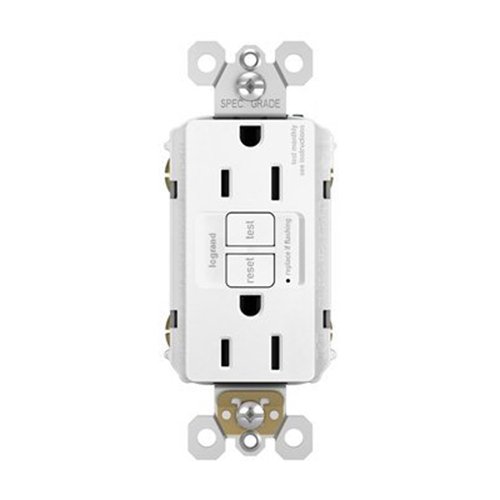
Image: Front view of the Legrand 1597TRW Tamper Resistant GFCI Wall Outlet. This image shows the two tamper-resistant receptacles, the TEST button (black), and the RESET button (red).
Operation
The GFCI outlet is designed to protect against electrical shock by quickly shutting off power if a ground fault is detected.
- RESET Button: After installation or a power outage, press the red RESET button to restore power to the outlet.
- TEST Button: Press the black TEST button to simulate a ground fault. The GFCI should trip, and power to the outlet will be cut off. This confirms the GFCI is functioning correctly.
Monthly Testing:
It is recommended to test your GFCI outlet monthly to ensure it is providing continuous protection. To test:
- Plug a lamp or other device into the GFCI outlet and turn it on.
- Press the black TEST button. The lamp should turn off, and the red RESET button should pop out.
- Press the red RESET button. The lamp should turn back on.
- If the lamp does not turn off or on as described, the GFCI may be faulty and should be replaced.
Maintenance
The Legrand 1597TRW GFCI outlet requires minimal maintenance. Regular testing is the primary maintenance procedure.
- Keep the outlet clean and free from dust and debris.
- Do not paint over the GFCI outlet or its buttons, as this can impair operation.
- If the GFCI trips frequently without an apparent cause, consult a qualified electrician to inspect your wiring.
Troubleshooting
| Problem | Possible Cause | Solution |
|---|---|---|
| GFCI will not reset. |
|
|
| GFCI trips frequently. |
|
|
| No power to the outlet. |
|
|
Specifications
- Model: 1597TRW
- Brand: Legrand
- Color: White
- Amperage: 15 Amps
- Voltage: 125 Volts
- Total Power Outlets: 2
- Connector Type: Nema 5-15
- Material: Metal
- Features: Tamper Resistant, Auto-Ground Clip, Feed-Thru Wiring, Line-Load Reversal Miswire Prevention
- UPC: 680147085438
- ASIN: B079LTP7Y5
Warranty and Support
Legrand products are designed and manufactured to the highest quality standards. For specific warranty information, please refer to the documentation included with your purchase or visit the official Legrand website. For technical support or further assistance, please contact Legrand customer service.
Contact information for Legrand can typically be found on their official website or product packaging.


