ECO-WORTHY ZWN-RSM1-PLUS

ECO-WORTHY Linear Actuator Motor Controller Instruction Manual

Model: ZWN-RSM1-PLUS

Brand: ECO-WORTHY

1. Product Overview

The ECO-WORTHY Linear Actuator Motor Controller is designed to control the positive and negative rotation of a DC motor, primarily used for linear actuators. This kit includes a controller and a wireless remote for convenient operation.

ECO-WORTHY Linear Actuator Motor Controller and Remote
Figure 1: ECO-WORTHY Linear Actuator Motor Controller and its wireless remote control. The controller is a white rectangular box with green terminal blocks, and the remote is a white, four-button device.

2. Specifications

ParameterValue
Input VoltageDC 8-35V
Max Amps10A
Fuse/AC AdaptorYes
Prevent Back-Connect ProtectionYes
Remote Control DistanceLess than 164 feet / 50 meters
On/Off Power Stable VoltageYes
Overtime ProtectionYes
Remote Battery TypeA23 (12V)
Product Dimensions5 x 3 x 2 inches
Item Weight6.4 ounces
Controller Parameters Table
Figure 2: Detailed specifications of the ECO-WORTHY Linear Actuator Motor Controller.

3. Setup and Installation

Follow these steps to assemble and connect your linear actuator system.

3.1 Linear Actuator Assembly

Attach the mounting brackets to both ends of the linear actuator. Ensure the cotter pins are securely curved to firmly hold the brackets in place.
Linear Actuator Assembly with Brackets
Figure 3: Assembly of the linear actuator with its mounting brackets. The brackets are attached to each end of the actuator using pins.

3.2 Wiring Instructions

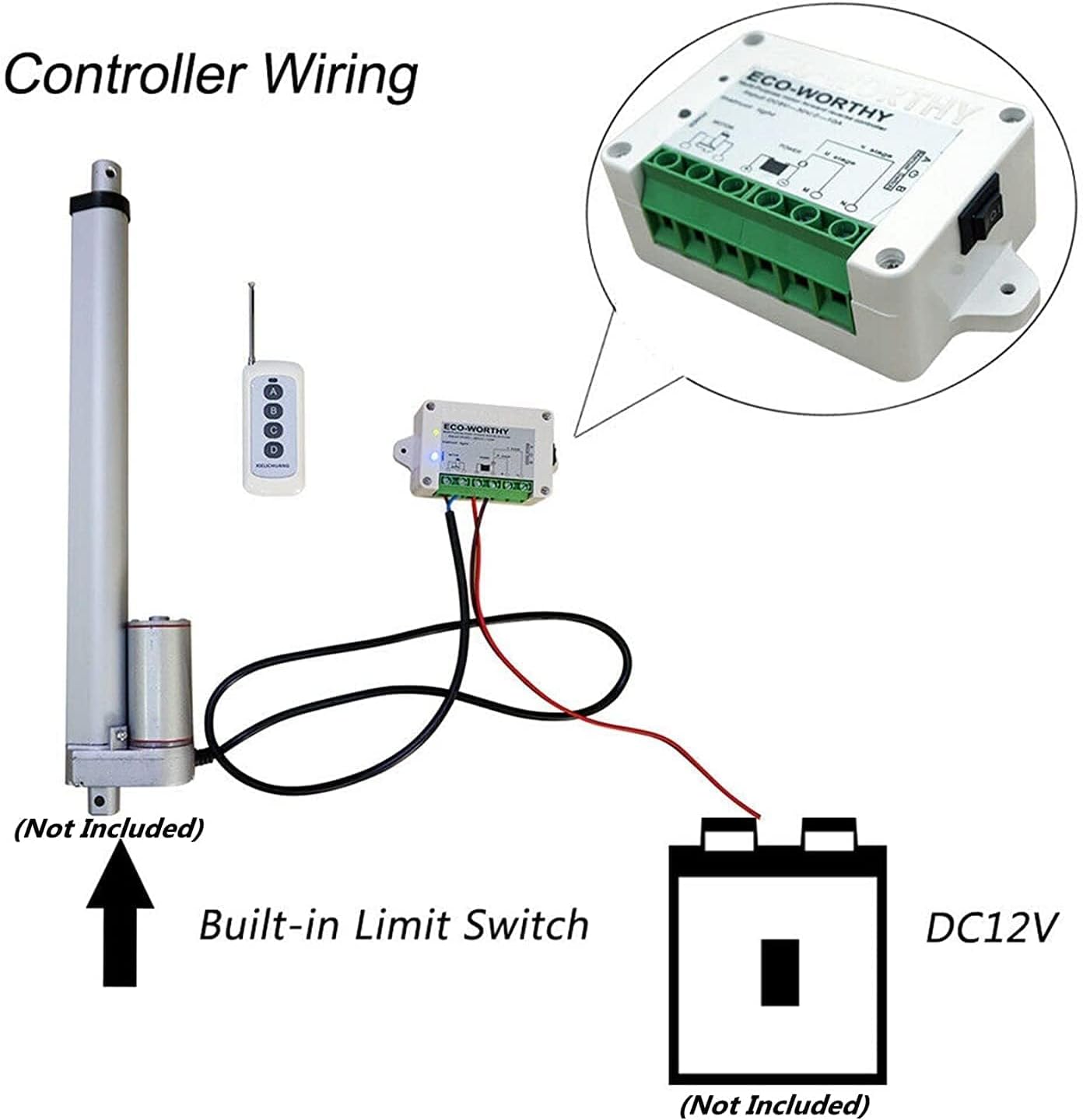
Connect the controller to the linear actuator and a 12V DC power source (battery). Pay close attention to the polarity of the connections.

  1. Connect two wires from your 12V DC power source to the controller's power input terminals. Ensure the red wire connects to the positive (+) terminal and the black wire to the negative (-) terminal.
  2. Connect the linear actuator's wires to the controller's motor output terminals. The red wire of the actuator connects to one motor terminal, and the black wire to the other.
  3. The controller features a manual switch for direct control and limit switch protection.
Detailed Wiring Diagram for Controller, Actuator, and Battery
Figure 4: Detailed wiring connections showing the controller, linear actuator, and 12V battery. The diagram illustrates the positive and negative connections for both the power source and the actuator.
Recommended Wiring Diagram
Figure 5: Recommended wiring setup for the linear actuator system, including the remote control, controller, battery, and motor.
Internal View of Controller with Components
Figure 6: Internal view of the controller, highlighting components such as the 10A fuse, Songle relays, power light (blue), instruction light (red for forward, yellow for reverse), wireless module, and high sensitivity receiver.
Manual Switch on Controller
Figure 7: Close-up view of the manual switch located on the side of the controller, allowing for direct control of the actuator.

3.3 Video Guide: Installation and Testing

Video 1: A comprehensive guide demonstrating the assembly, wiring, and testing of the ECO-WORTHY Linear Actuator Motor Controller system. This video includes steps for attaching brackets, connecting the controller to the actuator and battery, and performing forward/reverse tests.

4. Operating Instructions

The system can be operated using the included 4-key wireless remote control.

The controller also features a manual switch for direct control, which acts as a limit switch protection.

5. Troubleshooting

5.1 Actuator Not Moving

If the linear actuator does not move as expected, it may be due to incorrect wiring polarity. We suggest you exchange the position of the two wires connected to the actuator and check if it moves. This is a common issue that can be resolved by reversing the connections.

6. Maintenance

To ensure optimal performance and longevity of your ECO-WORTHY Linear Actuator Motor Controller:

7. Warranty and Support

For warranty information or technical support, please refer to the official ECO-WORTHY website or contact their customer service directly. Keep your purchase receipt for warranty claims.

© 2025 ECO-WORTHY. All rights reserved.

Related Documents - ZWN-RSM1-PLUS

PreviewECO-WORTHY Linear Actuator Installation and Specifications
This document provides detailed specifications, installation instructions, and safety warnings for the ECO-WORTHY Linear Actuator. It covers product features, mounting guidelines, and electrical connections for various models.
PreviewECO-WORTHY APP User Manual: Connect and Control Your Device via Bluetooth & WiFi
Comprehensive user manual for the ECO-WORTHY APP, guiding you through app installation, Bluetooth and WiFi connection, device management, and troubleshooting. Learn to connect your ECO-WORTHY device easily.
PreviewECO-WORTHY Dual-Axis Solar Tracker Installation Manual
Comprehensive installation manual for the ECO-WORTHY Dual-Axis Solar Tracker system. Includes safety precautions, a detailed parts list, step-by-step assembly instructions, and support contact information for proper setup and maintenance.
PreviewECO-WORTHY LiFePO4 Lithium Iron Phosphate Battery User Manual
User manual for ECO-WORTHY LiFePO4 Lithium Iron Phosphate batteries, covering specifications, charging methods, and troubleshooting for 12V 8Ah, 10Ah, 20Ah, 30Ah, and 50Ah models.
PreviewECO-WORTHY 51.2V 100AH LiFePO4 Battery User Companion Software Guide
This guide provides detailed instructions for using the ECO-WORTHY companion mobile application and the PC-based BMS Tool ES-UP software to monitor and manage ECO-WORTHY 51.2V 100AH LiFePO4 batteries. It covers app installation, Bluetooth and WiFi connectivity, data monitoring, troubleshooting, and PC software setup.
PreviewECO-WORTHY Metal Case LiFePO4 Battery User Manual (12V/24V/48V Series)
Comprehensive user manual for ECO-WORTHY Metal Case LiFePO4 Lithium Iron Phosphate Batteries, covering 12V, 24V, and 48V series. Includes specifications, installation guides, charging methods, troubleshooting, and maintenance.