
1. Product Overview
This manual provides instructions for the AIDITIYMI AH59-02547B replacement remote control, designed for use with various Samsung Sound Bar and Home Theater Soundbar models. This remote offers direct functionality without the need for programming or pairing.
Compatible Models:
- Samsung Sound Bar HW-F450ZA
- Samsung Sound Bar HW-F450
- Samsung Sound Bar PS-WF450
- Samsung Sound Bar AH68-02644D-00
- Samsung Sound Bar HW-FM45C
- Samsung Sound Bar HW-FM45
- Samsung Sound Bar HW-F450/ZA
- Samsung Sound Bar HW-H570
- Samsung Sound Bar HW-H550
- Samsung Sound Bar HW-H551
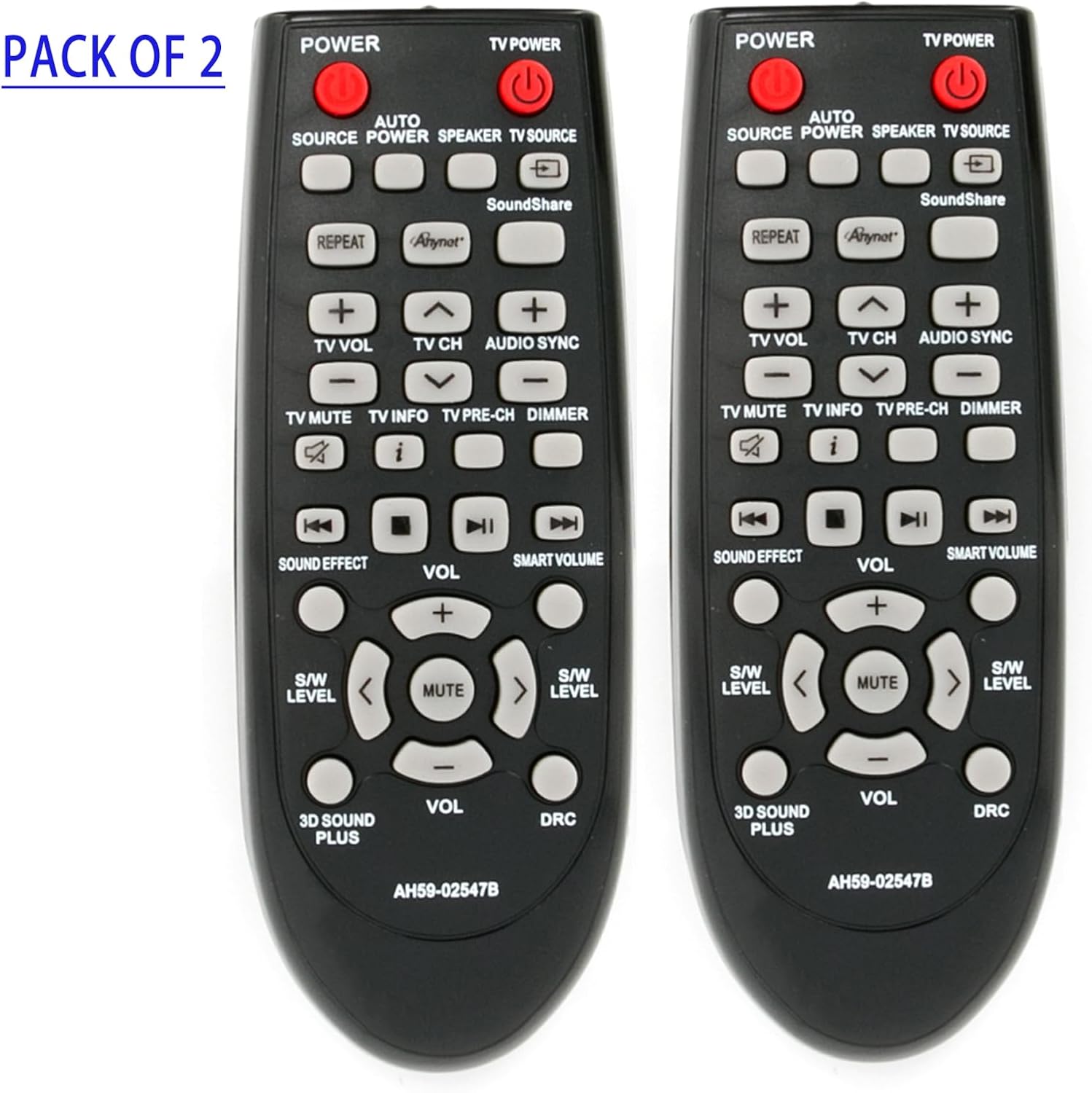
Image 1.1: Two AIDITIYMI AH59-02547B replacement remote controls. These remotes are designed to operate Samsung Sound Bar systems.
2. Setup
The AIDITIYMI AH59-02547B remote control requires no programming or pairing. Simply install batteries to begin operation.
2.1 Battery Installation
- Locate the battery compartment on the back of the remote control.
- Slide open the battery compartment cover.
- Insert two (2) AAA alkaline batteries, ensuring the positive (+) and negative (-) terminals align correctly with the markings inside the compartment.
- Close the battery compartment cover securely.
Note: Batteries are not included with the remote control. Always use new AAA alkaline batteries for optimal performance.
3. Operating Instructions
This section details the primary functions of the remote control buttons.
| Button | Function |
|---|---|
| POWER | Turns the Samsung Sound Bar system on or off. |
| TV POWER | Turns the connected television on or off (if compatible). |
| SOURCE | Cycles through available input sources (e.g., HDMI, Optical, Bluetooth). |
| SPEAKER | Selects speaker output mode. |
| VOL (+/-) | Adjusts the main volume level of the sound bar. |
| MUTE | Mutes or unmutes the sound. |
| SOUND EFFECT | Cycles through various sound modes (e.g., Standard, Music, Cinema). |
| SMART VOLUME | Activates or deactivates the Smart Volume feature, which helps maintain consistent volume levels. |
| S/W LEVEL (+/-) | Adjusts the subwoofer volume level. |
| 3D SOUND PLUS | Activates or deactivates the 3D Sound Plus feature for enhanced audio. |
| DRC | Dynamic Range Control. Adjusts the dynamic range of the audio. |
| REPEAT | Repeats the current track or playlist (functionality depends on source). |
| SoundShare | Activates Samsung SoundShare feature for wireless audio connection. |
| TV VOL (+/-) | Adjusts the volume of the connected television. |
| TV CH (+/-) | Changes channels on the connected television. |
| AUDIO SYNC | Adjusts audio delay to synchronize with video. |
| TV MUTE | Mutes or unmutes the connected television. |
| TV INFO | Displays information about the current TV program. |
| TV PRE-CH | Returns to the previously viewed TV channel. |
| DIMMER | Adjusts the brightness of the sound bar's display. |
| Playback Controls (Rewind, Play/Pause, Fast Forward, Stop) | Controls media playback from connected devices (e.g., USB, Bluetooth). |
4. Maintenance
4.1 Battery Replacement
Replace batteries when the remote's response becomes sluggish or stops working. Refer to Section 2.1 for battery installation instructions. Always replace both batteries at the same time with new AAA alkaline batteries.
4.2 Cleaning
To clean the remote control, gently wipe its surface with a soft, dry cloth. Do not use liquid cleaners, sprays, or abrasive materials, as these can damage the remote.
5. Troubleshooting
If you experience issues with your remote control, please refer to the following common problems and solutions:
- Remote is not responding:
- Ensure the batteries are inserted correctly with the correct polarity (+/-).
- Replace old batteries with new AAA alkaline batteries.
- Check for any obstructions between the remote control and the sound bar's infrared (IR) receiver.
- Ensure you are within the maximum operating range (approximately 32 feet) and pointing the remote directly at the sound bar.
- Limited operating range:
- Replace batteries with new ones.
- Ensure there are no strong light sources (e.g., direct sunlight, fluorescent lights) interfering with the IR signal.
- Certain buttons do not work:
- Verify that the sound bar model is listed as compatible in Section 1.
- Some advanced functions may require specific settings on your sound bar or connected device. Consult your sound bar's original manual for specific feature details.
6. Specifications
| Feature | Detail |
|---|---|
| Brand | AIDITIYMI |
| Model Number | AH59-02547B (Replacement) |
| Connectivity Technology | Infrared (IR) |
| Compatible Devices | Samsung Sound Bar Home Theater Systems (Specific models listed in Section 1) |
| Battery Type | 2 x AAA Alkaline Batteries (not included) |
| Maximum Range | Approximately 32 Feet (10 meters) |
| Button Quantity | 32 |
| Color | Black |
| Item Weight | 0.11 Pounds (approx. 50 grams) |
| Item Dimensions (L x W x H) | 8" x 2" x 0.6" (approx. 20.3cm x 5.1cm x 1.5cm) |
7. Warranty & Support
7.1 Warranty Information
This AIDITIYMI remote control comes with a 1-Year Warranty from the date of purchase. This warranty covers manufacturing defects under normal use. It does not cover damage caused by misuse, accidents, unauthorized modifications, or battery leakage.
7.2 Customer Support
For technical assistance, warranty claims, or further inquiries, please contact the AIDITIYMI customer support through your retailer or the manufacturer's official contact channels. Please have your purchase details and model number (AH59-02547B) ready when contacting support.