
1. Introduction
The HiLetgo DC 6.5-100V 0-20A Digital Multimeter is a versatile instrument designed for monitoring electrical parameters in DC circuits. It provides real-time measurements of voltage, current, active power, and energy consumption. Featuring a clear LCD display with a blue backlight, this device is suitable for various applications requiring precise electrical monitoring.
2. What's in the Box
- 1 x HiLetgo DC 6.5-100V 0-20A LCD Display Digital Ammeter Voltmeter Multimeter Current Voltage Power Energy Battery Monitor Amperage Meter Gauge with Built-in Shunt
3. Specifications
- Voltage Test Range: DC 6.5V ~ 100V
- Current Test Range: 0 ~ 20A
- Active Power Test Range: 0 ~ 2kW
- Energy Test Range: 0 ~ 9999kWh
- Measurement Accuracy: 1.0
- Measurement Speed: 2 times/second
- Display: Large-screen LCD with blue backlight
- Data Storage: Stores energy data when power is off (can be reset to 0)
- Backlight Control: Can be turned on/off manually
- Voltage Alarm: Over-voltage alarm thresholds, backlighting, and voltage flicker tips
- Product Dimensions: 7 x 16 x 22 inches; 2.82 ounces (approx. 17.8 x 40.6 x 55.9 cm; 80g)
- Item Model Number: 3-01-1457
4. Safety Precautions
- This module is only suitable for DC power within the 6.5V to 100V range.
- This module is designed for indoor use only.
- The applied load must not exceed the rated voltage and current limits of the device.
- Ensure correct wiring order to prevent damage to the device or connected components.
5. Product Overview
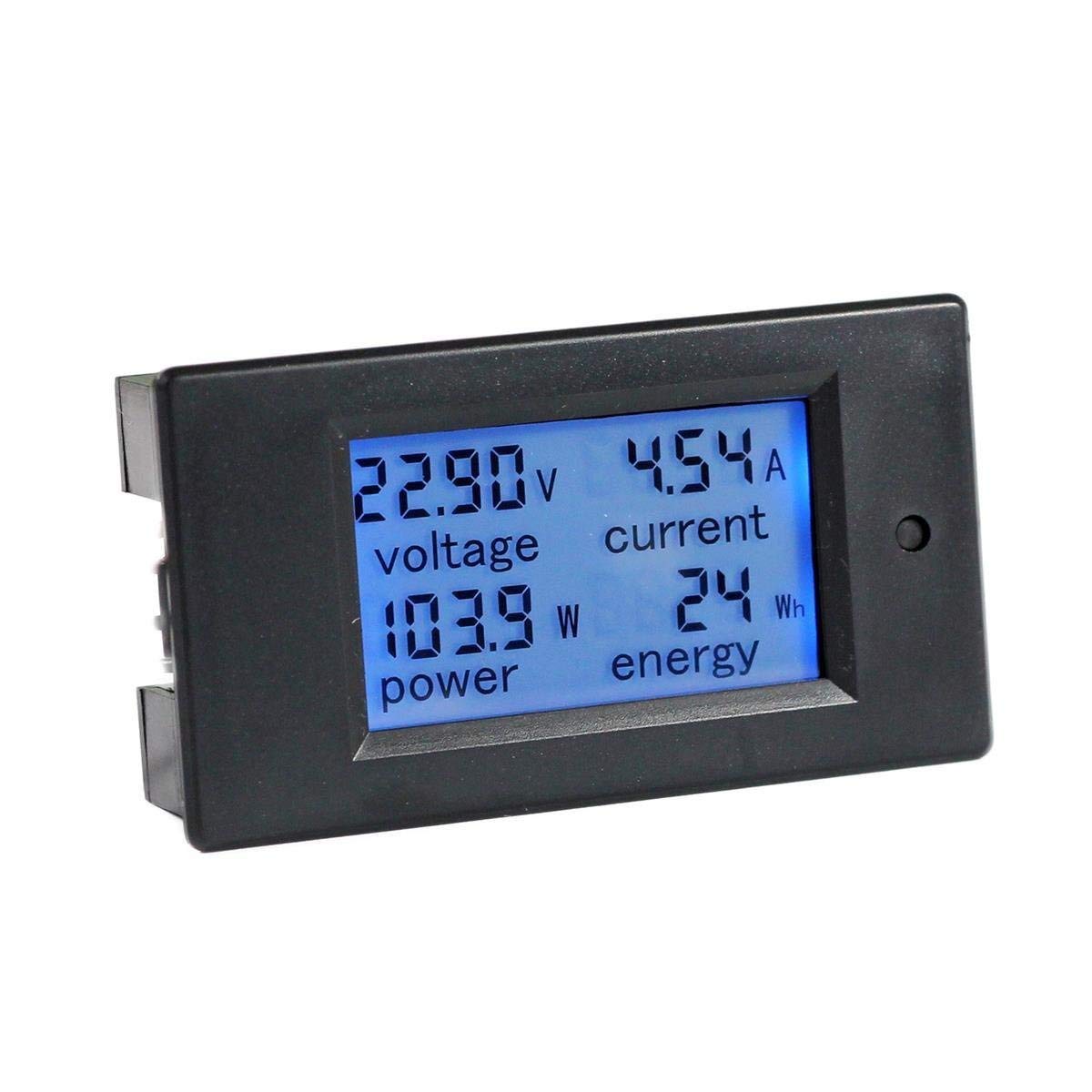
Figure 1: Front view of the HiLetgo DC Digital Multimeter. The LCD displays voltage (V), current (A), power (W), and energy (Wh) readings. A small button is visible on the right side.

Figure 2: Detail of the single button on the multimeter. This button controls the energy reset, backlight on/off function, and setting of power alarm thresholds.

Figure 3: Dimensional drawing of the multimeter, indicating measurements in millimeters for installation planning.
6. Setup and Wiring
Proper wiring is essential for the correct operation and safety of the multimeter. Refer to the wiring diagrams below for guidance.

Figure 4: Simplified wiring diagram located on the back of the multimeter. It shows connections for DC IN (power source) and LOAD (device being powered).

Figure 5: Comprehensive wiring diagram illustrating how to connect the multimeter between a DC power source (e.g., battery) and a load (e.g., light bulb). Ensure positive and negative terminals are connected correctly.
Wiring Steps:
- Identify Terminals: Locate the DC IN and LOAD terminals on the back of the multimeter. These are typically labeled with '+' and '-' symbols.
- Connect DC Input: Connect the positive terminal of your DC power source (e.g., battery) to the '+' terminal of the DC IN on the multimeter. Connect the negative terminal of your DC power source to the '-' terminal of the DC IN.
- Connect Load: Connect the positive terminal of your load (the device you want to monitor) to the '+' terminal of the LOAD on the multimeter. Connect the negative terminal of your load to the '-' terminal of the LOAD.
- Verify Connections: Double-check all connections to ensure they are secure and correctly polarized. Incorrect wiring can damage the device.
7. Operating Instructions
Display Functions:
Once powered, the LCD will display the following parameters:
- Voltage (V): Real-time DC voltage of the circuit.
- Current (A): Real-time DC current flowing through the circuit.
- Power (W): Real-time active power consumption.
- Energy (Wh/kWh): Accumulated energy consumption. This value is stored even when the device is powered off.
Button Functions:
The single button on the front panel serves multiple purposes:
- Short Press: Toggles the blue backlight ON or OFF.
- Long Press (3 seconds): Resets the accumulated energy (Wh/kWh) data to zero.
- Setting Voltage Alarm Thresholds: The manual does not provide specific instructions for setting alarm thresholds with the single button. Typically, this involves a combination of long presses and short presses to enter a setting mode and adjust values. Refer to the product listing or manufacturer's website for detailed instructions if this feature is critical for your application.
Voltage Alarm Function:
The device includes a voltage alarm function. If the measured voltage falls outside the preset upper and lower alarm thresholds, the backlight and voltage display will flicker to alert the user. This feature is useful for monitoring battery discharge levels or over-voltage conditions.
8. Maintenance
- Keep the device clean and free from dust and moisture.
- Avoid exposing the multimeter to extreme temperatures or direct sunlight for prolonged periods.
- Do not attempt to open the casing or modify the internal components, as this will void any potential warranty and may cause damage.
9. Troubleshooting
- No Display: Ensure the DC input voltage is within the 6.5V-100V range and that all wiring connections are secure and correct.
- Inaccurate Readings: Verify that the load does not exceed the rated current (20A) and voltage (100V). Ensure proper wiring, especially for current measurement.
- Backlight Not Working Below 7V: The backlight may not illuminate consistently below approximately 7V, even though the meter can measure down to 6.5V. This is normal behavior.
- Energy Data Not Resetting: Ensure you are performing a long press (approximately 3 seconds) on the button to reset the energy data.
- Display Flashing: This indicates that the voltage has exceeded or fallen below the set alarm thresholds. Check your circuit voltage.
10. Warranty and Support
For warranty information or technical support, please refer to the product packaging or contact HiLetgo customer service through their official channels. Keep your purchase receipt for any warranty claims.


