
AIDITIYMI AD-AK59-00149A-ADSNNICTYY01131
Instruction Manual for AIDITIYMI AK59-00149A Replacement Remote Control
Model: AD-AK59-00149A-ADSNNICTYY01131
Brand: AIDITIYMI
1. Introduction
This manual provides detailed instructions for the use and maintenance of your AIDITIYMI AK59-00149A Replacement Remote Control. This remote is designed as a direct replacement for the original Samsung BLU RAY DISC Player remote control, specifically compatible with various Samsung Blu-ray Player models. It requires no programming or pairing, offering immediate functionality upon battery installation.
2. Package Contents
- 1 x AIDITIYMI AK59-00149A IR Remote Control
- Note: Batteries (2 x AAA) and a user manual are not included in the package.
3. Setup and Battery Installation
The AIDITIYMI AK59-00149A remote control is designed for immediate use without any complex setup, programming, or pairing procedures. Simply install the batteries, and it will be ready to operate your compatible Samsung Blu-ray Player.
3.1 Battery Installation
- Locate the battery compartment cover on the back of the remote control.
- Press down on the tab and slide the cover off in the direction indicated by the arrow.
- Insert two (2) new AAA alkaline batteries into the compartment. Ensure that the positive (+) and negative (-) terminals of the batteries align correctly with the markings inside the compartment. Incorrect insertion can prevent the remote from functioning.
- Slide the battery compartment cover back into place until it clicks securely.
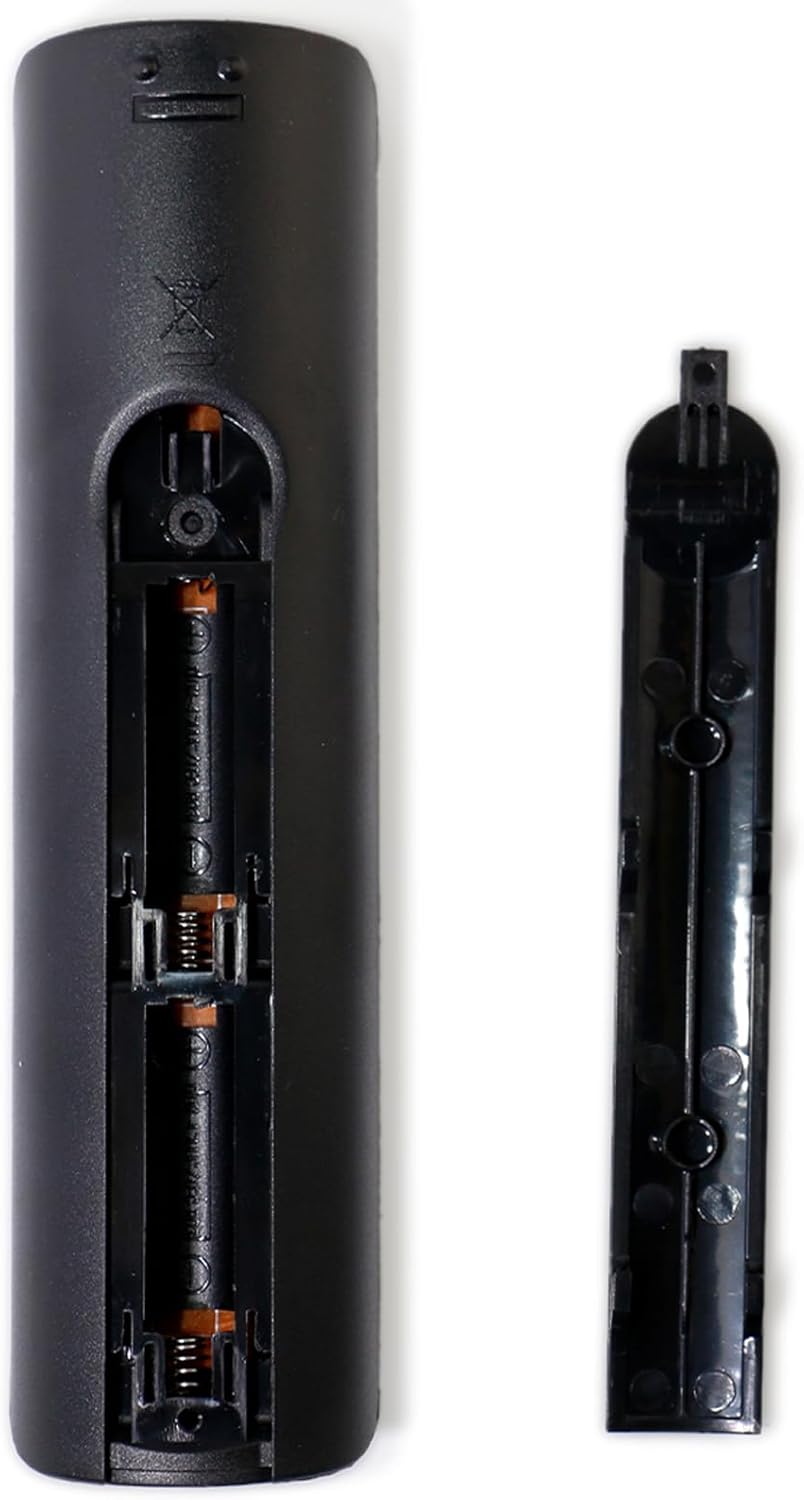
Figure 3.1: Battery Compartment View. This image shows the back of the remote control with the battery cover detached, revealing the slots for two AAA batteries. The correct polarity markings are visible.
Once batteries are installed, the remote is ready for use. Point the remote directly at your Samsung Blu-ray Player and press the desired function button.
4. Operating Instructions
The AIDITIYMI AK59-00149A remote control provides full functionality for compatible Samsung Blu-ray Disc Players. Below is a general overview of the buttons and their functions.

Figure 4.1: Front View of the Remote Control. This image displays the layout of all buttons on the remote, including power, volume, channel, navigation, playback, and special function keys.
4.1 Button Functions
- Power (⏻): Turns the Blu-ray player on or off.
- Source: Selects the input source.
- Volume (+/-): Adjusts the volume level.
- Mute: Mutes or unmutes the audio.
- Number Pad (0-9): Used for direct track selection or inputting numbers.
- Disc Menu: Accesses the disc menu during playback.
- Title Menu: Accesses the title menu of a disc.
- Popup: Displays a pop-up menu.
- Playback Controls (Rewind, Play, Fast Forward, Stop, Pause, Skip Back, Skip Forward): Standard controls for media playback.
- Home (⌂): Navigates to the main home screen of the Blu-ray player.
- Subtitle: Toggles subtitle display.
- Audio: Selects audio tracks or modes.
- Info (i): Displays information about the current content.
- Tools: Accesses various tools or settings.
- Navigation Arrows (Up, Down, Left, Right): Used to navigate menus and selections.
- Enter (Center button): Confirms selections.
- Return (↶): Goes back to the previous screen or menu.
- Exit: Exits the current menu or function.
- Color Buttons (A, B, C, D): Multi-functional buttons, typically used for specific features within menus or applications.
- Bonus View: Accesses bonus view features on compatible discs.
- Repeat / A-B: Repeats playback or sets A-B repeat points.
- Full Screen: Toggles full screen mode.

Figure 4.2: Remote Control in Use. This image illustrates a user holding the remote control, aiming it at a television and a Blu-ray player, depicting the common scenario of operating the device.
5. Compatible Samsung Blu-ray Player Models
This replacement remote control is compatible with a wide range of Samsung Blu-ray Player models, including but not limited to:
- BD-ES5000
- BD-ES5300
- BD-F5100
- BD-F5100/ZA
- BD-F5100/ZF
- BD-F5100/ZX
- BD-F5500/ZF
- BD-FM51
- BD-FM51/ZA
- BD-FM51C
- BD-FM51C/ZA
- BD-FM57C
- BD-FM57C/ZA
- BD-H5100
- BD-H5100/ZA
- BD-H5900
- BD-H5900/ZA
- BD-HM51
- BD-HM51/ZA
- BD-HM59
- BD-HM59/ZA
- BD-HM59C
- BD-HM59C/ZA
- BD-J5100/ZA
- BD-J5100E
- BD-J5100E/ZA
- BD-J5700
- BD-J5700/ZA
- BD-J5900
- BD-J5900/ZA
- BD-J5900E
- BD-J5900E/ZA
- BD-JM51
- BD-JM51/ZA
- BD-JM57
- BD-JM57/ZA
- BD-JM57C
- BD-JM57C/ZA
- BD-JM59
- BD-JM59/ZA
- BD-HM57C
If your model is not listed, please verify compatibility with the manufacturer or seller.
6. Maintenance
6.1 Cleaning
To maintain the remote control's appearance and functionality, wipe it regularly with a soft, dry cloth. For stubborn dirt, slightly dampen the cloth with water or a mild, non-abrasive cleaner. Avoid using harsh chemicals, solvents, or abrasive materials, as these can damage the remote's surface or internal components.
6.2 Battery Care and Replacement
- Replace batteries when the remote's responsiveness decreases or it stops functioning.
- Always replace both batteries at the same time with new AAA alkaline batteries. Do not mix old and new batteries, or different types of batteries.
- If the remote control will not be used for an extended period (e.g., one month or more), remove the batteries to prevent leakage, which can cause damage to the remote.
- Dispose of used batteries according to local regulations.
6.3 Storage
Store the remote control in a cool, dry place, away from direct sunlight, extreme temperatures, and high humidity. Avoid placing heavy objects on the remote or exposing it to excessive force, which could cause physical damage.
7. Troubleshooting
If you experience issues with your remote control, please refer to the following common troubleshooting steps:
- Remote Not Responding:
- Check the batteries: Ensure they are inserted correctly with the correct polarity (+/-) and are not depleted. Replace with new AAA alkaline batteries if necessary.
- Line of Sight: Make sure there are no obstructions between the remote control and the Blu-ray player's infrared (IR) sensor. The remote requires a clear line of sight to transmit signals.
- Distance: Ensure you are within the effective operating range of the remote control (typically up to 20 feet or 6 meters).
- Interference: Strong light sources (like direct sunlight or fluorescent lights) or other IR devices can sometimes interfere with the remote's signal. Try operating the remote in a different environment.
- Specific Buttons Not Working:
- Clean the remote: Dirt or debris under the buttons can sometimes prevent them from registering presses. Refer to the cleaning instructions in Section 6.1.
- Test other buttons: If only a few buttons are not working, it might indicate a specific issue with those buttons. If no buttons work, it's likely a battery or line-of-sight issue.
- Remote Controls Other Devices:
- This remote is specifically designed for Samsung Blu-ray Players. If it is inadvertently controlling other devices, ensure that the Blu-ray player is the intended target and that other devices are not in the direct line of the IR signal.
If the problem persists after trying these steps, contact the seller or manufacturer for further assistance.
8. Specifications
| Feature | Detail |
|---|---|
| Product Model Number | AD-AK59-00149A-ADSNNICTYY01131 |
| Product Dimensions | 7 x 2 x 0.6 inches (approximately 17.8 x 5.1 x 1.5 cm) |
| Item Weight | 1.76 ounces (approximately 50 grams) |
| Batteries Required | 2 x AAA batteries (not included) |
| Compatible Devices | Samsung Blu-ray Disc Players (various models) |
| Color | Black |
| Special Feature | Ergonomic design |
| Manufacturer | AIDITIYMI Factory |
| First Available Date | February 2, 2018 |

Figure 8.1: Remote Control Dimensions. This image provides a visual representation of the remote control's physical dimensions, indicating a length of 17.5 cm and a width of 4.5 cm.
9. Warranty and Support
For information regarding warranty coverage, returns, or technical support, please refer to the purchase documentation or contact the seller directly. As this is a replacement product, specific warranty terms may vary depending on the retailer and the manufacturer's policy.
For general inquiries or further assistance, please reach out to AIDITIYMI customer support or the platform where the product was purchased.