
NEEWER 10100304
NEEWER 26"/65cm Octagonal Softbox Instruction Manual
Model: 10100304 | Brand: NEEWER
Introduction
The NEEWER 26"/65cm Octagonal Softbox is designed to provide soft, crisp light for various photography applications, including portrait and event photography. Its quick-release mechanism ensures easy setup and portability, making it an ideal solution for both studio and on-location shoots. This manual provides detailed instructions for assembly, operation, and maintenance of your softbox.

Figure 1: NEEWER 26"/65cm Octagonal Softbox with S-Type Bracket Mount.
Product Features
- Application: Provides classic soft but crisp light; suitable for portrait and event photography, such as weddings, proms, or corporate events on location.
- S-type Bracket Mount Design: Allows flexible use with most flash speedlites and equipment, including camera flash speedlites, tripods, and light stands.
- High Reflective Interior: Features a silver particle inner baffle and two white diffusers to soften flash light and cast even lighting.
- Quick Opening and Folding: Special design enables assembly or disassembly in approximately one minute.
- Convenience: Lightweight, foldable, and includes a carrying case for easy storage and transportation.

Figure 2: Illustration of the octagonal shape, silver lining, and two-layer internal diffuser for optimal light softening.
Setup Instructions
The NEEWER Octagonal Softbox is designed for quick and easy setup without complex assembly.
- Unfold the Softbox: Remove the softbox from its carrying bag. The rods are pre-attached. Gently pull the rods outwards until they snap into place, forming the octagonal shape.
- Attach the S-Type Bracket: The S-Type bracket mount is integrated. Ensure your flash speedlite or strobe is securely mounted into the bracket's opening. Tighten any knobs to secure the flash.
- Mount to Light Stand/Tripod: The S-Type bracket features a standard mount for light stands or tripods. Attach the softbox assembly to your preferred support system and secure it.
- Install Diffusers: The softbox includes two white diffusers. Attach the inner diffuser first using the internal velcro tabs. Then, attach the outer diffuser to the front opening of the softbox using its velcro edges. These diffusers help to soften and spread the light evenly.

Figure 3: Visual guide for the quick installation process, from folded to fully assembled.
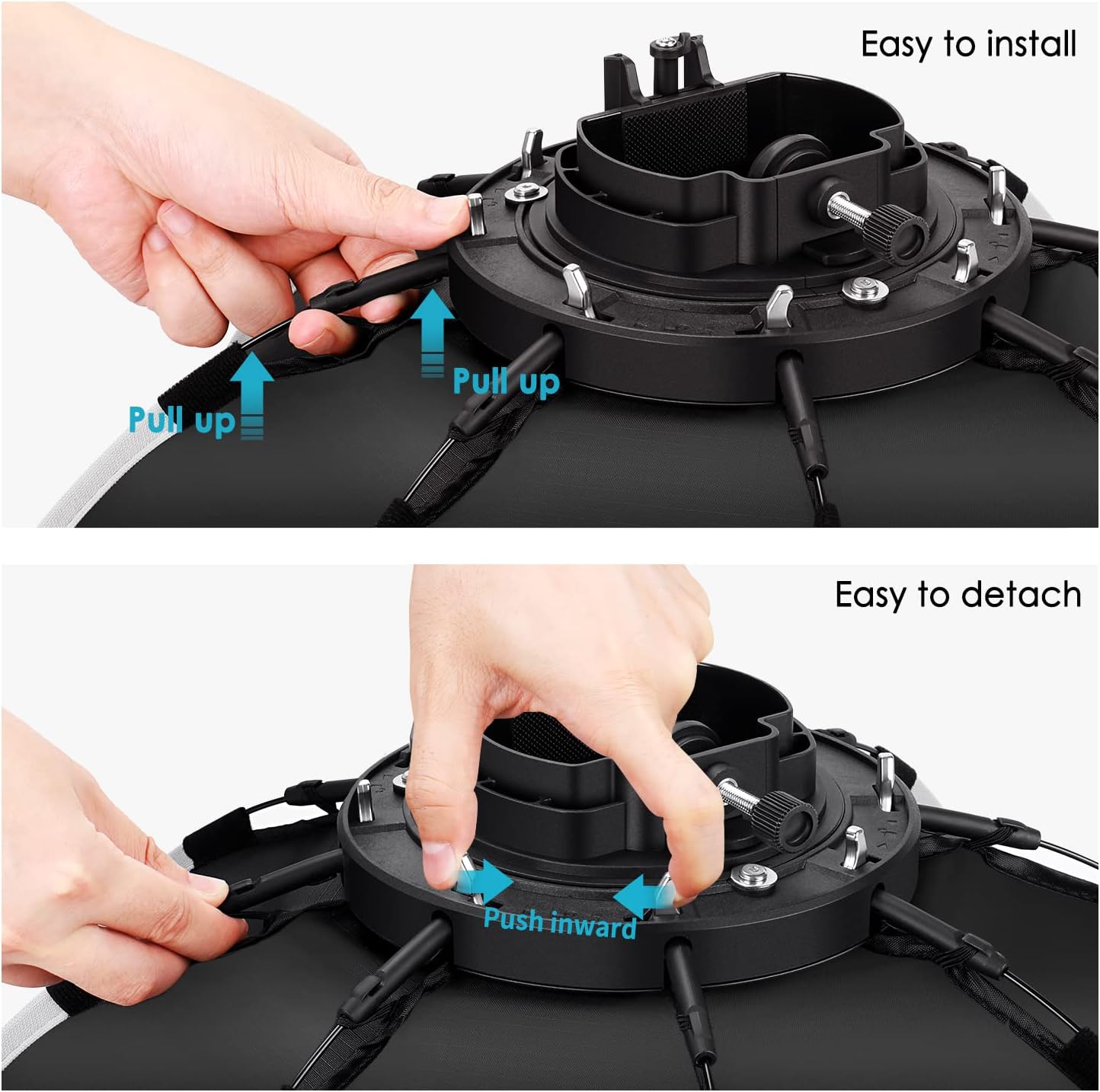
Figure 4: Detailed view of the quick-release clips for easy installation and detachment of the softbox rods.
Operating Instructions
Once assembled and mounted, the softbox is ready for use with your compatible flash unit.
- Power On Flash: Ensure your flash speedlite or strobe is powered on and set to your desired mode (e.g., Manual, TTL).
- Positioning: Adjust the angle and height of the softbox using the S-Type bracket's tilt mechanism and your light stand. Experiment with different positions to achieve the desired lighting effect on your subject.
- Light Quality: The octagonal shape and internal diffusers are designed to produce a soft, even light with natural-looking catchlights in the eyes for portraits.
- Compatibility: This softbox is compatible with various NEEWER flash strobes and other brands that fit the S-Type bracket, such as NEEWER TT560, NW561, NW600, NW620, NW700, NW-670, 750II, Q3, and AD200Pro.

Figure 5: Examples of the softbox in various photographic scenarios, including portrait, product, and event photography.
Maintenance
Proper maintenance will extend the lifespan of your softbox.
- Cleaning: Use a soft, dry cloth to wipe down the exterior of the softbox. For the diffusers, if necessary, gently hand wash with mild soap and water, then air dry completely before reattaching.
- Storage: When not in use, fold the softbox and store it in its provided carrying case to protect it from dust and damage. Avoid storing in damp or extremely hot environments.
- Inspection: Periodically check the rods, clips, and mounting bracket for any signs of wear or damage. Ensure all connections are secure before each use.

Figure 6: The softbox in its folded state, alongside the handle grip and diffusers, ready for storage or transport.
Troubleshooting
| Problem | Possible Cause | Solution |
|---|---|---|
| Softbox does not open fully. | Rods not fully extended and locked into place. | Ensure each rod is pulled outwards until it clicks securely into its respective clip on the S-Type bracket. |
| Light is not soft enough. | Diffusers not installed or improperly installed. | Verify that both the inner and outer diffusers are correctly attached to the softbox. |
| Softbox feels unstable on stand. | Mounting knob not tightened or stand is unstable. | Ensure the mounting knob on the S-Type bracket is securely tightened to the light stand. Use a sturdy light stand and consider sandbags for added stability. |
Specifications
| Feature | Detail |
|---|---|
| Product Dimensions | 12.2 x 25.6 x 25.6 inches (31 x 65 x 65 cm) |
| Item Weight | 1.83 pounds (0.83 kg) |
| Model Number | 10100304 |
| Material | Nylon |
| Color | White or Silver (Interior) |
| Mount Type | S-Type Bracket Mount |

Figure 7: The 25.6 inch (65cm) diameter of the octagonal softbox.
Warranty and Support
For warranty information or technical support, please refer to the official NEEWER website or contact their customer service directly. Specific warranty terms may vary by region and purchase date.
Manufacturer: Neewer
Date First Available: February 1, 2018
Related Documents - 10100304
 |
Manuale Utente e Specifiche Flash NEEWER NW635/NW-670/750II Guida completa al flash NEEWER NW635/NW-670/750II, incluse istruzioni per l'uso, impostazioni, modalità TTL, manuale, stroboscopica e slave, specifiche tecniche e note di sicurezza. |
 |
Neewer NW635/NW-670/750II TTL On-Camera Flash Instruction Manual Comprehensive guide to the Neewer NW635, NW-670, and 750II TTL on-camera flashes, covering setup, modes (TTL, Manual, Stroboscopic), slave modes, and accessories for optimal photography. |
 |
Neewer NK200/NK300 Softbox Lighting Set User Manual Comprehensive guide for setting up and using the Neewer NK200 and NK300 continuous softbox lighting sets. Includes assembly instructions, usage tips, and safety information. |
 |
NEEWER FL100C LED Light - User Manual, Features, and Setup Guide Comprehensive guide for the NEEWER FL100C LED light, covering package contents, features, setup instructions, DMX control, fault diagnosis, and specifications. Learn how to use and set up your photography lighting. |
 |
Neewer Z2PRO-S TTL Speedlite Flash for Sony Cameras - User Manual Comprehensive user manual for the Neewer Z2PRO-S TTL Speedlite Flash, detailing its features, operation, and troubleshooting for Sony cameras. Learn about TTL autoflash, manual flash, stroboscopic flash, wireless transmission, and custom settings. |
 |
NEEWER QPro-S Wireless Flash Trigger User Manual User manual detailing the setup, operation, features, and troubleshooting of the NEEWER QPro-S wireless flash trigger for Sony cameras and NEEWER speedlite flashes, including TTL and HSS capabilities. |
Ask a question about this manual
Ask about setup, troubleshooting, compatibility, parts, safety, or missing instructions. Manuals+ will review the question and use this page’s manual context to help answer it.