1. Introduction
This manual provides instructions for the proper use and maintenance of your Sony WH-CH700N Wireless Noise Cancelling Headphones. Please read this manual thoroughly before operating the headphones to ensure optimal performance and longevity.
2. Product Overview
2.1 Package Contents
- Sony WH-CH700N Headphones
- Micro-USB Cable (approx. 3.94 ft)
- Headphone Cable (approx. 3.94 ft, detachable single-sided type)
2.2 Headphone Components
Familiarize yourself with the various parts of your headphones:

Image: Front view of the Sony WH-CH700N Wireless Noise Cancelling Headphones, illustrating the overall design and earcups.
- Power Button: Used to turn the headphones on or off and initiate Bluetooth pairing.
- Volume Controls (+/-): Adjusts the audio output level.
- Multi-function Button: Controls playback (play/pause), call management (answer/end), and voice assistant activation.
- NC (Noise Cancelling) Button: Activates or deactivates the noise cancelling function.
- Microphone: Integrated for hands-free calling and voice assistant commands.
- Micro-USB Charging Port: For connecting the supplied micro-USB cable to charge the headphones.
- Audio Input Jack (3.5 mm): For connecting the supplied headphone cable for wired listening.
- NFC Detection Area: For one-touch Bluetooth pairing with NFC-compatible devices.
- Indicators: LED lights for power, Bluetooth connection status, and noise cancelling activation.

Image: Close-up view of the left earcup, highlighting the NC button, audio input jack, and micro-USB charging port.
3. Setup
3.1 Charging the Headphones
- Connect the supplied micro-USB cable to the micro-USB charging port on the headphones.
- Connect the other end of the micro-USB cable to a USB charging adapter or a USB port on your computer.
- The indicator light will illuminate during charging and turn off when charging is complete.
A full charge provides approximately 35 hours of wireless playback with noise cancelling. A 10-minute quick charge can provide additional playback time.
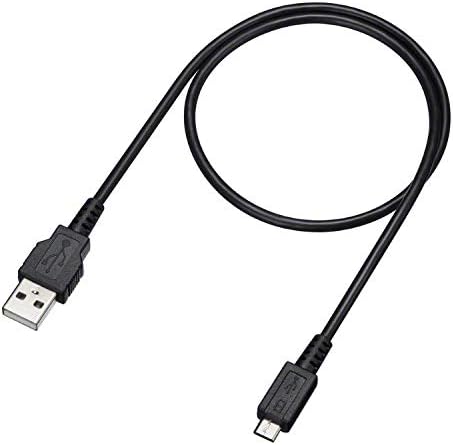
Image: The micro-USB charging cable included with the headphones.
3.2 Bluetooth Pairing
To connect your headphones wirelessly to a device:
- Ensure the headphones are powered off.
- Press and hold the power button for approximately 7 seconds until the indicator flashes blue and red alternately. This indicates the headphones are in pairing mode.
- On your Bluetooth-enabled device (e.g., smartphone, tablet, computer), enable Bluetooth and search for available devices.
- Select "WH-CH700N" from the list of detected devices to complete the pairing process.
NFC Pairing: If your device supports NFC, simply touch the device to the N-Mark on the left earcup of the headphones to initiate and complete pairing automatically.
4. Operating Instructions
4.1 Power On/Off
- To power on, press and hold the power button until the blue indicator flashes.
- To power off, press and hold the power button until the red indicator flashes and then turns off.
4.2 Noise Cancelling Function
- Press the NC button on the left earcup to activate or deactivate the noise cancelling function.
- When noise cancelling is active, a green indicator light next to the NC button will illuminate.
- For optimal noise cancelling performance, ensure the earpads fit snugly around your ears.
- The noise cancelling function is most effective for low-frequency sounds (e.g., airplane engines, air conditioning) and less effective for high-frequency sounds or human voices.
4.3 Volume Adjustment
- Use the + and - buttons on the headphones to increase or decrease the volume.
4.4 Voice Assistant
- Press and hold the multi-function button to activate your connected device's voice assistant (e.g., Alexa, Google Assistant).
4.5 Making and Receiving Calls
- To answer an incoming call, press the multi-function button once.
- To end a call, press the multi-function button once during the call.
- The built-in microphone allows for hands-free communication.
4.6 Wired Connection
- Connect the supplied headphone cable to the 3.5 mm audio input jack on the headphones and to the audio output jack of your device.
- The headphones can be used in wired mode even when powered off. Note that noise cancelling will not be active unless the headphones are powered on.
5. Maintenance
5.1 Cleaning
- Wipe the headphones with a soft, dry cloth.
- Do not use alcohol, benzene, thinners, or other chemical cleaners, as these may damage the surface or components.
5.2 Storage
- Store the headphones in a cool, dry place away from direct sunlight and extreme temperatures.
- Avoid placing heavy objects on the headphones to prevent damage.
6. Troubleshooting
6.1 Common Issues and Solutions
- No Power: Ensure the headphones are sufficiently charged.
- No Sound: Check the Bluetooth connection. Verify that the volume is not muted on both the headphones and the connected device. If using a wired connection, ensure the cable is securely connected.
- Noise Cancelling Not Effective:
- Verify that the NC function is turned on (green indicator light).
- Adjust the earpad position to ensure a proper seal around your ears.
- Remember that noise cancelling is less effective for high-frequency sounds like human voices.
- Cannot Pair via Bluetooth:
- Ensure the headphones are in pairing mode (indicator flashing blue and red).
- Delete any existing pairing information for "WH-CH700N" from your device's Bluetooth settings and attempt to pair again.
- Ensure the headphones are within 10 meters (33 feet) of the Bluetooth device.
6.2 Resetting to Factory Settings
If the headphones are not functioning correctly, you can reset them to their factory settings:
- Disconnect the micro-USB cable from the headphones.
- Turn off the headset.
- Press and hold the power button and the NC button simultaneously for more than 7 seconds.
- The indicator (blue) will flash 4 times, indicating that all settings, including volume adjustments and pairing information, have been reset to factory defaults.
- After resetting, you must delete the headset's pairing information from your Bluetooth device and pair them again.
Persistent Issues: If the headset does not operate correctly even after initializing, consult your nearest Sony dealer or an authorized Sony service center.
7. Specifications
| Feature | Detail |
|---|---|
| Model Name | WH-CH700N |
| Manufacturer | Sony |
| Connectivity Technology | Bluetooth, NFC |
| Bluetooth Version | 4.0 |
| Bluetooth Range | 10 Meters (33 feet) |
| Frequency Response | 7 Hz – 20,000 Hz |
| Headphones Jack | 3.5 mm Jack |
| Special Feature | Active Noise Cancellation |
| Battery Life | Up to 35 Hours (with Noise Cancelling) |
| Charging Time | Approximately 7 hours for full charge; 10-minute quick charge capability |
| Included Components | Headphones, Micro-USB Cable, Headphone Cable |
| Item Weight | 8.5 Ounces (240g) |
| Product Dimensions | 8.71 x 2.72 x 10.28 inches |
| Water Resistance Level | Not Water Resistant |
| Control Type | Voice Control, Touch |
| Batteries | 1 Lithium Metal battery (included) |
8. Warranty and Support
For detailed warranty information, product registration, and further technical support, please refer to the official Sony website or contact your local Sony customer service center. It is recommended to keep your proof of purchase for any warranty claims.