
Biscount TF6204
LCD Digital Large Display Alarm Interval Timer
Model: TF6204 | Brand: Biscount
Introduction
The Biscount TF6204 is a versatile LCD digital interval timer designed for various fitness and training activities. Its large display ensures easy readability, and it features both alarm and vibrate functions for discreet or audible alerts. This manual provides comprehensive instructions for setting up, operating, and maintaining your timer.
Key Features:
- Interval Timer: Configurable for 2-99 repeats and 1-2 intervals, measuring up to 99 minutes and 59 seconds per interval.
- Count Up Timer: Measures time with 1/100 second precision, up to 99 minutes and 59 seconds.
- Alarm and Vibrate Functions: Provides both audible and silent alerts for versatile use in different environments.
- Power Off Function: Allows for battery conservation when not in use.
- Ideal for various activities including Yoga, Boxing, Weight Lifting, Running, and Tabata training.

Figure 1: The Biscount TF6204 timer shown alongside examples of its diverse applications in fitness and sports.
Product Overview
The TF6204 timer features a clear LCD display and intuitive button layout for easy operation. It is designed to be compact and portable, with a built-in clip for secure attachment during activities.

Figure 2: Front view of the TF6204 timer, highlighting its large, easy-to-read digital display.
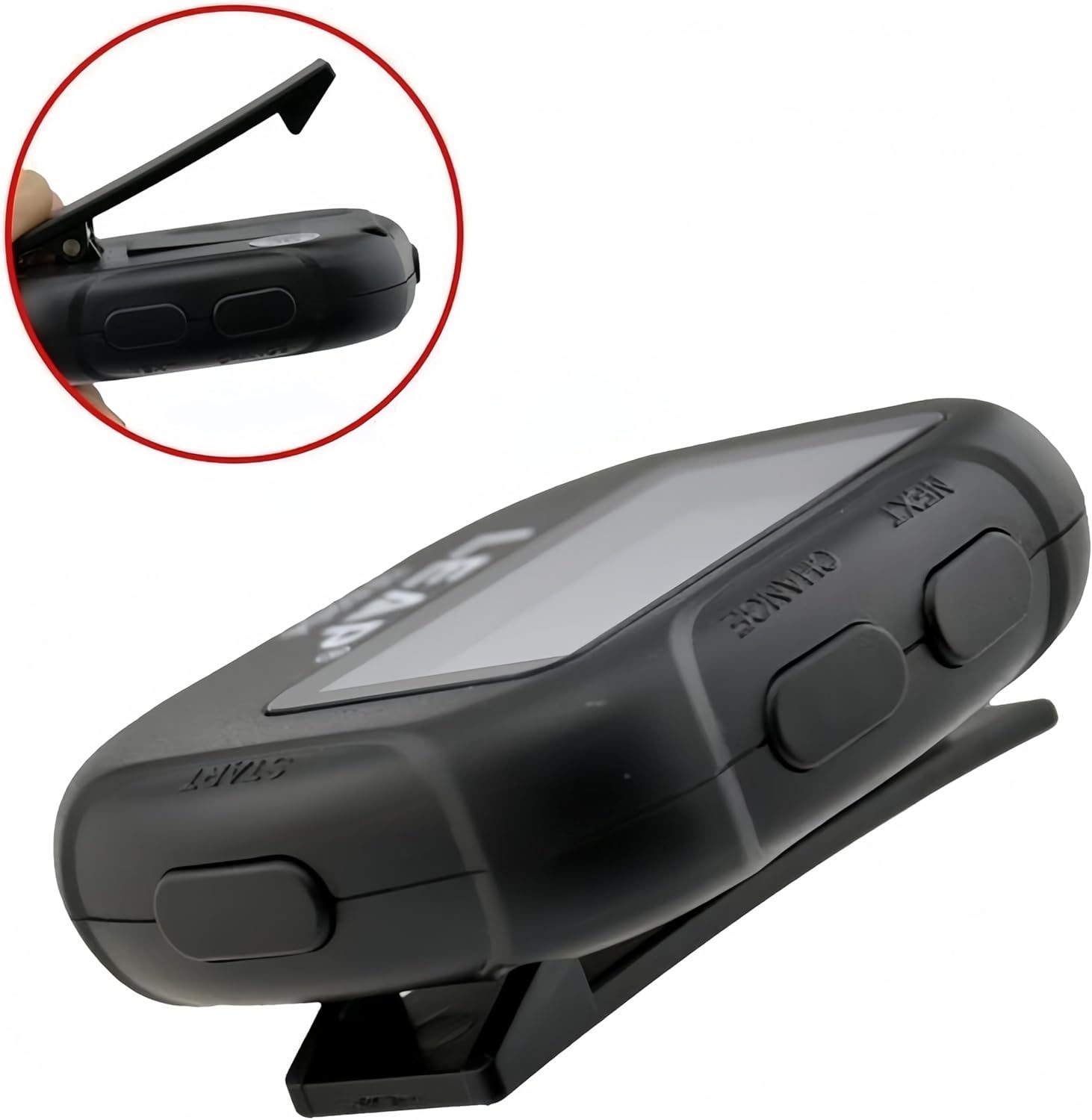
Figure 3: Side profile of the TF6204 timer, illustrating the convenient clip for attachment and the accessible control buttons.
Controls and Display:
- Display: Large LCD screen showing time, intervals, and mode indicators.
- START Button: Initiates or pauses timing functions.
- NEXT Button: Advances through settings or modes.
- CHANGE Button: Modifies values or selects options within a setting.
- Clip: Integrated on the back for attaching to clothing or equipment.
Setup
The TF6204 timer is designed for immediate use. Ensure the battery is properly installed upon first use. The device typically comes with a pre-installed battery, but if the display is blank or dim, battery replacement may be necessary.
Initial Power On:
- Locate the power button (if present, otherwise it's always on or has auto-off). The product description mentions "power off function", implying a button or auto-off. Refer to the "Operating Modes" section for specific power management.
- Press and hold the START button for a few seconds to power on the device. If the device is already on, this will typically start a timer.
- The display should illuminate, showing the default time or mode.
Battery Installation/Replacement:
While specific battery type and compartment access are not detailed in the product information, most small electronic timers use coin cell batteries (e.g., CR2032). To replace the battery:
- Locate the battery compartment on the back or side of the device. This may require a small screwdriver.
- Carefully open the compartment.
- Remove the old battery and insert a new one, ensuring correct polarity (+/-).
- Close the battery compartment securely.
Operating Modes
The TF6204 timer offers two primary timing functions: Interval Timer and Count Up Timer, along with alarm and vibrate features.
1. Interval Timer Mode:
This mode is ideal for structured workouts with alternating work and rest periods, such as Tabata, HIIT, or circuit training. It supports 2 to 99 repeats and 1 to 2 intervals per repeat, with each interval measuring up to 99 minutes and 59 seconds.
- Entering Interval Mode: Press the NEXT button repeatedly until "INT" or "INTERVAL" is displayed on the screen.
- Setting Intervals:
- Press CHANGE to select the parameter to adjust (e.g., Interval 1 time, Interval 2 time, or number of repeats).
- Use NEXT to increase the value. Hold NEXT for faster adjustment.
- Repeat for all desired interval times and the number of repeats (2-99).
- Starting the Timer: Once settings are configured, press the START button to begin the interval sequence.
- Pausing/Resuming: Press START again to pause the timer. Press START to resume.
- Stopping/Resetting: To stop and reset, press and hold START for a few seconds, or cycle through modes with NEXT.

Figure 4: The TF6204 timer in use during a weight lifting session, demonstrating its applicability for timed exercises.

Figure 5: The TF6204 timer assisting with timed yoga poses, highlighting its utility for various fitness routines.
2. Count Up Timer Mode:
This mode functions as a standard stopwatch, measuring elapsed time with 1/100 second accuracy, up to 99 minutes and 59 seconds. It is suitable for tracking continuous activity durations.
- Entering Count Up Mode: Press the NEXT button repeatedly until "COUNT UP" or a simple time display (e.g., 00:00.00) appears.
- Starting the Timer: Press the START button to begin counting up.
- Pausing/Resuming: Press START again to pause. Press START to resume.
- Resetting: While paused, press the CHANGE button to reset the timer to zero.

Figure 6: The TF6204 timer used during a running activity, demonstrating its stopwatch functionality.
3. Alarm and Vibrate Functions:
The TF6204 can provide alerts through an audible alarm or a silent vibration, making it suitable for various environments.
- Setting Alarm/Vibrate:
- In a non-timing mode (e.g., time display mode), press CHANGE to cycle through alarm settings.
- Use NEXT to adjust the alarm time.
- Look for an icon or indicator on the display to switch between alarm (bell icon) and vibrate (vibration icon) modes, or both. This is typically done by pressing CHANGE or NEXT while the alarm setting is active.
- Activating/Deactivating: Once set, ensure the alarm/vibrate function is enabled. There might be a dedicated button or a combination of buttons to toggle it on/off.
- During Timing: When an interval ends or a set time is reached, the timer will alert you according to the selected alarm/vibrate setting.

Figure 7: The TF6204 timer in a boxing training scenario, where its alarm and vibrate functions can signal round changes.
Maintenance
Proper care and maintenance will extend the life of your Biscount TF6204 timer.
Cleaning:
- Wipe the timer with a soft, dry cloth.
- For stubborn dirt, slightly dampen the cloth with water. Do not use harsh chemicals, abrasive cleaners, or immerse the device in water.
- Ensure the device is completely dry before storage or next use.
Storage:
- Store the timer in a cool, dry place away from direct sunlight and extreme temperatures.
- If storing for an extended period, consider removing the battery to prevent leakage.
Troubleshooting
If you encounter issues with your TF6204 timer, refer to the following common problems and solutions.
| Problem | Possible Cause | Solution |
|---|---|---|
| Display is blank or dim. | Low or dead battery. | Replace the battery (refer to "Battery Installation/Replacement" in Setup section). |
| Timer not responding to button presses. | Device frozen or in an unresponsive state. | Remove and reinsert the battery to perform a hard reset. |
| Alarm/Vibrate not working. | Function is disabled or volume/intensity is too low. | Ensure alarm/vibrate is enabled in settings. Check for any volume controls (if applicable). |
| Difficulty understanding settings. | Complex menu navigation. | Carefully re-read the "Operating Modes" section, paying attention to the sequence of button presses (NEXT, CHANGE). Practice with the timer. |
Specifications
Detailed technical specifications for the Biscount TF6204 timer.
| Feature | Detail |
|---|---|
| Model Number | TF6204 |
| Brand | Biscount |
| Color | Black |
| Material | Plastic |
| Product Dimensions (D x W x H) | 0.91" x 2.01" x 2.56" (23.1mm x 51.1mm x 65mm) |
| Item Weight | 1.76 ounces (50 grams) |
| Number of Settings | 6 (likely referring to modes/functions) |
| UPC | 786738617832 |
| Interval Timer Range | 2-99 repeats, 1-2 intervals, up to 99 minutes 59 seconds per interval. |
| Count Up Timer Range | 1/100 second precision, up to 99 minutes 59 seconds. |

Figure 8: Dimensions of the TF6204 timer for reference.
Warranty and Support
For warranty information or technical support regarding your Biscount TF6204 timer, please contact the manufacturer directly. Details are typically provided with your product packaging or can be found on the official Biscount website.
Manufacturer: Biscount
For further assistance, please refer to the contact information provided at the point of purchase or on the product's official support page.
Ask a question about this manual
Ask about setup, troubleshooting, compatibility, parts, safety, or missing instructions. Manuals+ will review the question and use this page’s manual context to help answer it.