
1. Introduction
This manual provides essential information for the safe and efficient operation of your Aktobis WDH-725DG Dehumidifier. Please read these instructions carefully before using the appliance and retain them for future reference. This dehumidifier is designed to reduce humidity levels in indoor environments, contributing to a more comfortable and healthier atmosphere.

Image 1.1: Front-top view of the Aktobis WDH-725DG Dehumidifier, showing the control panel and air outlet.
2. Safety Instructions
To prevent injury to users or damage to the appliance, always observe the following safety precautions:
- Ensure the power supply matches the voltage specified on the rating label.
- Do not operate the dehumidifier with a damaged power cord or plug.
- Keep the appliance away from heat sources, flammable materials, and direct sunlight.
- Do not block the air inlet or outlet. Maintain adequate clearance around the unit for proper airflow.
- Always place the dehumidifier on a stable, level surface to prevent water spillage.
- Unplug the unit before cleaning, maintenance, or when not in use for extended periods.
- Do not allow children or individuals with reduced physical, sensory, or mental capabilities to operate the appliance without supervision.
- In case of malfunction, do not attempt to repair the unit yourself. Contact qualified service personnel.
3. Product Features
The WDH-725DG Dehumidifier incorporates several features designed for effective and convenient humidity control:
- High Dehumidification Capacity: Capable of removing up to 25 liters of moisture per day.
- Electronic Hygrostat: Features an LED display for precise regulation and setting of desired humidity levels.
- Clear Digital Display: Provides real-time information on current temperature, humidity, and operational status.
- Timer Function: Allows users to set an automatic remaining operating time or a start time between 1 and 24 hours.
- Adjustable Air Outlet Louvers: Directs airflow as needed for optimal dehumidification.
- Automatic Operation: The unit automatically stops (including the fan) when the target humidity is reached and restarts when humidity increases.
- Two Fan Speeds: Offers 'low' and 'high' settings for ventilation and air circulation.
- Continuous Operation Mode: Suitable for prolonged or continuous dehumidification tasks.
- Automatic Defrost Function: Ensures efficient operation even in cooler conditions.
- SmartHome Compatibility: Can be integrated into a SmartHome system via a WLAN plug (external timer control possible).
- Portable Design: Equipped with a carrying handle and castors for easy mobility.
- Washable Air Filter: Antibacterial and reusable for easy maintenance.
4. Setup
4.1 Unpacking and Placement
Carefully remove the dehumidifier from its packaging. Place the unit upright on a firm, level surface. Ensure there is at least 20 cm (8 inches) of clear space around the air inlet and outlet for optimal performance. Avoid placing the unit near walls, furniture, or curtains that could obstruct airflow.
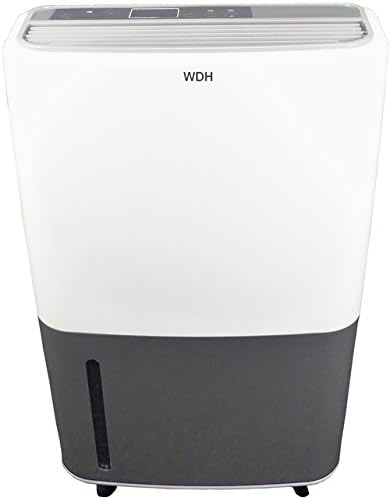
Image 4.1: Front view of the WDH-725DG Dehumidifier, illustrating its compact design suitable for various placements.
4.2 Power Connection
Plug the power cord into a grounded electrical outlet. Ensure the outlet meets the power requirements of the dehumidifier (refer to specifications section).
4.3 Water Drainage Options
The WDH-725DG offers two methods for water drainage:
- Internal Water Tank: The unit collects condensed water in its removable 3-liter water tank. When the tank is full, the dehumidifier will automatically shut off and an indicator light will illuminate.
- Continuous Drainage: For extended operation without needing to empty the tank, a hose can be connected to the continuous drainage port. This allows water to drain directly into a floor drain or larger container. The drainage hose is not included with the unit.

Image 4.2: Close-up view of the continuous drainage port, located at the rear of the unit.
5. Operating Instructions
5.1 Control Panel Overview
The control panel is located on the top of the unit and features a digital display and several buttons for operation.

Image 5.1: Detailed view of the digital control panel, showing power, timer, humidity settings, and fan speed buttons.
5.2 Basic Operation
- Power On/Off: Press the 'Power' button to turn the unit on or off.
- Setting Desired Humidity: Use the 'Humidity Setting' buttons (up/down arrows) to adjust the target humidity level. The digital display will show the current and target humidity.
- Fan Speed: Press the 'Fan Speed' button to cycle between low and high fan speeds.
- Timer Function: Press the 'Timer' button to set a delayed start or stop time (1-24 hours).
5.3 Automatic Mode
The dehumidifier features an automatic mode where it will operate to maintain the set humidity level. Once the desired humidity is reached, the compressor and fan will stop. They will restart automatically if the humidity rises above the set level.

Image 5.2: The dehumidifier in operation within a room, illustrating the upward airflow for effective moisture removal.
6. Maintenance
Regular maintenance ensures optimal performance and extends the lifespan of your dehumidifier.
6.1 Emptying the Water Tank
When the water tank is full, the 'Bucket Full' indicator will light up, and the unit will stop operating. Carefully remove the water tank from the front of the unit and empty the collected water. Reinsert the tank securely until it clicks into place. The unit will resume operation.

Image 6.1: The dehumidifier with its water collection tank detached, showing the internal compartment.
6.2 Cleaning the Air Filter
The air filter, located at the rear of the unit, should be cleaned regularly (approximately every two weeks, depending on usage) to prevent dust buildup and maintain efficiency. To clean:
- Unplug the dehumidifier from the power outlet.
- Remove the filter cover from the back of the unit.
- Gently remove the air filter.
- Wash the filter with lukewarm water and a mild detergent. Rinse thoroughly and allow it to air dry completely before reinserting.
- Reattach the filter cover.

Image 6.2: Rear view of the dehumidifier, showing the removable air filter for cleaning.
6.3 General Cleaning
Wipe the exterior of the unit with a soft, damp cloth. Do not use abrasive cleaners or solvents. Ensure no water enters the electrical components.
7. Troubleshooting
If you encounter issues with your dehumidifier, refer to the following common problems and solutions:
| Problem | Possible Cause | Solution |
|---|---|---|
| Dehumidifier does not turn on. | No power supply; power cord not plugged in; power outage. | Check power connection; ensure power outlet is functional. |
| Unit is running but not collecting water. | Room temperature too low; humidity level too low; air filter clogged. | Ensure room temperature is above 5°C (41°F); check and adjust desired humidity setting; clean the air filter. |
| 'Bucket Full' indicator is on, but tank is not full. | Water tank not properly seated; float switch malfunction. | Remove and reinsert the water tank firmly; contact support if issue persists. |
| Unit is noisy. | Unit not on a level surface; fan speed too high; internal component vibration. | Place on a level surface; reduce fan speed; ensure no objects are touching the unit. |
If the problem persists after attempting these solutions, please contact customer support.
8. Specifications
Detailed technical specifications for the Aktobis WDH-725DG Dehumidifier:

Image 8.1: Visual representation of the dehumidifier's key performance metrics and dimensions.
| Specification | Value |
|---|---|
| Brand | WDH |
| Model Number | WDH-725DG |
| Color | White/Anthracite |
| Product Dimensions (L x W x H) | 24 x 36 x 59 cm |
| Item Weight | 13.2 Kilograms |
| Dehumidification Capacity | Up to 25 Liters/Day |
| Water Tank Volume | 3 Liters |
| Power Consumption | Max. 420 Watts (Average 320W) |
| Material | Metal, Plastic |
| Number of Speeds | 2 |
| Recommended Floor Area | Up to 50 m² |
| Noise Level | Max. 50 dB(A) |
| Special Feature | Can be controlled by external timer |
| Included Components | Dehumidifier |
| Country of Origin | China |
9. Warranty and Support
For warranty information or technical support, please refer to the documentation provided with your purchase or contact the seller, Aktobis AG. Ensure you have your model number (WDH-725DG) and proof of purchase available when seeking assistance.