
1. Introduction
The carcasaschulas Erreka FT02 Photoelectric Sensor is a crucial safety device designed for use with automatic doors, gates, and similar access control systems. Its primary function is to detect obstacles in the path of movement, thereby preventing collisions and enhancing user safety. This manual provides essential information for the proper installation, operation, and maintenance of your Erreka FT02 sensor.
Please read this manual thoroughly before installation and operation to ensure correct usage and to maximize the lifespan and performance of the device.
2. Safety Information
Always adhere to the following safety guidelines to prevent injury or damage to the device:
- Qualified Personnel: Installation and wiring should only be performed by qualified technicians in accordance with local electrical codes and regulations.
- Power Disconnection: Always disconnect power to the automatic system before performing any installation, wiring, or maintenance on the sensor.
- Correct Voltage: Ensure the power supply voltage matches the sensor's requirements (12-24 VAC/VDC). Incorrect voltage can damage the device.
- Secure Mounting: Mount the sensor and mirror securely to prevent accidental displacement, which could lead to system malfunction.
- Obstruction-Free Path: Ensure the optical path between the sensor and the mirror is clear of any permanent obstructions.
- Testing: After installation, thoroughly test the sensor's functionality to confirm it detects obstacles correctly before putting the automatic system into full operation.
3. Package Contents
Verify that all components are present and undamaged upon unpacking:
- 1x Erreka FT02 Photoelectric Sensor Unit
- 1x Polarized Reflective Mirror
- Mounting Hardware (screws, brackets - may vary)
- Instruction Manual (this document)
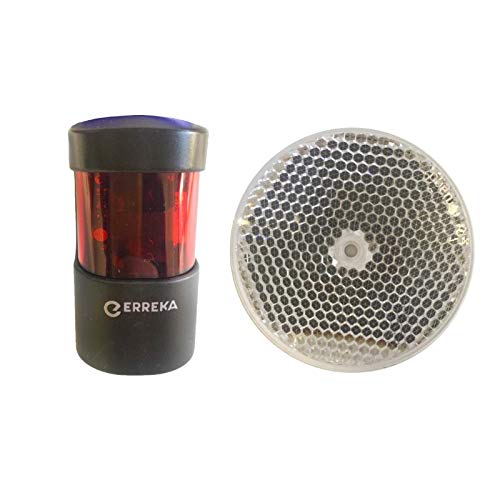
This image displays the Erreka FT02 photoelectric sensor unit, which is a black cylindrical device with a red translucent top section, and a separate circular reflective mirror with a hexagonal pattern.
4. Setup and Installation
4.1 Mounting
The Erreka FT02 sensor operates on a reflective principle, meaning the sensor unit and the mirror are installed opposite each other, creating an optical beam. When this beam is interrupted, the sensor triggers its output.
- Placement: Mount the sensor unit and the reflective mirror at the desired height and distance, ensuring they are directly facing each other. The maximum recommended distance is 12 meters.
- Alignment: Carefully align the sensor and mirror. The polarized mirror can be rotated 90 degrees to assist with alignment and optimize performance. A proper alignment is indicated by a stable signal (refer to the sensor's indicator light, if present).
- Stability: Ensure both the sensor and mirror are mounted on stable, vibration-free surfaces.
4.2 Wiring
The sensor requires a 12-24 VAC/VDC power supply and provides potential-free relay outputs. Refer to the wiring diagram provided with your automatic system's control unit for specific connections.
- Power Connection: Connect the power input terminals of the sensor to a stable 12-24 VAC/VDC power source. Observe correct polarity if using DC power.
- Output Connection: The sensor features potential-free relay contacts, typically Normally Closed (NC) or Normally Open (NO). Connect these contacts to the safety input terminals of your automatic door/gate control unit.
- Autotest Function: The sensor includes an autotest function. Ensure your control unit is compatible with and correctly wired to utilize this feature for continuous monitoring of the sensor's operation.
- Cable Management: Secure all wiring to prevent damage and ensure a tidy installation.
5. Operating Instructions
Once properly installed and wired, the Erreka FT02 sensor operates automatically:
- Detection: The sensor continuously emits an infrared beam towards the reflective mirror. When an object or person interrupts this beam, the sensor's relay output changes state (e.g., NC contacts open, NO contacts close).
- Safety Trigger: This change in output signals the connected automatic system (e.g., garage door opener) to stop or reverse its movement, preventing impact with the detected obstacle.
- Autotest: The integrated autotest function periodically verifies the sensor's internal components and optical path. If a fault is detected, the sensor will signal the control unit, typically preventing operation of the automatic system until the fault is resolved.
6. Maintenance
The Erreka FT02 sensor is designed for low maintenance. However, periodic checks can ensure optimal performance:
- Cleaning: Regularly clean the sensor lens and the reflective mirror with a soft, damp cloth to remove dust, dirt, or debris that could obstruct the beam. Do not use abrasive cleaners.
- Alignment Check: Periodically verify that the sensor and mirror remain correctly aligned. Strong vibrations or impacts can sometimes shift their position.
- Wiring Inspection: Check all wiring connections for signs of wear, corrosion, or loose terminals.
- Function Test: Manually test the sensor's detection capability by placing an object in its path to ensure the automatic system reacts as expected.
7. Troubleshooting
If the automatic system is not functioning correctly or the sensor appears to be faulty, consider the following:
- System Not Operating:
- Check power supply to the sensor.
- Verify sensor and mirror alignment.
- Ensure the optical path is clear of obstructions.
- Inspect wiring for loose connections or damage.
- Check the control unit for error codes related to safety devices.
- False Detections:
- Clean the sensor lens and mirror.
- Check for reflective surfaces or objects near the beam path that might cause interference.
- Re-align the sensor and mirror carefully.
- Autotest Failure:
- Ensure the autotest wiring to the control unit is correct.
- Check for any physical damage to the sensor or mirror.
- If the issue persists, the sensor unit may require replacement.
If troubleshooting steps do not resolve the issue, contact a qualified technician or customer support.
8. Specifications
| Attribute | Value |
|---|---|
| Brand | carcasaschulas |
| Model | FT02 Erreka |
| Compatible Devices | Garage door |
| Special Features | No programming required |
| Operating Voltage | 12-24 VAC/VDC, 50/60 Hz |
| Output Type | Potential-free relay contacts (NC/NO) |
| Maximum Range | 12 Meters |
| Batteries Included | No |
| Batteries Required | No |
| Item Number | FT02 Erreka |
| Package Dimensions | 11 x 11 x 5 cm |
| Weight | 140 g |
| First Available Date | May 4, 2018 |
9. Warranty and Support
For warranty information, please refer to the terms and conditions provided at the time of purchase or contact your retailer. For technical support or further assistance, please reach out to carcasaschulas customer service.