1. Introduction
Thank you for purchasing the Shop BDM-24 24L Oil-Lubricated Air Compressor. This manual provides essential information for the safe and efficient operation, maintenance, and troubleshooting of your new air compressor. Please read this manual thoroughly before using the product and keep it for future reference.
This 24-liter oil-lubricated air compressor is designed for versatile use in household, hobbyist, and semi-professional applications, including blowing, inflating, airbrush painting, and general painting tasks. It features an oil level indicator, dual air outlets, and dual pressure gauges for simultaneous connection of two tools, an anti-vibration front support, and two wheels for portability, and a pressure switch for automatic operation.
2. Safety Instructions
Always follow basic safety precautions when using electrical appliances to reduce the risk of fire, electric shock, and personal injury.
- Read all instructions: Before operating the compressor, read and understand all safety warnings and instructions provided in this manual.
- Electrical Safety: Ensure the power supply matches the voltage specified on the compressor's rating plate (230V/50Hz). Use a grounded outlet. Do not operate in wet conditions.
- Personal Protective Equipment (PPE): Always wear safety glasses or goggles to protect against airborne particles. Hearing protection is recommended due to noise levels.
- Ventilation: Operate the compressor in a well-ventilated area to prevent overheating and ensure proper air intake.
- Pressure Safety: Never exceed the maximum operating pressure of 8 bar. Do not tamper with the pressure relief valve.
- Maintenance: Disconnect the power supply before performing any maintenance or repairs. Regularly check for leaks and damage.
- Children and Bystanders: Keep children and bystanders away from the operating compressor.
- Stability: Ensure the compressor is placed on a stable, level surface during operation.
- Hot Surfaces: The compressor head and motor can become hot during operation. Avoid contact with these surfaces.
3. Product Overview and Components
Familiarize yourself with the main components of your Shop BDM-24 air compressor.

Figure 1: Main view of the Shop BDM-24 24L Oil-Lubricated Air Compressor. This image shows the blue 24-liter tank, the black motor and pump assembly on top, the handle, wheels, and pressure gauges.
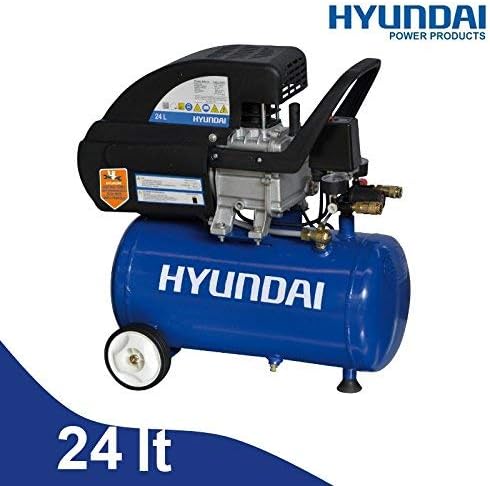
Figure 2: Side view of the Shop BDM-24 24L Air Compressor, highlighting the "HYUNDAI POWER PRODUCTS" branding and the 24 Lt tank capacity.
Key Components:
- Air Tank (24L): Stores compressed air.
- Motor/Pump Assembly: Compresses air into the tank.
- Pressure Switch: Automatically turns the motor on/off to maintain tank pressure.
- Pressure Gauges (Dual): One shows tank pressure, the other shows regulated outlet pressure.
- Air Outlets (Dual): Connect air tools or hoses.
- Pressure Regulator: Adjusts the air pressure delivered to the tools.
- Oil Level Indicator: Displays the current oil level in the pump.
- Drain Valve: Located at the bottom of the tank for draining condensation.
- Wheels and Handle: For easy portability.
- Anti-Vibration Support: Front support to reduce vibration during operation.
4. Setup and Initial Preparation
- Unpacking: Carefully remove the compressor from its packaging. Inspect for any shipping damage.
- Attach Wheels and Handle: If not pre-assembled, attach the wheels and handle according to the included assembly instructions (not detailed here, assume standard procedure).
- Check Oil Level: Before first use, verify the oil level using the oil level indicator. If low, add appropriate compressor oil (ISO VG 100 or equivalent) to the recommended level. Do not overfill.
- Placement: Position the compressor on a firm, level surface in a well-ventilated area. Ensure there is adequate space around the unit for air circulation.
- Electrical Connection: Connect the power cord to a grounded 230V/50Hz electrical outlet.
- Break-in Procedure (First Use):
- Open the pressure regulator completely (turn counter-clockwise) or open the tank drain valve to allow air to escape freely.
- Turn on the compressor and let it run for approximately 15-20 minutes without building pressure. This allows the internal components to lubricate properly.
- Turn off the compressor and close the drain valve/regulator. The compressor is now ready for normal operation.
5. Operating Instructions
- Connect Air Tool: Attach your air hose and desired air tool to one of the air outlets.
- Turn On: Flip the power switch to the "ON" position. The compressor will begin to fill the tank with air.
- Monitor Pressure: Observe the tank pressure gauge. The compressor will automatically shut off once the maximum pressure (8 bar) is reached.
- Adjust Outlet Pressure: Use the pressure regulator knob to set the desired working pressure for your tool. The second gauge will display this regulated pressure.
- Begin Work: Once the desired pressure is set, you can begin using your air tool. The compressor will cycle on and off automatically to maintain tank pressure as air is consumed.
- Shut Down: When finished, turn the power switch to the "OFF" position. Disconnect air tools and hoses.
- Drain Condensation: Always drain the condensation from the air tank after each use. Place a container under the drain valve at the bottom of the tank and open the valve slowly. Close the valve once all water has been expelled. This prevents rust and extends tank life.
Recommended Uses:
- Blowing: For cleaning dust and debris from surfaces or equipment.
- Inflating: For tires, sports equipment, and inflatable items.
- Airbrushing/Painting: Provides consistent air pressure for various painting applications.
- Light Duty Air Tools: Suitable for staplers, nailers, and other small air tools within the compressor's capacity.
6. Maintenance
Regular maintenance ensures the longevity and optimal performance of your compressor. Always disconnect the power before performing any maintenance.
- Daily/After Each Use:
- Drain condensation from the air tank.
- Weekly/Every 10 Hours of Use:
- Check oil level and top up if necessary.
- Inspect air filter for dirt and debris. Clean or replace if clogged.
- Monthly/Every 50 Hours of Use:
- Change compressor oil. Refer to the oil drain plug location (usually at the bottom of the pump crankcase).
- Check all fasteners for tightness.
- Inspect hoses and fittings for wear or leaks.
- Storage:
- Store the compressor in a dry, clean environment.
- Ensure the tank is drained of all condensation before storage.
7. Troubleshooting
| Problem | Possible Cause | Solution |
|---|---|---|
| Compressor does not start. | No power supply. Overload protector tripped. Faulty power switch. | Check power cord and outlet. Reset overload button (if present) after cooling. Contact qualified service personnel. |
| Compressor runs continuously or cycles frequently. | Air leak in tank or fittings. Pressure switch malfunction. Check valve leaking. | Check all connections with soapy water for bubbles. Tighten or replace. Contact qualified service personnel. Contact qualified service personnel. |
| Low air pressure at outlet. | Regulator set too low. Clogged air filter. Air leak in hose or tool. | Adjust pressure regulator. Clean or replace air filter. Check connections and repair leaks. |
| Excessive noise or vibration. | Loose components. Insufficient oil. Worn bearings. | Check and tighten all bolts and screws. Check and add oil. Contact qualified service personnel. |
| Oil in discharge air. | Overfilled oil. Worn piston rings. | Drain excess oil. Contact qualified service personnel. |
For issues not listed above or if solutions do not resolve the problem, please contact customer support.
8. Technical Specifications
| Characteristic | Value |
|---|---|
| Model | BDM-24 |
| Brand | Shop |
| Power Supply (V/Hz) | 230/50 |
| Power (kW / HP) | 1.5 kW (2 HP) |
| Motor Speed (rpm) | 2850 |
| Cylinder Quantity | 1 |
| Suction Capacity (l/min) | 188 |
| Tank Capacity (l) | 24 |
| Max. Operating Pressure (bar) | 8 |
| Dimensions (LxWxH mm) | 530x320x570 |
| Weight (Kg) | 20 |
9. Warranty and Support
Information regarding product warranty is typically provided at the point of purchase or within separate documentation included with the product. Please refer to your purchase receipt or the manufacturer's official website for specific warranty terms and conditions.
For technical support, spare parts, or service inquiries, please contact the retailer or the manufacturer's customer service department using the contact information provided with your purchase.