
1. Introduction
This manual provides detailed instructions for the safe installation, operation, and maintenance of your Monte Carlo 5DIW52WHD 52-inch Transitional Outdoor Ceiling Fan. Please read all instructions carefully before beginning installation and retain this manual for future reference. This fan is designed for outdoor use in wet locations.
2. Safety Information
WARNING: To reduce the risk of fire, electric shock, or personal injury, always follow these basic precautions:
- Read all instructions before installing the fan.
- Ensure the installation site is suitable for the fan's weight and size. The support structure must be capable of supporting a minimum of 35 lbs (15.9 kg).
- All electrical wiring must be performed by a qualified electrician and comply with all local and national electrical codes.
- Disconnect power at the main circuit breaker or fuse box before attempting any installation or maintenance.
- Do not operate the fan with a damaged power cord or plug.
- Avoid placing objects in the path of the fan blades.
- This fan is rated for wet locations. Ensure all connections are properly sealed to prevent water intrusion.
3. Package Contents
Carefully unpack your fan and inspect the contents. Refer to the list below to ensure all parts are present. If any parts are missing or damaged, contact your retailer immediately.
- Motor Housing Assembly
- Fan Blades (5)
- Mounting Bracket
- Downrod Assembly
- Canopy
- Blade Brackets/Holders
- Hardware Pack (screws, washers, wire nuts)
- Remote Control and Receiver (if applicable)
- Pull Chain (pre-attached or separate)
- Instruction Manual
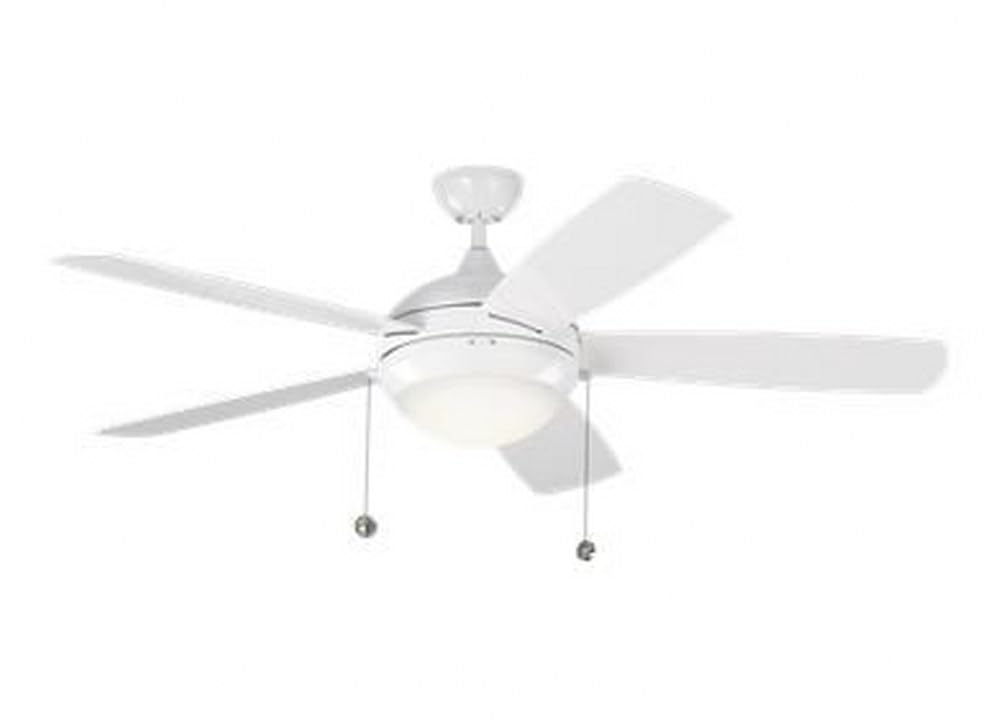
Image 3.1: Main view of the Monte Carlo 5DIW52WHD 52-inch Outdoor Ceiling Fan in White finish. This image shows the complete fan assembly, including the motor housing, five blades, and downrod.
4. Setup and Installation
IMPORTANT: Before installation, ensure power is turned OFF at the circuit breaker.
4.1 Mounting the Fan
- Secure the mounting bracket to the ceiling junction box. The junction box must be listed for fan support of 35 lbs (15.9 kg) or less.
- Attach the downrod to the motor housing, ensuring the set screw is tightened securely.
- Carefully lift the fan assembly and hang it from the mounting bracket using the provided hook or ball-and-socket system.
4.2 Electrical Connections
- Connect the fan's electrical wires to the household wiring according to the wiring diagram provided in the full installation guide (not included in this summary). Typically, this involves connecting the black wire from the fan to the black (hot) wire from the ceiling, the white wire from the fan to the white (neutral) wire from the ceiling, and the green/bare copper wire from the fan to the green/bare copper (ground) wire from the ceiling.
- If a remote control receiver is included, install it within the canopy and connect it according to its specific instructions.
- Ensure all wire connections are secured with wire nuts and tucked neatly into the junction box.
4.3 Attaching Blades
- Attach each fan blade to its respective blade bracket using the screws provided.
- Secure the blade assemblies to the motor housing. Ensure all screws are tightened firmly.

Image 4.1: Close-up view of the fan's motor housing and the point where blades attach. This illustrates the central hub of the fan before blades are fully installed.
5. Operating Instructions
Once installation is complete and power is restored, your Monte Carlo 5DIW52WHD fan can be operated using the pull chain or the remote control.
5.1 Using the Pull Chain
- Fan Speed: Pull the chain once for high speed, twice for medium, three times for low, and four times to turn the fan off.
- Light (if applicable): If your fan includes a light kit, a separate pull chain will control the light. Pull it to cycle through light settings (on/off or brightness levels).
5.2 Using the Remote Control
The remote control provides convenient operation from anywhere in the room. Ensure the remote has fresh batteries installed.
- Fan ON/OFF: Press the fan button to turn the fan on or off.
- Speed Control: Use the speed buttons (e.g., 1, 2, 3 or up/down arrows) to adjust the fan speed.
- Light Control: Use the light button to turn the light on or off, and potentially dim or brighten it.
- Reverse Function: Many remotes include a button to reverse the direction of the fan blades for seasonal use (downward airflow for cooling, upward for heat circulation).
6. Maintenance
Regular maintenance ensures optimal performance and longevity of your ceiling fan.
- Cleaning: Clean the fan periodically with a soft, damp cloth. Do not use abrasive cleaners or solvents, as these can damage the finish or blades. For outdoor fans, ensure the fan is dry before operating.
- Blade Inspection: Check the fan blades for any cracks or damage. Ensure all blade screws are tight. Loose blades can cause wobbling and noise.
- Motor Housing: Keep the motor housing free of dust and debris to prevent overheating.
- Electrical Connections: Periodically check all electrical connections for tightness.

Image 6.1: Side view of the Monte Carlo 5DIW52WHD fan blades. This angle highlights the blade design and material, which should be regularly inspected for wear.
7. Troubleshooting
If your fan is not operating correctly, consult the following troubleshooting guide before contacting customer service.
| Problem | Possible Cause | Solution |
|---|---|---|
| Fan does not start | No power to the fan Loose wire connections Remote control battery dead | Check circuit breaker/fuses Verify all wire connections are secure Replace remote control batteries |
| Fan wobbles | Loose blade screws Unbalanced blades Loose mounting bracket | Tighten all blade screws Use a blade balancing kit Ensure mounting bracket is securely fastened |
| Noisy operation | Loose screws Motor not seated properly Blade rubbing against canopy | Check and tighten all screws Ensure motor housing is properly secured Adjust canopy to ensure clearance |
| Remote control not working | Dead batteries Incorrect pairing Obstruction | Replace batteries Refer to remote control pairing instructions Ensure clear line of sight to receiver |
8. Specifications
- Model: 5DIW52WHD
- Brand: Monte Carlo
- Size: 52 inches
- Finish: White (Painted)
- Number of Blades: 5
- Blade Length: 52 Inches
- Style: Transitional / Contemporary
- Indoor/Outdoor Usage: Outdoor (Wet Rated)
- Power Source: Corded Electric
- Voltage: 120 Volts
- Wattage: 20 watts
- Air Flow Capacity: 4470 Cubic Feet Per Minute
- Luminous Flux (Light): 800 lumen (if light kit included)
- Type of Bulb (Light): LED (if light kit included)
- Control Method: Pull Chain, Remote
- Item Weight: 20.5 Pounds
- Product Dimensions: 10.3 x 52 x 15.4 inches
- Safety Rating: ETL, Wet Listed
9. Warranty and Support
9.1 Warranty Information
The provided product information states the warranty description is "N/a." For specific warranty details, please refer to the documentation included with your purchase or contact Monte Carlo customer service directly. Keep your proof of purchase for any warranty claims.
9.2 Customer Support
If you have any questions, require technical assistance, or need to order replacement parts, please contact Monte Carlo customer support. You can typically find contact information on the manufacturer's website or on the packaging materials.
For more information, visit the Monte Carlo Store on Amazon.


