
Introduction
This manual provides detailed instructions for the installation, operation, and maintenance of your Sony MEX-XB120BT car stereo. Please read this manual thoroughly before using the unit to ensure proper operation and to prevent damage.
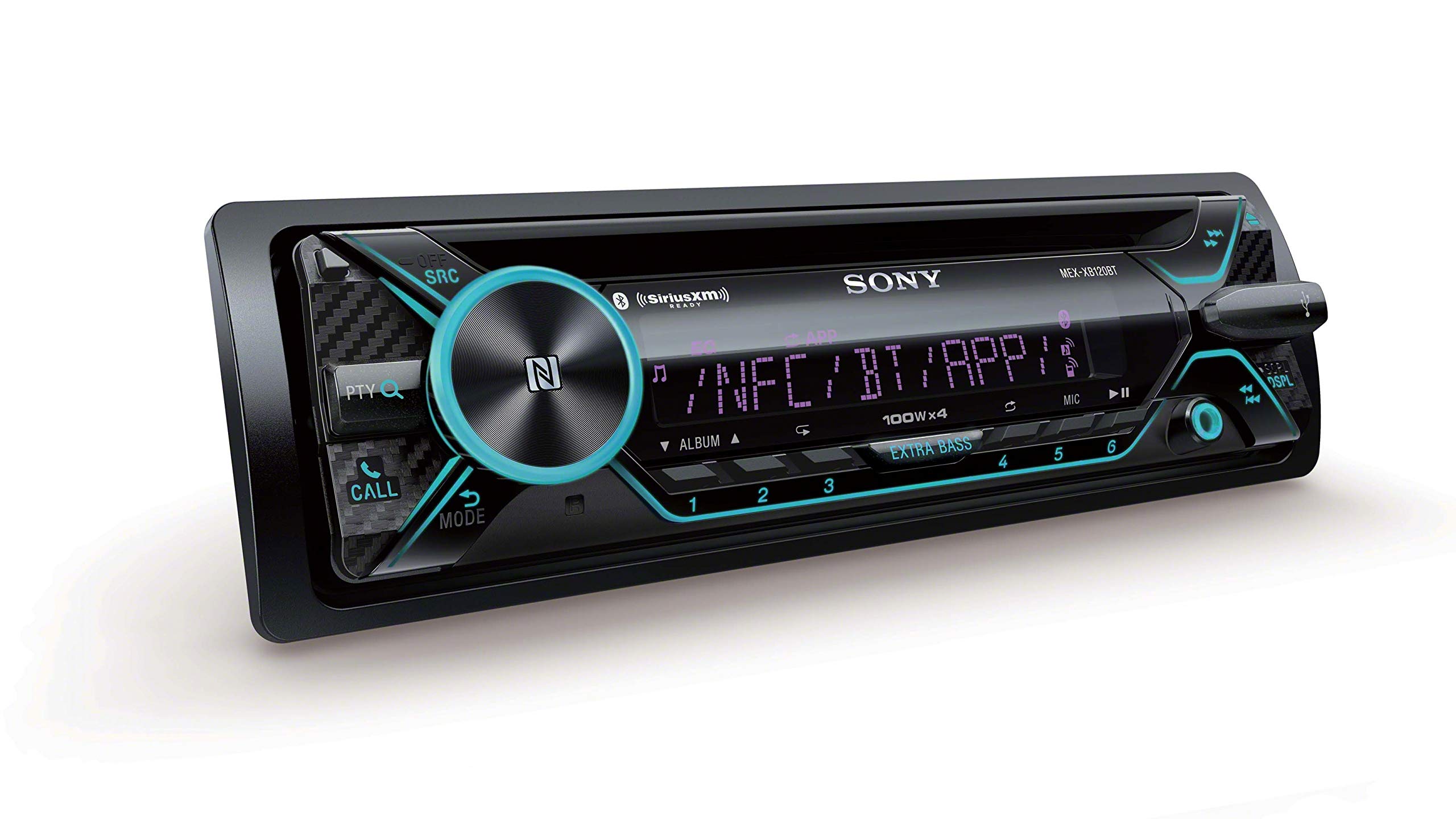
Figure 1: Front panel view of the Sony MEX-XB120BT car stereo. This image displays the main unit with its display, control knob, and various buttons for source selection, call functions, and extra bass.
Setup and Installation
Proper installation is crucial for optimal performance and to prevent issues such as the 'output error'. It is recommended to have the unit installed by a qualified professional.
Wiring Connections
- Power and Ground: For the high-power amplifier to function correctly and to avoid the 'output error' at high volumes, it is strongly recommended to run dedicated 12-gauge power and ground wires directly from the car battery to the head unit. Install an inline 20-amp fuse near the battery on the power line. Connecting to factory wiring, especially if the factory fuse for that circuit is less than 20 Amps, may lead to power delivery issues and the 'output error' message.
- Speaker Connections: Connect your speakers to the appropriate outputs. Ensure speaker impedance matches the unit's specifications.
- Microphone: The external microphone (included) must be connected and positioned correctly for hands-free calling and voice control features. Route the microphone cable carefully to avoid interference.
- Antenna: Connect the car's antenna for AM/FM radio reception.
- USB Port: The USB port is located on the front panel for connecting USB devices.
Mounting
Mount the unit securely in a single DIN opening in your vehicle's dashboard. Ensure adequate space for wiring and ventilation.
Operating Instructions
Basic Controls
- Power On/Off: Press the SRC (Source) button briefly to turn the unit on. Press and hold the SRC button to turn it off.
- Volume Control: Rotate the large central knob to adjust the volume.
- Source Selection: Press the SRC button repeatedly to cycle through available sources (Tuner, CD, USB, Bluetooth Audio, AUX, SiriusXM).
Bluetooth Pairing (NFC)
The unit supports Bluetooth for audio streaming and hands-free calling. NFC (Near Field Communication) allows for quick pairing with compatible devices.
- Ensure Bluetooth is enabled on your smartphone.
- For NFC pairing, tap your NFC-enabled smartphone on the volume knob of the MEX-XB120BT. Follow the prompts on your phone to complete pairing.
- For manual Bluetooth pairing, navigate to the Bluetooth settings on the MEX-XB120BT and search for available devices on your smartphone. Select "MEX-XB120BT" from the list and confirm the pairing code.
Voice Control
Utilize voice commands for hands-free operation with your smartphone.
- Siri Eyes Free (iOS): Connect your iOS device to control music, navigation, messaging, and more using Siri.
- Android Voice Control: Use voice commands to get directions, send messages, and play tracks on your Android smartphone.
Audio Adjustments
- EXTRA BASS: Press the EXTRA BASS button to enhance low-frequency sound. This feature adjusts the bass output.
- Equalizer: Access the equalizer settings through the menu to customize sound profiles (e.g., Rock, Pop, Jazz, Custom).
Demo Mode
The unit may enter a demonstration mode if left untouched for a period. To disable this, access the system settings menu and turn off the 'Demo' option.
Maintenance
Regular maintenance ensures the longevity and optimal performance of your car stereo.
- Cleaning the Unit: Use a soft, dry cloth to wipe the front panel. For stubborn dirt, dampen the cloth with a mild detergent solution and wipe gently. Avoid abrasive cleaners or solvents.
- CD Slot: Keep the CD slot free of dust and debris. Do not insert foreign objects.
- USB Port: Ensure the USB port is clean and free from obstructions before inserting a USB device.
Troubleshooting
Refer to the following common issues and their solutions. If the problem persists, consult a qualified service technician.
| Problem | Possible Cause / Solution |
|---|---|
| "Output Error" displayed, no sound. | This often indicates insufficient power delivery to the amplifier, especially at high volumes. Solution: Ensure dedicated 12-gauge power and ground wires are run directly from the car battery to the head unit with an inline 20-amp fuse. Factory wiring may not be sufficient for the unit's high power output. |
| No power. | Check the car's fuse box and the inline fuse on the power cable. Ensure all wiring connections are secure. |
| No sound from speakers. | Verify speaker connections. Check the volume level and mute function. Ensure the correct audio source is selected. |
| Bluetooth pairing fails. | Ensure Bluetooth is enabled on both the stereo and your smartphone. Move the devices closer. Delete previous pairings and try again. |
| Radio reception is poor. | Check the antenna connection. Ensure the antenna is fully extended (if applicable) and not obstructed. |
| Unit enters demo mode automatically. | Disable the 'Demo' option in the system settings menu. |
Specifications
| Feature | Specification |
|---|---|
| Model Number | MEX-XB120BT |
| Output Power | 45 Watts RMS x 4 channels (CEA Rated Power) |
| Total Output Wattage | 180 Watts |
| Connectivity Technology | Bluetooth, NFC, USB |
| Supported Internet Services | SiriusXM Ready |
| Controller Type | Android, iOS (Voice Control) |
| Audio Output Mode | Stereo |
| Built-In Media | Radio, CD |
| Item Weight | 16 ounces |
| UPC | 027242909625 |
Warranty Information
This Sony product is covered by a limited warranty. For specific details regarding warranty coverage, duration, and terms, please refer to the warranty card included with your product or visit the official Sony support website. Keep your proof of purchase for warranty claims.
Customer Support
For further assistance, technical support, or service inquiries, please visit the official Sony support website or contact Sony customer service. You can find contact information and frequently asked questions on their website.