1. Introduction
The Fosi Audio M04 is a high-performance mono amplifier designed to power passive subwoofers or speakers. Utilizing the Texas Instruments TPA3116 chip and NE5532 op-amp, it delivers 100 watts of output power for 2-ohm loads. This compact amplifier enhances bass response and offers versatile connectivity for various audio setups, including home theater systems.
2. Safety Instructions
- Ensure proper ventilation around the amplifier to prevent overheating.
- Do not expose the device to water, moisture, or extreme temperatures.
- Use only the provided power adapter to avoid damage.
- Disconnect power before making any connections or adjustments.
- Keep out of reach of children.
3. Package Contents
Verify that all items are present in the package:
- Fosi Audio M04 Subwoofer Amplifier x1
- 19V/4.74A Power Supply x1
- User Manual x1

Image: The Fosi Audio M04 amplifier, 19V/4.74A power adapter, and user manual are shown as included package contents.
4. Product Overview
Front and Rear Panel

Image: A diagram illustrating the front and rear panels of the Fosi Audio M04 amplifier, highlighting the controls and connection ports.
- Power Indicator: Illuminates when the unit is powered on.
- PBTL & SUB Selector: Switch between full-frequency mono amplifier (PBTL) and subwoofer bass amplifier (SUB) modes.
- Sub Frequency Knob: Adjusts the low-pass filter frequency when in SUB mode.
- Power Switch & Volume Knob: Turns the unit on/off and controls the output volume.
- Line In (RCA): Connects to audio sources such as phones, laptops, TVs, or computers.
- Output (Speaker Terminals): Connects to passive subwoofers or speakers.
- DC 12-24V Power Interface: Connects to the provided power adapter.
5. Setup
5.1 Connecting to Passive Subwoofer/Speakers
The Fosi Audio M04 can be used to power either a passive subwoofer or a full-range passive speaker. Ensure all connections are secure before powering on the device.
- Connect your audio source (e.g., phone, laptop, TV, computer) to the Line In (RCA) ports on the rear panel of the M04.
- Connect your passive subwoofer or passive speaker to the Output (Speaker Terminals) on the rear panel. Ensure correct polarity (+ to + and - to -).
- Set the PBTL & SUB Selector switch on the front panel to the appropriate mode:
- SUB: For connecting a passive subwoofer. This mode activates the low-pass filter.
- PBTL: For connecting a full-range passive speaker. This mode bypasses the low-pass filter.
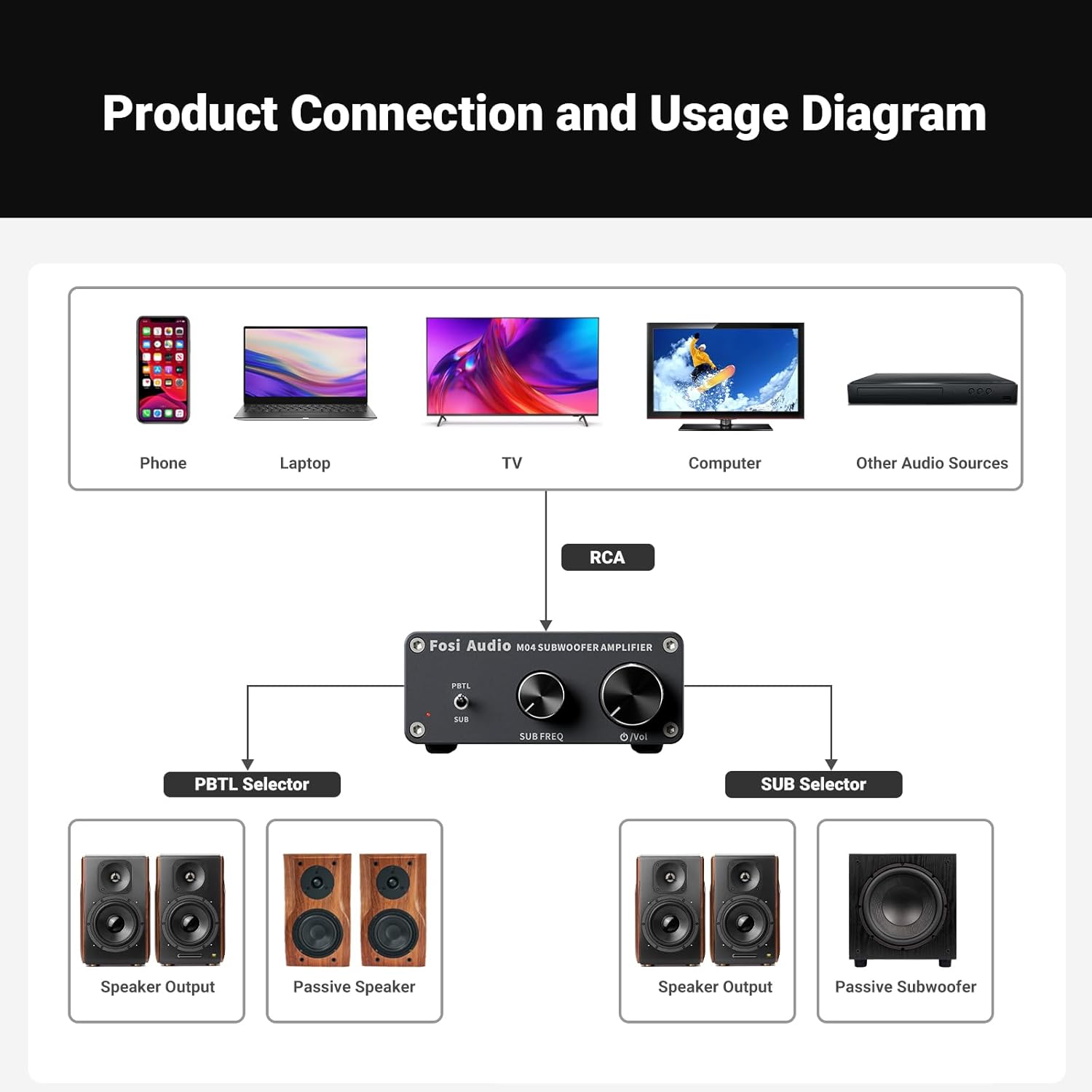
Image: A diagram illustrating various audio sources (phone, laptop, TV, computer) connecting via RCA to the Fosi Audio M04, which then connects to either passive speakers or a passive subwoofer, demonstrating the PBTL and SUB selector functions.
5.2 Power Connection
Connect the provided 19V/4.74A power supply to the DC 12-24V Power Interface on the rear panel of the M04, then plug the power supply into a wall outlet.
Video: This video demonstrates the Fosi Audio M04 Subwoofer Amplifier in a home theater setup, showcasing its compact size and integration with other audio components.
6. Operating Instructions
6.1 Power On/Off and Volume Control
Turn the Power Switch & Volume Knob clockwise to power on the amplifier. The power indicator LED will illuminate. Continue turning clockwise to increase the volume. Turn counter-clockwise to decrease volume and eventually power off the unit.

Image: A close-up view of the Fosi Audio M04 amplifier's front panel, showing the PBTL/SUB selector, Sub Frequency knob, and Power Switch/Volume knob.
6.2 SUB/PBTL Selector
Use the PBTL & SUB Selector switch to choose between modes:
- SUB Mode: Activates the built-in low-pass filter, ideal for driving passive subwoofers to produce deep bass.
- PBTL Mode: Provides full-frequency mono amplification, suitable for powering a single passive full-range speaker.
6.3 Sub Frequency Control
When in SUB mode, the Sub Frequency Knob allows you to adjust the cutoff frequency of the low-pass filter. This helps integrate your subwoofer seamlessly with your main speakers by controlling the range of bass frequencies it reproduces.
6.4 Audio Playback
Once all connections are made and the unit is powered on, begin playing audio from your connected source. Adjust the volume on the M04 and your source device as needed for optimal sound.
Video: This video illustrates how to stream Hi-Fi music to your stereo system using Fosi Audio components, demonstrating various connection possibilities and product integration.
7. Specifications
| Feature | Specification |
|---|---|
| Output Power | 100 Watts |
| Number of Channels | 1 |
| Voltage | 12 Volts (DC) |
| Maximum Supply Voltage | 19 Volts (DC) |
| Minimum Supply Voltage | 19 Volts (DC) |
| Specification Met | THD <= 0.04% and Frequency Range 20Hz - 120Hz |
| Item Dimensions (L x W x H) | 5.2 x 3.5 x 1.4 inches |
| Item Weight | 15.9 ounces |
| Mounting Type | Freestanding |
8. Troubleshooting
If you encounter issues with your Fosi Audio M04, refer to the following common problems and solutions:
- No Sound:
- Check if the power indicator is on. If not, ensure the power adapter is securely connected and the power switch is turned on.
- Verify all audio cables (RCA, speaker wires) are correctly and securely connected.
- Ensure the volume knob on the M04 and your audio source is turned up.
- Confirm the PBTL/SUB selector is in the correct position for your setup.
- Test with a different audio source or speaker to isolate the problem.
- Distorted Sound:
- Reduce the volume on both the M04 and your audio source. Overdriving the amplifier or speakers can cause distortion.
- Check speaker wire connections for any loose strands or short circuits.
- Ensure the impedance of your speaker/subwoofer matches the amplifier's requirements (2-ohm minimum).
- Weak Bass (in SUB mode):
- Adjust the Sub Frequency knob to a higher setting to allow more bass frequencies through.
- Ensure your subwoofer is properly connected and functioning.
- Check the audio source for any bass reduction settings.
9. Maintenance
To ensure the longevity and optimal performance of your Fosi Audio M04 amplifier:
- Cleaning: Use a soft, dry cloth to wipe the exterior of the amplifier. Avoid using harsh chemicals or abrasive cleaners.
- Ventilation: Keep the amplifier in a well-ventilated area. Do not block the ventilation holes.
- Storage: When not in use for extended periods, store the amplifier in a cool, dry place away from direct sunlight and extreme temperatures.
10. Warranty and Support
Fosi Audio products are designed for reliability and performance. For warranty information, technical support, or service inquiries, please contact Fosi Audio customer support through their official website or the retailer where the product was purchased.