
1. Introduction
The bblüv Termö Infrared Digital Thermometer provides a safe, accurate, and non-contact method for measuring temperature. Designed for convenience, it can be used for adults, children, toddlers, and infants. This manual will guide you through the proper use and care of your Termö thermometer.
2. Product Features
- Non-Contact Measurement: Provides temperature readings without physical contact, ensuring hygiene and comfort.
- Multiple Measurement Modes: Capable of measuring body temperature (forehead, ears, armpit), surface temperature (milk, bath water, food), and room temperature.
- Instant Readings: Delivers precise temperature measurements quickly.
- Color-Coded Fever Indicator: The LCD screen changes color to indicate temperature status: Green (Normal), Orange (Slight Fever), Red (High Fever).
- Memory Function: Stores up to 32 previous readings for tracking.
- Unit Selection: Switch between Fahrenheit (°F) and Celsius (°C).
- Automatic Shutdown: Powers off automatically after 30 seconds to conserve battery life.
- Included Accessories: Comes with 2 AA batteries and a protective carrying case.
3. Setup and Components
Before first use, ensure the batteries are correctly installed.
3.1 Battery Installation
- Open the battery compartment cover located at the bottom of the handle.
- Insert the two included AA batteries, ensuring correct polarity (+/-).
- Close the battery compartment cover securely.
3.2 Component Overview

Image: Overview of the Termö thermometer, highlighting its infrared lens, LCD panel, MUTE button, MODE button, °F/°C button, MEMORY button, and ON/SCAN button.
- Infrared Lens: Sensor for temperature measurement.
- LCD Panel: Displays temperature readings and settings.
- MODE Button: Switches between Body, Surface, and Room temperature modes.
- °F/°C Button: Toggles between Fahrenheit and Celsius units.
- MEMORY Button: Accesses stored temperature readings.
- ON/SCAN Button: Powers on the device and initiates a temperature scan.
- MUTE Button: Toggles sound on/off.
4. Operating Instructions
4.1 Taking Body Temperature
- Ensure the thermometer is in Body mode. Press the MODE button to switch if necessary.
- Hold the thermometer 1 to 2 inches (2.5 to 5 cm) away from the forehead.
- Press the ON/SCAN button once. The temperature will be displayed instantly on the LCD screen.

Image: A person using the bblüv Termö thermometer to take a forehead temperature, demonstrating the non-contact method.
4.2 Measuring Surface Temperature
Use this mode to check the temperature of liquids like milk or bath water, or solid food surfaces.
- Switch to Surface Temp mode by pressing the MODE button.
- Point the thermometer at the surface of the object you wish to measure, maintaining a distance of 1 to 2 inches (2.5 to 5 cm).
- Press the ON/SCAN button. The surface temperature will appear on the display.

Image: The Termö thermometer being used to measure the temperature of a baby's milk bottle, illustrating its versatility.
4.3 Checking Room Temperature
The Termö can also provide the ambient room temperature.
- Select Room mode using the MODE button.
- Point the thermometer towards an open space in the room.
- Press the ON/SCAN button to get the room temperature reading.

Image: The Termö thermometer being used to check the room temperature in a nursery, ensuring a comfortable environment for a baby.
4.4 Understanding the Display
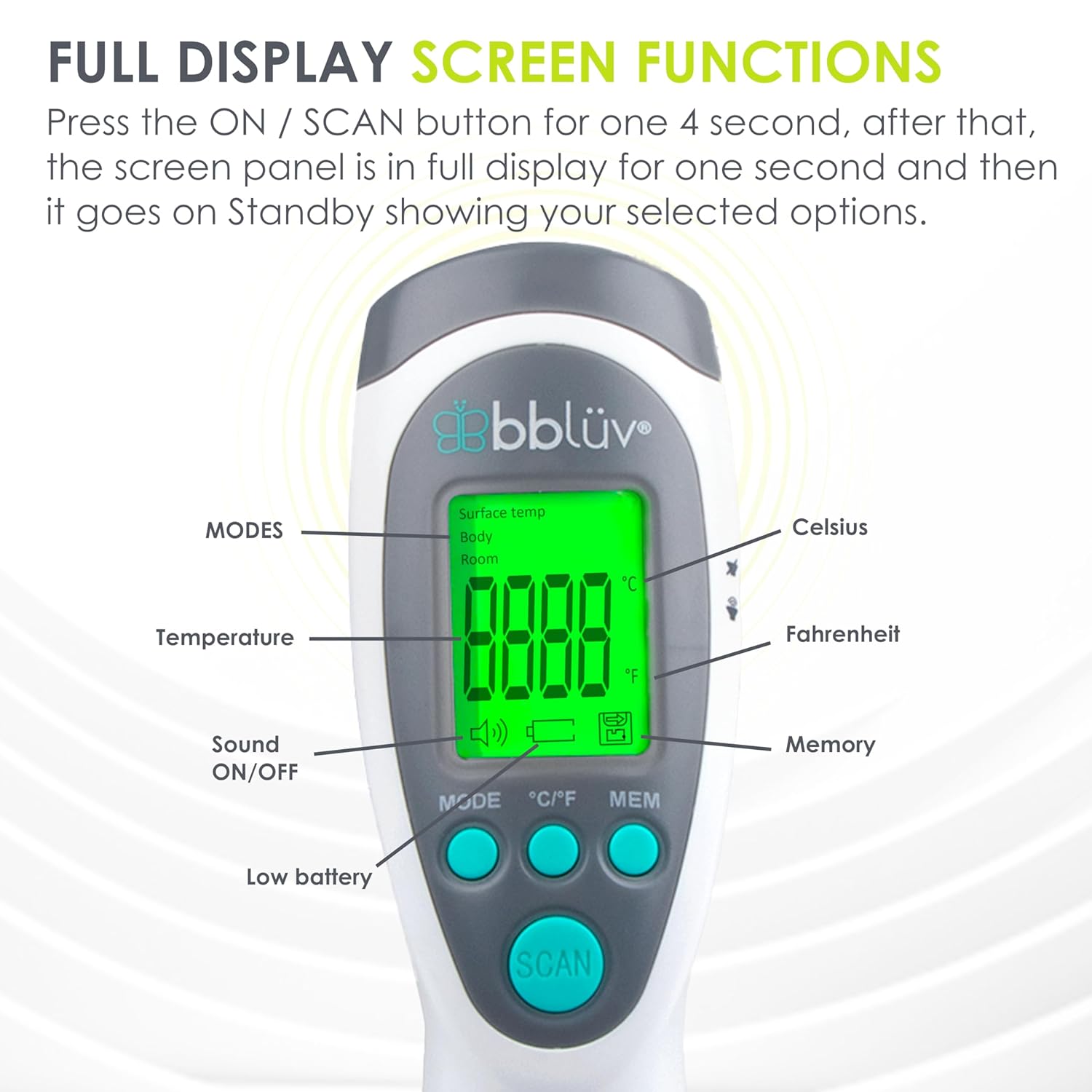
Image: A detailed diagram illustrating the full display screen functions of the Termö thermometer, including indicators for modes, temperature, sound, low battery, Celsius, Fahrenheit, and memory.
Upon pressing the ON/SCAN button, the screen will briefly show a full display before settling on your selected options. Key indicators include:
- MODES: Indicates Body, Surface, or Room.
- Temperature: The numerical reading.
- Sound ON/OFF: Icon indicating if sound is active.
- Low Battery: Icon appears when batteries need replacement.
- Celsius/Fahrenheit: Indicates the unit of measurement.
- Memory: Icon for memory function.
4.5 Fever Indicator Colors
The Termö thermometer uses a color-coded backlight system to quickly indicate temperature status:

Image: Visual representation of the Termö's 3 temperature indicator colors: Green for normal temperature (≤ 99.1 °F / 37.3 °C), Orange for slight fever (99.3 °F to 100.2 °F / 37.4 °C to 37.9 °C), and Red for high fever (≥ 100.4 °F / 38.0 °C).
- Green: Normal temperature (≤ 99.1 °F / 37.3 °C)
- Orange: Slight fever (99.3 °F to 100.2 °F / 37.4 °C to 37.9 °C)
- Red: High fever (≥ 100.4 °F / 38.0 °C)
5. Maintenance and Care
Proper maintenance ensures the longevity and accuracy of your Termö thermometer.
- Cleaning: Wipe the thermometer body and infrared lens with a soft, damp cloth. Do not immerse the device in water or use abrasive cleaners.
- Storage: Store the thermometer in its provided carrying case when not in use to protect it from dust and damage. Keep it in a cool, dry place, away from direct sunlight and extreme temperatures.
- Battery Replacement: Replace batteries when the low battery indicator appears on the screen. Dispose of used batteries responsibly.

Image: The bblüv Termö thermometer neatly stored within its compact and practical carrying case, emphasizing portability and protection.
6. Troubleshooting
If you encounter any issues with your Termö thermometer, please refer to the following common solutions:
| Problem | Possible Cause | Solution |
|---|---|---|
| No display or device won't turn on. | Low or incorrectly installed batteries. | Check battery polarity or replace with new AA batteries. |
| Inaccurate readings. | Thermometer too far from the measurement surface, dirty lens, or incorrect mode. | Ensure proper distance (1-2 inches), clean the infrared lens, and verify the correct measurement mode (Body, Surface, Room). |
| "HI" or "LO" displayed. | Temperature is outside the measurable range. | Ensure the temperature is within the operating range of the device. |
If the problem persists, please contact customer support for further assistance.
7. Specifications
| Feature | Detail |
|---|---|
| Brand | bblüv |
| Model Name | B0143 |
| Special Feature | Non-Contact |
| Display Type | Digital |
| Connectivity Technology | Infrared |
| Power Source | Battery Powered (2 AA batteries included) |
| Response Time | 1 second |
| Upper Temperature Range | 120 Degrees Fahrenheit |
| Item Weight | 0.32 Kilograms |
| Outer Material | Plastic |
| Product Care Instructions | Wipe Clean |
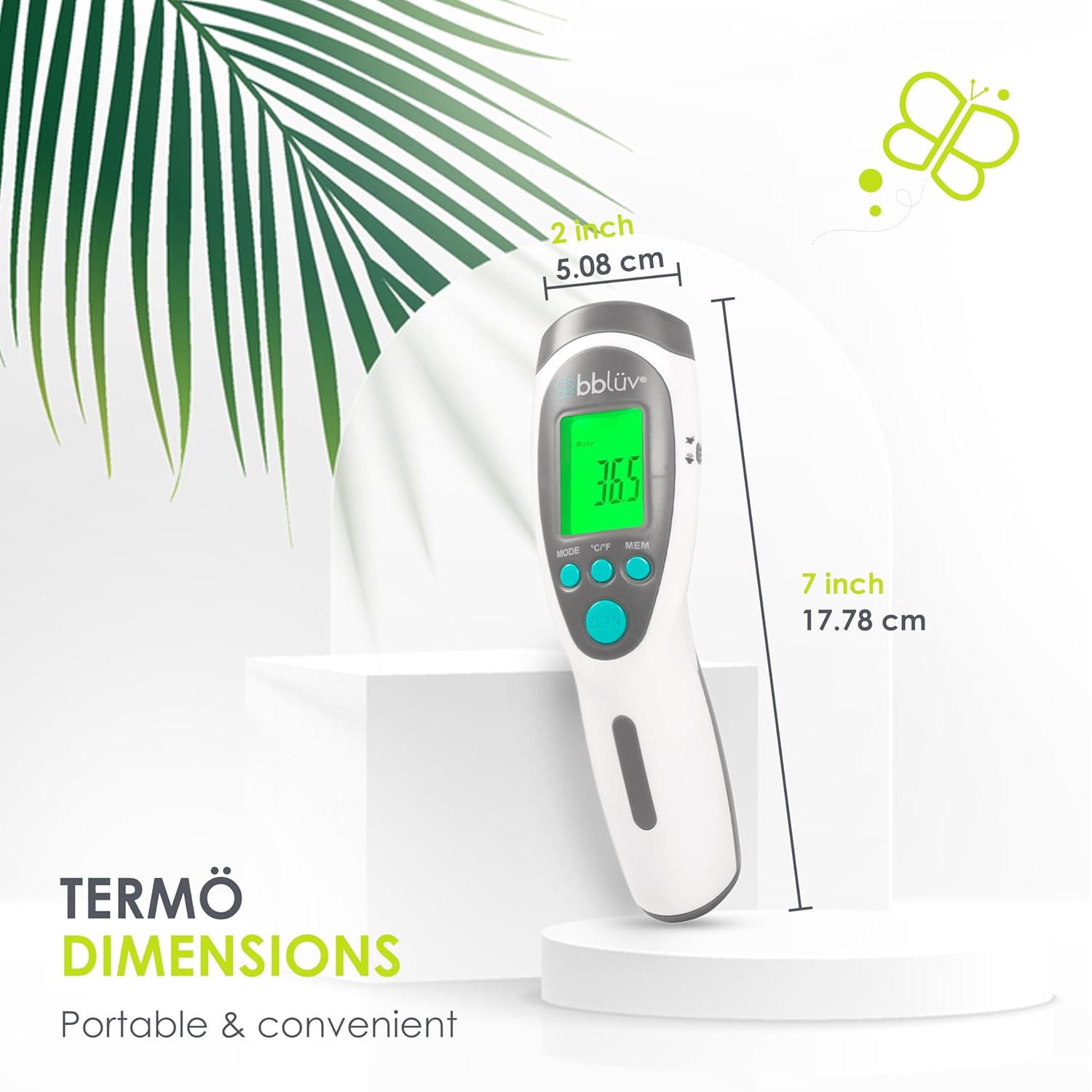
Image: The Termö thermometer displaying its compact dimensions: approximately 2 inches (5.08 cm) wide and 7 inches (17.78 cm) long, highlighting its portable and convenient design.
8. Warranty and Support
The bblüv Termö Infrared Digital Thermometer comes with a manufacturer's warranty. Please refer to the product packaging or the official bblüv website for specific warranty terms and conditions.
For technical support, troubleshooting assistance, or any questions regarding your product, please contact bblüv customer service through their official channels.