
Uniden AS7401
UNIDEN AS7401 Titanium Corded Landline Phone User Manual
Model: AS7401
Introduction
This manual provides comprehensive instructions for the setup, operation, and maintenance of your Uniden AS7401 Titanium Corded Landline Phone. Please read this manual thoroughly before using your new phone to ensure proper functionality and to familiarize yourself with all its features.
Product Overview and Components
The Uniden AS7401 is a corded landline phone featuring a speakerphone and Caller ID functionality. It is designed for reliable communication in various environments.
Package Contents
Upon unpacking, please ensure all the following items are present:
- Base Unit
- Handset
- Telephone Line Cord
- Handset Cord
- User Manual (this document)
Phone Components
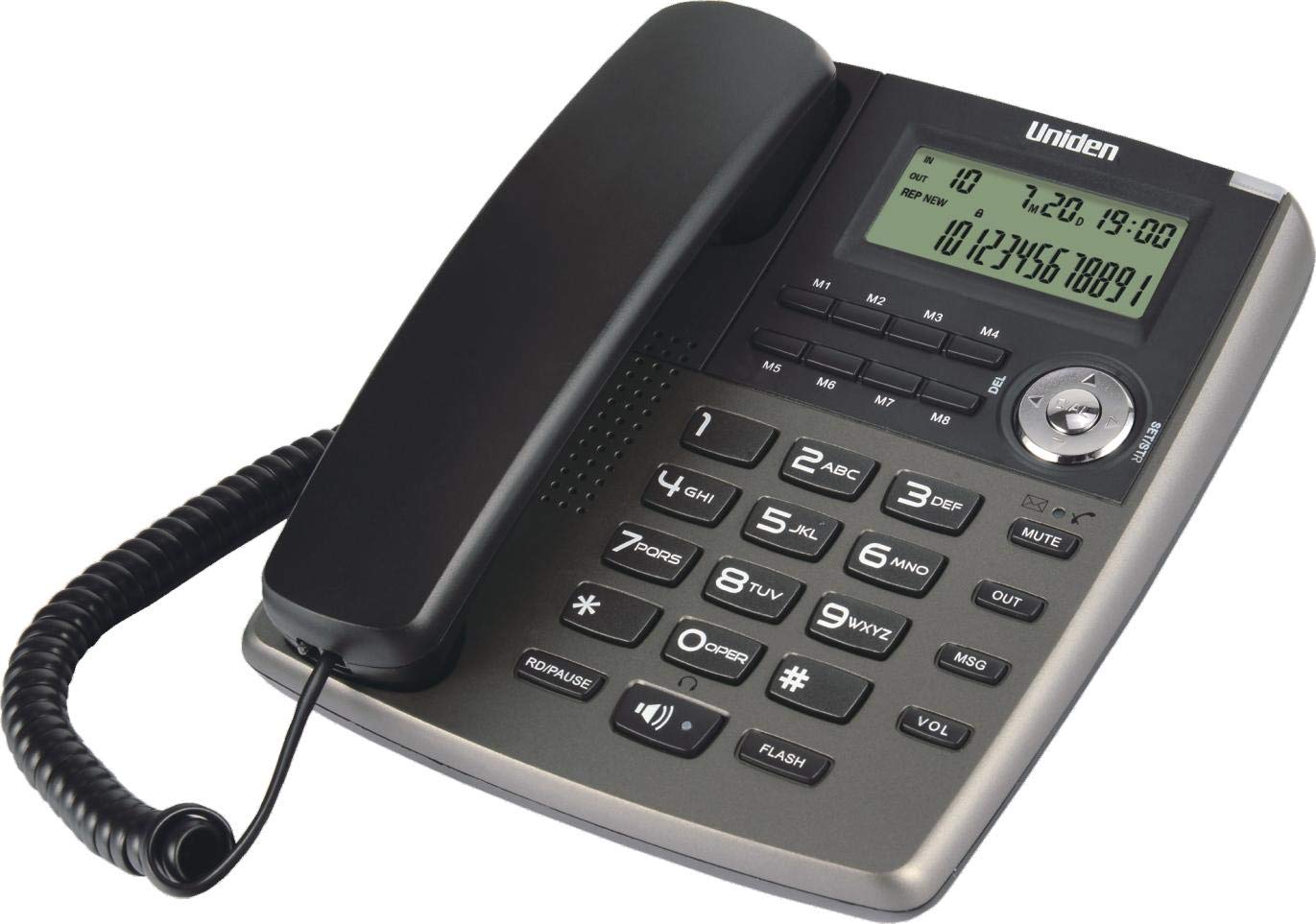
Figure 1: Top-down view of the Uniden AS7401 phone, showing the handset, base unit, keypad, and display screen.

Figure 2: Frontal view of the Uniden AS7401 phone, highlighting the display and keypad layout.

Figure 3: Angled view of the Uniden AS7401 phone, illustrating its compact design and key feature indicators.
The phone consists of a base unit and a handset. Key components include:
- LCD Display: Shows caller ID information, time, date, and menu options.
- Keypad: Standard numeric keys (0-9), *, #, and function keys.
- Speakerphone Button: Activates the hands-free speakerphone.
- Mute Button: Mutes your microphone during a call.
- Volume Control: Adjusts speakerphone and ringer volume.
- Memory Keys (M1-M8): For one-touch dialing.
- Flash Button: Used for call waiting or transferring calls (PABX dependent).
- R/D Pause Button: Redial/Pause function.
- MSG Button: Message retrieval key (PABX dependent).
- Navigation/Selection Dial: For navigating menus and selecting options.
Setup
Connecting the Phone
- Connect one end of the coiled handset cord to the handset and the other end to the handset jack on the left side of the phone base unit.
- Connect one end of the telephone line cord to the LINE jack on the back of the phone base unit.
- Connect the other end of the telephone line cord to your wall telephone jack.
The Uniden AS7401 operates without the need for batteries, drawing power directly from the telephone line.
Wall Mounting (Optional)
The phone is designed to be wall-mountable. To mount the phone:
- Locate the two keyhole slots on the underside of the phone base unit.
- Install two screws (not supplied) into the wall, spaced appropriately to align with the keyhole slots. Ensure the screws are securely fastened and protrude slightly.
- Align the keyhole slots with the screws and slide the phone downwards to secure it in place.
Operating Instructions
Making and Receiving Calls
- To Make a Call: Lift the handset or press the SPEAKERPHONE button. Dial the desired number.
- To Receive a Call: Lift the handset or press the SPEAKERPHONE button when the phone rings.
- To End a Call: Place the handset back on the cradle or press the SPEAKERPHONE button again if using hands-free.
Speakerphone Function
To use the speakerphone for hands-free communication:
- During a call, press the SPEAKERPHONE button. You can then place the handset back on the cradle.
- To switch back to the handset, simply lift the handset.
- To end a speakerphone call, press the SPEAKERPHONE button again.
Caller ID (FSK / DTMF)
The phone supports both FSK and DTMF Caller ID systems. When a call comes in, the caller's number (and name, if available and subscribed to the service) will be displayed on the LCD screen before you answer.
- Incoming Calls Memory: The phone stores up to 50 incoming call records. Use the navigation dial to scroll through the call history.
- Outgoing Calls Memory: The phone stores up to 10 outgoing call records.
One-Touch Memory Dialing (M1-M8)
The phone features 8 one-touch memory keys for quick dialing of frequently used numbers.
- To Store a Number:
- Dial the number you wish to store.
- Press the STORE button.
- Press one of the memory keys (M1-M8) where you want to save the number.
- To Dial a Stored Number: Lift the handset or press SPEAKERPHONE, then press the desired memory key (M1-M8).
Mute Function
During a call, press the MUTE button to temporarily disable your microphone. The other party will not hear you, but you can still hear them. Press MUTE again to resume conversation.
Flash Function
The FLASH button is used for network services such as Call Waiting or transferring calls on a PABX system. The flash time is selectable (100 / 300 / 600 / 1000ms) to match your telephone system requirements. Refer to your telephone service provider or PABX manual for the correct setting.
Ringer Settings
The ringer volume can be set to High (HI), Low (LOW), or Off (OFF) using the switch located on the side or back of the phone.
Voice Message Waiting Lamp
The Voice Message Waiting Lamp will illuminate when you have new messages in your voicemail service. This feature works with most branded PABX systems. Contact your service provider for compatibility and activation.
2.5mm Earset Jack
A 2.5mm earset jack is provided for connecting a compatible headset (not included) for hands-free private conversations.
Maintenance
- Clean the phone's exterior with a soft, damp cloth. Do not use abrasive cleaners or solvents.
- Avoid exposing the phone to direct sunlight, excessive moisture, or extreme temperatures.
- Keep the phone away from sources of electrical noise, such as motors or fluorescent lighting.
Troubleshooting
| Problem | Possible Solution |
|---|---|
| No dial tone. |
|
| Caller ID not displaying. |
|
| Speakerphone volume is too low/high. | Adjust the volume using the dedicated volume control buttons on the phone base. |
| Ringer does not sound. | Check the ringer switch setting (HI/LOW/OFF) and ensure it is not set to OFF. |
Specifications
| Brand | Uniden |
| Model | AS7401 |
| Type | Corded Landline Phone |
| Color | Titanium |
| Caller ID | FSK / DTMF Compatible |
| Incoming Call Memory | 50 entries |
| Outgoing Call Memory | 10 entries |
| One-Touch Memory | 8 entries (M1-M8) |
| Flash Time Selectable | 100 / 300 / 600 / 1000ms |
| Ringer Settings | HI / LOW / OFF |
| Earset Jack | 2.5mm |
| Power Source | Line Powered (No Battery Required) |
| Dimensions (LxWxH) | 22.23 x 20.32 x 6.99 cm |
| Item Weight | 710 g |
Warranty and Support
The Uniden AS7401 Titanium Corded Landline Phone comes with a 1-Year Warranty from the date of purchase. Please retain your proof of purchase for warranty claims.
For technical support, service, or further inquiries, please refer to the contact information provided with your product packaging or visit the official Uniden website.
Ask a question about this manual
Ask about setup, troubleshooting, compatibility, parts, safety, or missing instructions. Manuals+ will review the question and use this page’s manual context to help answer it.