
1. Introduction
The LittleHippo Mella Kids Alarm Clock is a multi-functional device designed to assist children in developing healthy sleep habits. It combines a sleep trainer, night light, sound machine, and alarm clock into one unit. This manual provides detailed instructions for setting up and operating your Mella device.

Figure 1: LittleHippo Mella Kids Alarm Clock (Bright Purple)
2. Product Overview & Features
The Mella alarm clock is engineered with several features to support children's sleep and wake routines:
- Sleep Training: Utilizes gentle colors and facial expressions to indicate bedtime (red light, sleepy face) and wake-up time (green light, happy face). An optional yellow light can signal 'play time' before wake-up.
- Soothing Sleep Sounds: Offers six distinct sleep sound options to create a calming environment.
- Night Light: Features six night light colors with adjustable brightness levels.
- Alarm Clock: Includes three playful sounds for morning alarms.
- Nap Timer: Provides an audible or silent countdown timer for naps.
- Child Lock: Prevents accidental changes to settings by children.
- Durable Design: Constructed from child-safe ABS and silicone materials.

Figure 2: Key Features of the Mella Alarm Clock
3. Setup
To begin using your LittleHippo Mella Kids Alarm Clock, follow these initial setup steps:
- Power Connection: Connect the provided USB cable to the back of the Mella device and plug the USB adapter into a power outlet. The device is corded electric and requires continuous power to function.
- Battery Backup: A Lithium Metal battery is included for memory backup, preserving your settings in case of a power outage or if the device is unplugged.
- Initial Power On: The device should power on automatically once connected.
- Accessing Settings: The control buttons are located on the underside of the device. Familiarize yourself with the 'SET', 'TIME', 'ALARM', 'SLEEP', 'WAKE', 'NAP', 'SOUND', and 'LIGHT' buttons, along with the '+' and '-' buttons for adjustments.

Figure 3: Underside Control Panel and Power Input
4. Operating Instructions
Detailed instructions for using the various functions of your Mella alarm clock:
4.1. Setting the Time
- Press and hold the 'TIME' button until the hour display flashes.
- Use the '+' or '-' buttons to adjust the hour.
- Press 'TIME' again to set the minutes, then use '+' or '-' to adjust.
- Press 'TIME' once more to confirm and exit.
4.2. Sleep Training (OK to Wake)
The Mella uses color and facial expressions to guide sleep and wake times.
- Set Bedtime: Press and hold the 'SLEEP' button. Set the desired bedtime using '+' or '-' for hours and minutes. The clock will display a sleepy face and glow red at this time.
- Set Wake-Up Time: Press and hold the 'WAKE' button. Set the desired wake-up time using '+' or '-' for hours and minutes. The clock will display a happy face and glow green at this time.
- Optional Play Time: Some models offer an optional yellow light for 'play time' before the green wake-up light. Refer to the specific manual for your model for activation.
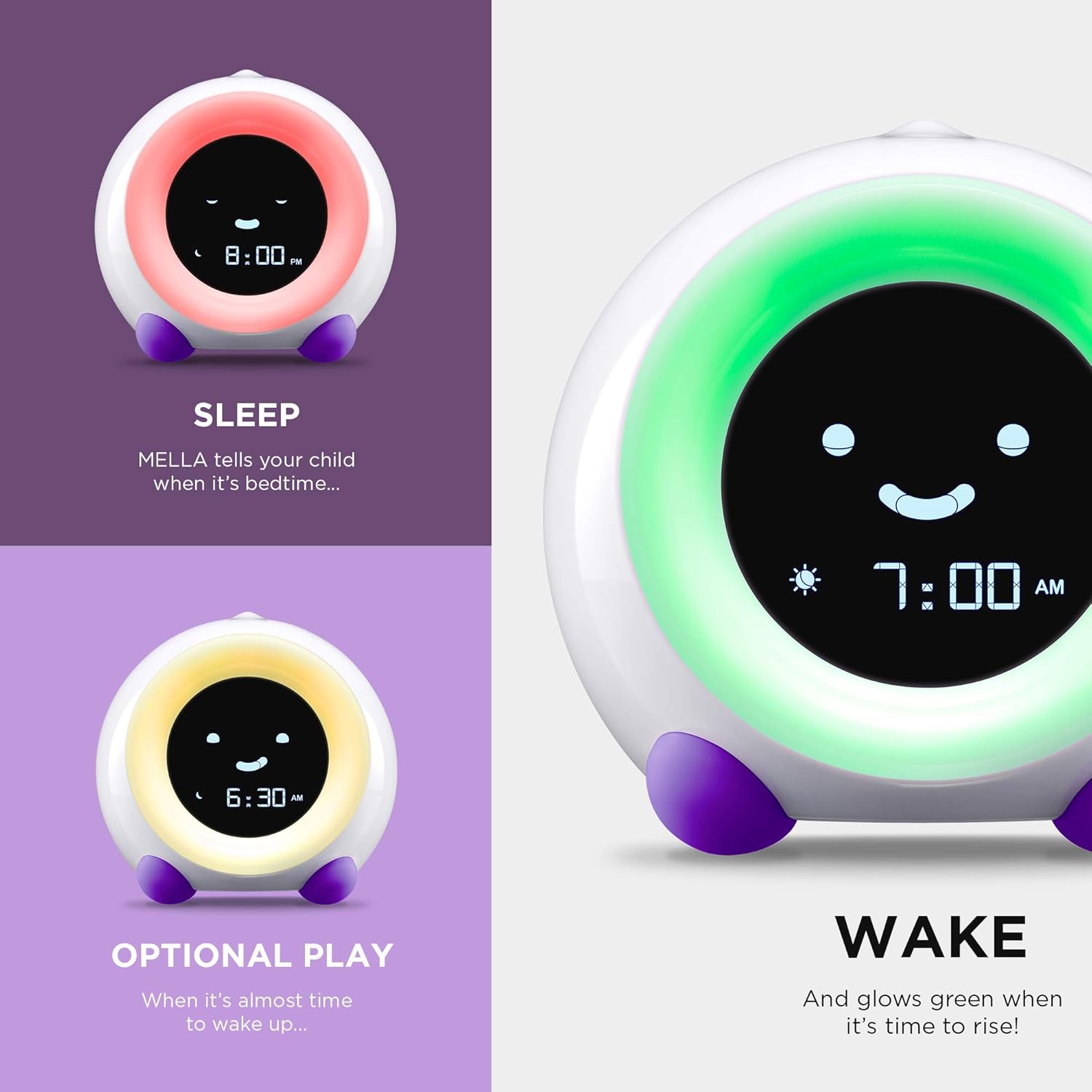
Figure 4: Sleep, Play, and Wake Indicators
4.3. Night Light Function
Mella offers six night light colors and adjustable brightness.
- Press the 'LIGHT' button to cycle through the six available colors.
- To adjust brightness, press and hold the 'LIGHT' button, then use '+' or '-' to increase or decrease the intensity.

Figure 5: Night Light Color Options
4.4. Sound Machine
Choose from six peaceful sleep sounds.
- Press the 'SOUND' button to cycle through the available sounds.
- To adjust volume, press and hold the 'SOUND' button, then use '+' or '-' to set the desired volume level.
4.5. Alarm Setting
Set a traditional alarm for your child.
- Press and hold the 'ALARM' button. Set the desired alarm time using '+' or '-' for hours and minutes.
- Choose an alarm sound by pressing the 'SOUND' button while in alarm setting mode.
- Press 'ALARM' again to confirm and activate.
4.6. Nap Timer
Set a countdown timer for naps or quiet time.
- Press and hold the 'NAP' button. Use '+' or '-' to set the desired nap duration.
- Press 'NAP' again to start the countdown.
4.7. Child Lock Functionality
To prevent children from accidentally changing settings:
- Locate the 'LOCK' button on the underside of the device.
- Press and hold the 'LOCK' button to activate or deactivate the child lock. A lock icon will appear on the display when activated.
5. Maintenance
To ensure the longevity and proper functioning of your LittleHippo Mella Kids Alarm Clock, follow these maintenance guidelines:
- Cleaning: Wipe the device with a soft, dry cloth. Avoid using abrasive cleaners or solvents, as these can damage the surface.
- Storage: Store the device in a cool, dry place when not in use for extended periods.
- Power Cord Care: Ensure the power cord is not bent, twisted, or pinched to prevent damage.
6. Troubleshooting
If you encounter any issues with your Mella alarm clock, consider the following:
- Device Not Powering On: Ensure the USB cable is securely connected to both the device and the power adapter, and that the adapter is plugged into a working electrical outlet.
- Settings Not Saving: Verify that the internal Lithium Metal battery is correctly installed and not depleted. This battery provides backup for settings.
- Lights or Sounds Not Working: Check if the child lock is activated, which might prevent certain functions from being adjusted. Ensure volume and brightness settings are not at their minimum.
- Alarm Not Sounding: Confirm the alarm time is correctly set and activated. Check the alarm volume.
- Child Lock Issues: If the child lock is stuck, try pressing and holding the 'LOCK' button for a few seconds.
For persistent issues, please refer to the Warranty and Support section for contact information.
7. Specifications
| Brand | LittleHippo |
| Model Number | KHAC |
| Color | Bright Purple |
| Display Type | Digital |
| Power Source | Corded Electric |
| Product Dimensions | 1.5"W x 4.49"H |
| Item Weight | 8 Ounces |
| Frame Material | Acrylonitrile Butadiene Styrene |
| Batteries Included | Yes (1 Lithium Metal battery for backup) |
| Special Features | Adjustable Brightness, Adjustable Volume, Alarm, OK to Wake, Snooze |
8. Safety Information
The LittleHippo Mella is designed with child safety in mind and complies with international standards:
- Crafted from child-safe ABS and silicone materials.
- Complies with FCC, CE, RoHS, CA65, REACH, and CPSIA standards.
Always supervise young children when they are interacting with electronic devices.
9. Warranty and Support
LittleHippo stands by the quality and performance of the Mella Kids Alarm Clock.
- Warranty Type: Limited Warranty. Please refer to the product packaging or LittleHippo's official website for specific warranty terms and duration.
- Customer Support: For any questions, troubleshooting assistance, or warranty claims, please visit the official LittleHippo Store or contact their customer service directly.
Visit the LittleHippo Store for more information and support resources.