
1. Product Overview
The Sony STRDH190 is a 2-channel home stereo receiver designed to deliver high-quality audio from various sources, including vinyl records and Bluetooth-enabled devices. Its low-profile design allows it to fit seamlessly into most AV cabinets.
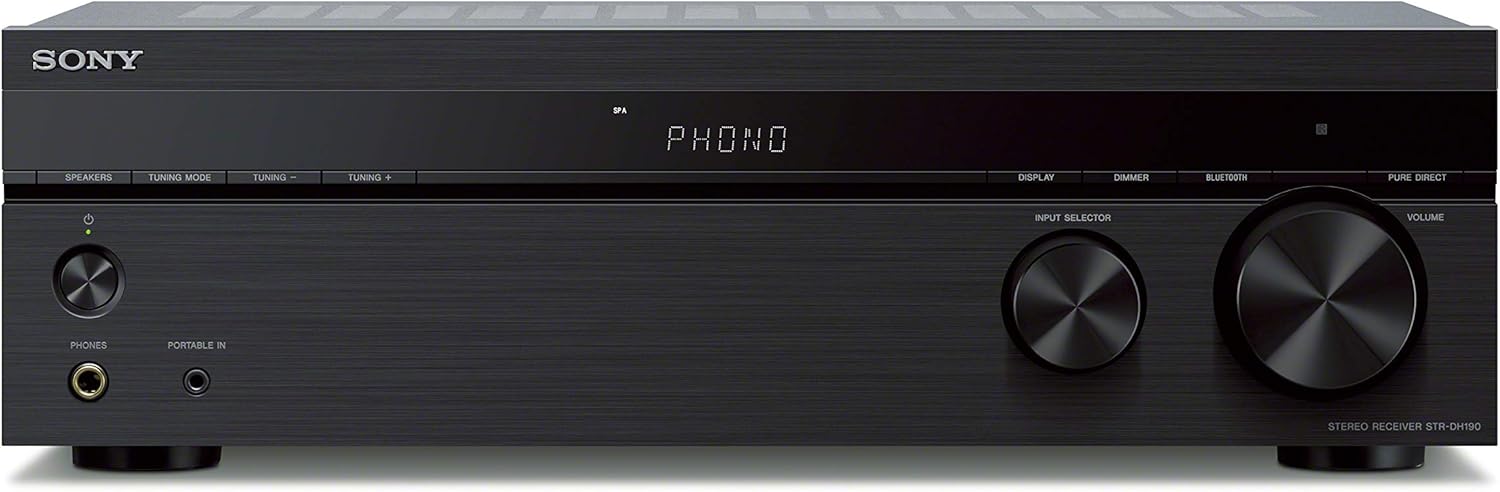
Figure 1: Front view of the Sony STRDH190 Stereo Receiver, showcasing its sleek black finish and control knobs.
Key features include 100 watts x 2 channel output, a dedicated phono input for turntables, four stereo RCA audio inputs, a 3.5mm input, and built-in Bluetooth for wireless streaming. It also supports connecting up to four speakers with A/B switching capabilities.
Video 1: A brief product overview of the Sony STRDH190 Stereo Receiver, highlighting its design and primary functions.
2. Safety Information
Always ensure the receiver is placed on a stable, level surface with adequate ventilation. Do not block ventilation openings. Avoid exposing the unit to rain, moisture, or excessive heat. Disconnect the power cord from the wall outlet if the unit is not to be used for an extended period.
Refer to the full user manual (PDF) for detailed safety instructions and warnings.
3. Setup
3.1 Unboxing
Carefully remove the receiver and all accessories from the packaging. Verify that all components listed in the 'What's in the Box' section are present.

Figure 2: Angled front view of the receiver, showing its compact size and minimalist design.
The package typically includes the receiver unit, a remote control (RMT-AA400U), batteries for the remote, and an FM antenna.

Figure 3: The included remote control (RMT-AA400U) for the Sony STRDH190 receiver.
3.2 Connections
Before making any connections, ensure the receiver is powered off and unplugged from the wall outlet.

Figure 4: Rear panel of the receiver, detailing the various audio input/output ports and speaker terminals.
- Speaker Connections: Connect your speakers to the speaker terminals on the rear panel. The receiver supports 6-16 ohm speakers. Ensure correct polarity (+ to + and - to -). You can connect up to four speakers (Speaker A and Speaker B).
- Audio Inputs:
- Phono Input: For connecting a turntable. Ensure your turntable has a built-in pre-amp or use an external one if needed. Connect the ground wire from the turntable to the SIGNAL GND terminal on the receiver.
- RCA Audio Inputs (Input 1-4): Connect external audio devices such as CD players, cassette decks, or other media players using RCA cables.
- Portable In (3.5mm): For connecting portable audio devices like smartphones or MP3 players using a 3.5mm audio cable.
- FM Antenna: Connect the supplied FM antenna to the FM ANTENNA terminal for radio reception.
- Power: Once all audio and speaker connections are made, plug the power cord into a wall outlet.
4. Operating Instructions
4.1 Basic Controls
- Power: Press the POWER button on the front panel or the remote control to turn the receiver on or off.
- Volume: Rotate the VOLUME knob on the front panel or use the VOLUME +/- buttons on the remote to adjust the sound level.
- Input Selection: Rotate the INPUT SELECTOR knob on the front panel or use the dedicated input buttons (e.g., PHONO, INPUT 1-4, BLUETOOTH) on the remote to select your desired audio source.
4.2 Bluetooth Pairing
To connect a Bluetooth device:
- Select BLUETOOTH as the input source using the INPUT SELECTOR knob or the remote. The display will show "CONNECTING" and the Bluetooth indicator will blink.
- On your Bluetooth device (e.g., smartphone), enable Bluetooth and search for available devices.
- Select "STRDH190" from the list of devices. Once connected, the Bluetooth indicator will stop blinking and remain lit.

Figure 5: A user wirelessly streaming music from a smartphone to the Sony STRDH190 receiver via Bluetooth.
4.3 FM Radio Operation
To listen to FM radio:
- Select FM as the input source.
- Use the TUNING +/- buttons on the remote to tune to your desired station.
- You can store up to 30 FM station presets using the remote control's preset functions.
4.4 Speaker A/B Switching
The receiver allows you to switch between Speaker A, Speaker B, or both (A+B) if you have two pairs of speakers connected.
- Press the SPEAKERS A/B button on the remote control to cycle through the speaker output modes.
5. Maintenance
To maintain your receiver, regularly wipe the exterior with a soft, dry cloth. Avoid using abrasive cleaners or solvents. Ensure ventilation grilles are free from dust buildup. Do not attempt to open the receiver casing, as there are no user-serviceable parts inside.
6. Troubleshooting
| Problem | Possible Cause | Solution |
|---|---|---|
| No power | Power cord unplugged; Power outage | Check power cord connection; Verify power supply |
| No sound | Incorrect input selected; Speaker cables loose; Volume too low | Select correct input; Check speaker connections; Increase volume |
| Bluetooth not connecting | Device out of range; Pairing mode not active; Interference | Move device closer; Ensure receiver is in pairing mode; Reduce interference |
| Poor FM reception | Antenna not connected or positioned poorly | Connect FM antenna securely; Adjust antenna position for best reception |
For more detailed troubleshooting, please consult the full user manual.
7. Specifications
- Output Power: 100 watts x 2 (8 ohms, 1 Kilo Hertz)
- Speaker Impedance: 6–16 ohms
- Inputs: Phono input, 4 stereo RCA audio inputs, 3.5mm input
- Outputs: Stereo RCA output, 1/4 inch headphone jack
- Connectivity: Bluetooth, FM Radio
- Dimensions (W x H x D): 17 x 5.2 x 11 inches (approx.)
- Weight: 1 pounds (approx.)
- Power Requirement: AC 120 V 60 Hz
8. Warranty and Support
This product comes with a manufacturer's warranty. Please refer to the warranty card included in your product packaging for specific terms and conditions. For technical support, product registration, or service inquiries, please visit the official Sony support website or contact their customer service.
Online resources such as FAQs and downloadable manuals are often available on the manufacturer's website.