
1. Introduction and Overview
The Stranger Cube 20 is a versatile 20-watt RMS amplifier designed for guitar, keyboard, and microphone applications. It features an 8-inch dual cone speaker and a 3-way tone control for precise sound shaping. This manual provides essential information for the safe and effective use of your amplifier.

Image 1.1: Front view of the Stranger Cube 20 Amplifier, showcasing its compact design and speaker grille.
2. Safety Instructions
- Ensure the amplifier is connected to an AC220V 50Hz power supply. Using an incorrect voltage may damage the unit.
- Do not expose the amplifier to rain or moisture to prevent electric shock or fire.
- Do not open the amplifier casing. Refer all servicing to qualified personnel.
- Place the amplifier on a stable, level surface to prevent it from falling.
- Keep ventilation openings clear to prevent overheating.
- Unplug the power cord during lightning storms or when unused for long periods.
3. Product Features
The Cube 20M amplifier is equipped with the following key features:
- Output Power: 20 Watts RMS.
- Speaker: 8-inch dual cone speaker for clear audio reproduction.
- Tone Control: 3-way tone control (Bass, Mid, Treble) with a range of ±10 dB.
- Inputs: Three inputs, including two channels for guitar/keyboard and one low-impedance microphone input.
- Outputs: Line Out, Pre Out, and Headphone jack for versatile connectivity.
- Power Supply: AC220V 50Hz.

Image 3.1: Close-up of the amplifier's speaker grille, featuring the 'Stranger' brand logo.
4. Setup
- Unpacking: Carefully remove the amplifier from its packaging. Inspect for any signs of damage.
- Placement: Position the amplifier on a stable, flat surface away from direct sunlight, heat sources, and moisture. Ensure adequate ventilation around the unit.
- Power Connection: Connect the supplied power cord to the amplifier's power input and then to a suitable AC220V 50Hz wall outlet. Ensure the amplifier's power switch is in the "OFF" position before connecting.
- Instrument/Microphone Connection:
- For Guitar/Keyboard: Use a standard 1/4" (6.35mm) instrument cable to connect your guitar or keyboard to one of the "GUITAR / KEYBOARD" input jacks.
- For Microphone: Use an XLR cable to connect a low-impedance microphone to the "MIC" input jack.
- External Connections (Optional):
- Headphones: Connect headphones to the "HEADPHONE" jack for silent practice.
- Line Out: Use the "LINE OUT" jack to send the amplifier's signal to a mixing console or another amplifier.
- Pre Out: The "PRE OUT" jack provides an unprocessed signal for external effects or recording.
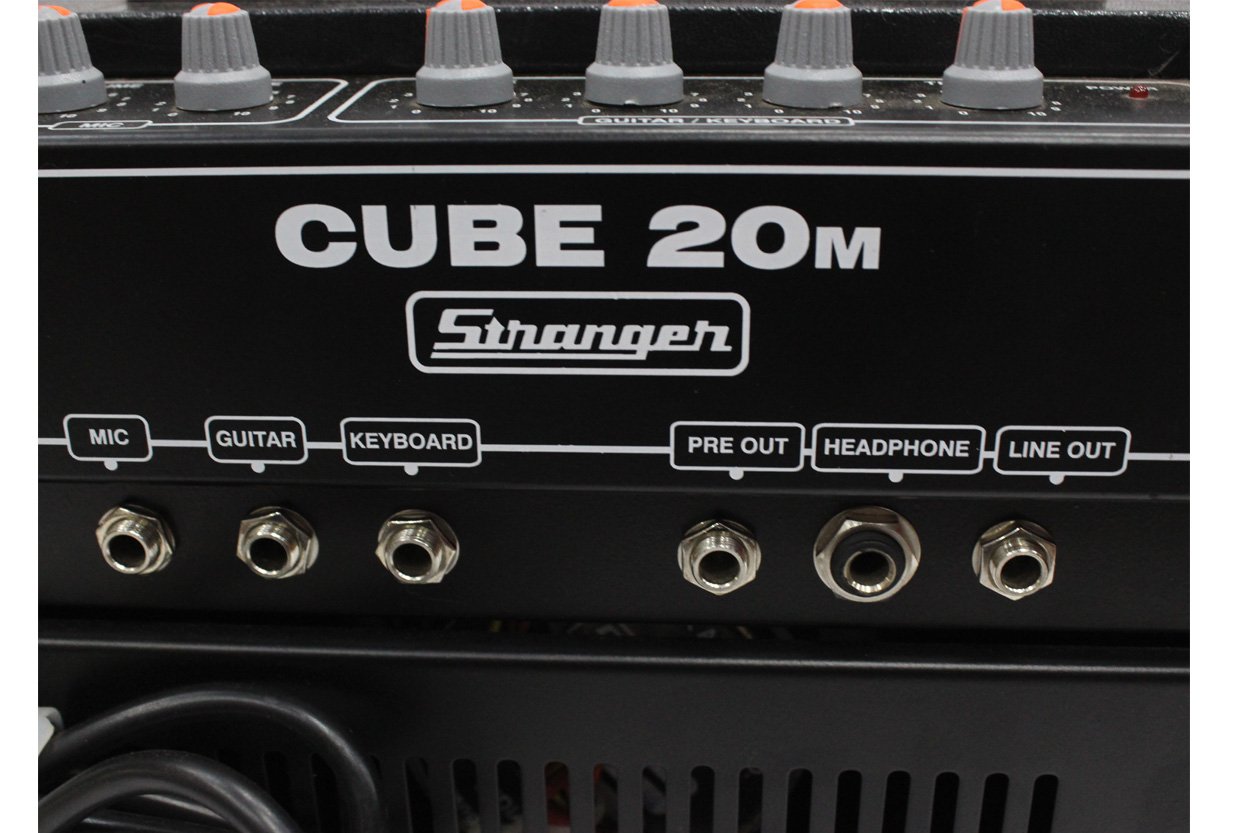
Image 4.1: Close-up view of the input and output jacks, including Mic, Guitar, Keyboard, Pre Out, Headphone, and Line Out.
5. Operating Instructions
Once all connections are made, follow these steps to operate your amplifier:
- Power On: Turn the amplifier's power switch to the "ON" position. The power indicator light will illuminate.
- Volume Adjustment:
- Guitar/Keyboard Volume: Adjust the "VOLUME" knob in the "GUITAR / KEYBOARD" section to control the overall output level for instruments.
- Microphone Volume: Adjust the "VOLUME" knob in the "MIC" section to control the microphone's output level.
- Tone Control (Guitar/Keyboard): Use the "BASS", "MID", and "TREBLE" knobs in the "GUITAR / KEYBOARD" section to shape the instrument's tone.
- Bass: Adjusts low frequencies.
- Mid: Adjusts mid-range frequencies.
- Treble: Adjusts high frequencies.
- Tone Control (Microphone): Use the "TONE" knob in the "MIC" section to adjust the microphone's tonal characteristics.
- Headphone Use: When headphones are connected, the main speaker output will be muted. Adjust the headphone volume using the respective channel volume controls.
- Power Off: Before disconnecting any cables or moving the amplifier, turn the power switch to the "OFF" position.

Image 5.1: Close-up of the Guitar/Keyboard control section, showing Volume, Bass, Mid, and Treble knobs.

Image 5.2: Close-up of the Microphone control section, showing Volume and Tone knobs.
6. Maintenance
- Cleaning: Wipe the exterior of the amplifier with a soft, dry cloth. Do not use abrasive cleaners, waxes, or solvents.
- Storage: When not in use, store the amplifier in a cool, dry place, away from extreme temperatures and humidity.
- Ventilation: Regularly check that the ventilation openings are free from dust and debris.
- Cable Care: Avoid bending or crimping cables excessively. Store cables neatly to prevent damage.
7. Troubleshooting
| Problem | Possible Cause | Solution |
|---|---|---|
| No sound output |
|
|
| Distorted sound |
|
|
| Humming or buzzing noise |
|
|
8. Specifications
| Model Name | Cube 20 |
| Model Number | Cube20M |
| Brand | STRANGER AUDIO PVT LTD |
| Output Wattage | 20 Watts RMS |
| Speaker Size | 8 Inches (Dual Cone) |
| Tone Control | 3-Band (Bass, Mid, Treble ±10 dB) |
| Inputs | 2 x 1/4" (6.35mm) Jack (Guitar/Keyboard), 1 x XLR (Low Impedance Microphone) |
| Outputs | Line Out, Pre Out, Headphone |
| Power Source | Corded Electric (AC220V 50Hz) |
| Dimensions (D x W x H) | 15.3D x 27.5W x 30H Centimeters |
| Weight | 5.15 Kilograms (Approx) |
| Enclosure Material | Plastic |
9. Warranty and Support
For warranty information and technical support, please refer to the documentation provided with your purchase or contact STRANGER AUDIO PVT LTD directly. Keep your proof of purchase for any warranty claims.
For further assistance, you may visit the official STRANGER AUDIO PVT LTD store online: STRANGER AUDIO PVT LTD Store