
1. Product Overview
The HD Mirror Cam is a dashboard camera designed to record video and audio while driving. It integrates into your vehicle's existing rearview mirror, providing a discreet recording solution. Key features include 720P HD video recording, motion detection, loop recording, and night vision capabilities.

Image 1: HD Mirror Cam and included accessories.
2. Setup and Installation
2.1 What's in the Box
- HD Mirror Cam Unit
- Micro SD Card (16 GB included)
- USB Micro SD Card Reader
- Vehicle Power Cable / Car Charger
- Mounting Clips
- 2 Rubber Strap Bands (attached to the back of the unit)
- Quick Start Guide
- Instruction Manual
2.2 Installation Steps
- Attach to Rearview Mirror: Securely attach the HD Mirror Cam to your existing rearview mirror using the provided rubber strap bands. Ensure the camera lens faces forward and the mirror is stable.
- Insert Micro SD Card: Locate the Micro SD card slot on the unit and insert the included 16 GB Micro SD card. Ensure it clicks into place.
- Connect Power: Plug the vehicle power cable into the unit's USB port and then into your car's 12V power outlet (cigarette lighter socket). The unit will automatically power on and begin recording when the vehicle ignition is turned on.
- Adjust Lens: Adjust the 350-degree rotating lens to capture the desired view. It can be rotated to record the road ahead or the interior of the vehicle.

Image 2: Attaching the HD Mirror Cam to the rearview mirror.

Image 3: Adjusting the camera's swivel lens.
2.3 Instructional Video
For a visual guide on setup and operation, please refer to the official instructional video:
Video 1: HD Mirror Cam Instructional Video. This video demonstrates the installation and basic functions of the dash camera.
3. Operating Instructions
3.1 Automatic Recording
The HD Mirror Cam automatically starts recording when your vehicle's ignition is turned on and stops recording when the ignition is turned off. This ensures continuous coverage during your drives.
3.2 Loop Recording
The device features loop recording, which means it continuously records video. When the Micro SD card is full, the oldest files are automatically overwritten by new recordings. This ensures you always have the most recent footage available.
3.3 Motion Detection
With motion detection enabled, the camera will automatically start recording if it detects movement while your vehicle is parked. This feature helps capture incidents that occur when you are not present.
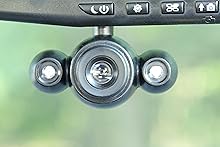
Image 4: Motion detection in action, capturing an event in a parking lot.
3.4 2.5" LCD Screen and Playback
The built-in 2.5-inch LCD screen allows for instant playback of recorded video directly on the unit. You can also turn the screen off while recording to minimize distractions during driving.

Image 5: The LCD screen displaying video.
3.5 Photo Mode
The camera includes a one-touch picture mode, allowing you to instantly capture still images with the press of a button.
3.6 Night Vision
Equipped with exclusive night vision LEDs, the HD Mirror Cam provides clear recording even in low-light conditions or at night.
3.7 Image Stabilization
The image stabilization feature helps to reduce blur and shakiness in recordings, providing clearer video footage.
3.8 Time/Date Stamp
An optional time and date stamp can be overlaid on your video recordings, providing crucial information for incident verification.
3.9 Anti-Glare Dimming
The mirror features anti-glare dimming to improve visibility and reduce eye strain, especially during night driving.
3.10 Transferring Files
To review or save footage, you can either play it back directly on the unit or remove the Micro SD card and use the included USB card reader to transfer files to a computer.
4. Maintenance
- Cleaning: Use a soft, dry cloth to clean the mirror surface and camera lens. Avoid abrasive cleaners or solvents.
- SD Card Management: Periodically format the Micro SD card to ensure optimal performance and prevent data corruption. Back up important footage before formatting.
- Firmware Updates: Check the manufacturer's website for any available firmware updates to ensure your device has the latest features and bug fixes.
- Temperature: Avoid exposing the device to extreme temperatures for prolonged periods, as this can affect battery life and performance.
5. Troubleshooting
| Problem | Possible Solution |
|---|---|
| Device does not power on. | Ensure the car charger is securely connected to both the unit and the vehicle's 12V outlet. Check if the vehicle's 12V outlet is functioning. |
| Recording stops unexpectedly. | Check if the Micro SD card is full or corrupted. Format the SD card (after backing up data) or replace it. Ensure the power connection is stable. |
| Video footage is blurry or unclear. | Clean the camera lens. Ensure the lens is properly adjusted and focused. Check for any obstructions to the camera's view. |
| Motion detection is not working. | Ensure motion detection is enabled in the device settings. Check the sensitivity settings. |
| Cannot view files on computer. | Ensure the Micro SD card is properly inserted into the card reader and the reader is connected to the computer. Try a different USB port or card reader. |
6. Specifications
- Product Dimensions: 11.75 x 4.5 x 1.88 inches
- Item Weight: 1.2 pounds
- Model Number: 8542134319
- Brand: HD Mirror Cam
- Manufacturer: InvenTel
- Connectivity Technology: USB
- Special Features: Built-In Microphone, Loop Recording, Night Vision, Motion Detection
- Video Capture Resolution: 720p
- Mounting Type: Rearview Mirror Mount
- Screen Size: 2.5 Inches
- Control Method: Touch
7. Warranty & Support
7.1 Warranty Information
The HD Mirror Cam typically comes with a 30-day warranty from the date of purchase. Please retain your proof of purchase for warranty claims. For specific warranty terms and conditions, refer to the documentation included with your product or contact the manufacturer directly.
7.2 Customer Support
For technical assistance, troubleshooting, or warranty inquiries, please contact the manufacturer, InvenTel. Contact information can usually be found on the product packaging, the official website, or within the included instruction manual.


