
Technuv CK-102S
Technuv CK-102S Digital Automatic Wrist Blood Pressure Monitor User Manual
Model: CK-102S | Brand: Technuv
1. Introduction
The Technuv CK-102S is a digital automatic wrist blood pressure monitor designed for convenient and accurate measurement of systolic blood pressure, diastolic blood pressure, and pulse rate. It utilizes an oscillometric method for measurement and features intelligent automatic pressure and decompression.
This manual provides essential information for the safe and effective operation of your Technuv CK-102S blood pressure monitor. Please read it thoroughly before use and retain it for future reference.
2. Safety Information
- Consult your physician before using this device if you have any medical conditions.
- Do not use this device on infants, children, or individuals who cannot express their consent.
- Do not use this device for purposes other than measuring blood pressure and pulse rate.
- Avoid taking measurements immediately after exercise, bathing, or consuming alcohol/caffeine.
- Keep the device away from strong electromagnetic fields.
- Do not disassemble or attempt to repair the device yourself. Contact qualified service personnel.
3. Package Contents
Verify that all components are present in the package:
- Technuv CK-102S Digital Automatic Wrist Blood Pressure Monitor
- Wrist Cuff (integrated)
- Storage Case
- User Manual (this document)
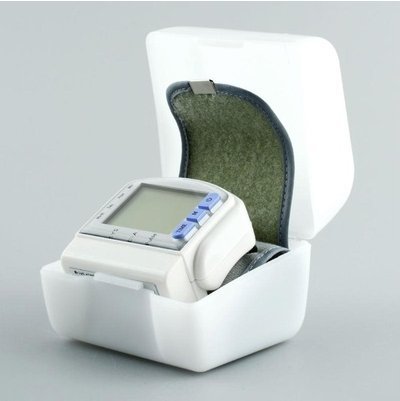
Image: The Technuv CK-102S blood pressure monitor stored within its protective hard case.
4. Product Features
- Intelligent automatic pressure and decompression for comfortable measurement.
- Simultaneous measurement of systolic blood pressure, diastolic blood pressure, and pulse.
- Automatic memory function with large capacity to store 60 test results, including date and time.
- Automatic power-off device to conserve battery life.
- Large digital LCD screen for clear display of readings.
- Simple one-button operation for ease of use.
- Utilizes fuzzy theory measurement for high accuracy.
- Original imported chips, pressure sensors, and inflatable motors for high measurement accuracy and long life.
5. Setup
5.1 Battery Installation
The device requires two AAA batteries (not included). Locate the battery compartment on the back of the unit. Open the cover, insert the batteries according to the polarity indicators (+/-), and close the cover securely.
5.2 Cuff Placement
Proper cuff placement is crucial for accurate readings.
- Sit comfortably with your arm resting on a flat surface, palm facing up.
- Slide the cuff onto your left wrist with the display facing upwards, approximately 1-2 cm above your wrist joint.
- Ensure the cuff is snug but not too tight. You should be able to insert one finger between the cuff and your wrist.
- The device should be at the same level as your heart during measurement.

Image: The Technuv CK-102S blood pressure monitor correctly positioned on a wrist for measurement.
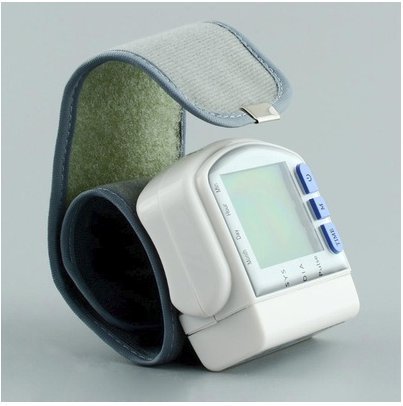
Image: The Technuv CK-102S blood pressure monitor with its cuff wrapped, demonstrating its compact form.
6. Operating Instructions
To take a measurement:
- Ensure you are in a relaxed state. Sit quietly for at least 5 minutes before measuring.
- Place the cuff on your wrist as described in Section 5.2.
- Press the large blue "START/STOP" button (often labeled with a power symbol or 'S'). The cuff will automatically inflate.
- Remain still and do not talk during the measurement process.
- Once the measurement is complete, the cuff will deflate, and your systolic pressure, diastolic pressure, and pulse rate will be displayed on the LCD screen.
- The device will automatically store the reading and power off after 3 minutes of inactivity.
7. Understanding Your Readings
The display shows three main values:
- SYS (Systolic Pressure): The top number, representing the pressure in your arteries when your heart beats.
- DIA (Diastolic Pressure): The bottom number, representing the pressure in your arteries between beats.
- PULSE: Your heart rate, measured in beats per minute.
Consult your healthcare professional for interpretation of your blood pressure readings and for personalized advice.
8. Memory Function
The Technuv CK-102S automatically stores up to 60 measurement results, including the date and time of each reading. To review past readings:
- Press the "M" (Memory) button.
- Each press of the "M" button will cycle through the stored readings, from the most recent to the oldest.
- The display will show the systolic pressure, diastolic pressure, pulse rate, and the corresponding date and time for each stored record.
9. Maintenance and Care
- Clean the device with a soft, dry cloth. Do not use abrasive cleaners or immerse the unit in water.
- Store the device in its protective case when not in use to prevent damage.
- Remove batteries if the device will not be used for an extended period to prevent battery leakage.
- Keep the device away from direct sunlight, extreme temperatures, and high humidity.
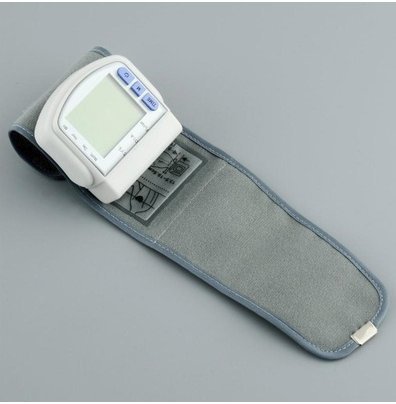
Image: The Technuv CK-102S blood pressure monitor with its cuff laid flat, showing the internal structure and care instructions on the cuff itself.
10. Troubleshooting
| Problem | Possible Cause | Solution |
|---|---|---|
| Device does not power on. | Batteries are dead or incorrectly inserted. | Replace batteries with new ones, ensuring correct polarity. |
| Error message on display. | Cuff not applied correctly, movement during measurement, or irregular pulse. | Re-apply cuff, remain still, or consult a physician if errors persist. |
| Inaccurate readings. | Improper cuff placement, arm not at heart level, or recent activity. | Ensure proper cuff placement and arm position. Rest for 5 minutes before measuring. |
If the problem persists after attempting these solutions, please contact customer support.
11. Specifications
| Parameter | Value |
|---|---|
| Model | CK-102S |
| Measurement Method | Pulse scan / Oscillometry |
| Display | LCD Digital Display |
| Measuring Range | 20-280 mmHg |
| Pressure Accuracy | ± 3 mmHg |
| Pulse Accuracy | ± 5 % |
| Power Source | 3V (2 x AAA batteries) |
| Applicable Working Temperature | +5°C to +40°C |
| Automatic Shutdown | Yes (after 3 minutes) |
| Dimensions | Approx. 70 x 72 x 23 mm (device only) |
| Weight | Approx. 0.23 kg (without batteries) |
12. Warranty and Support
For warranty information and customer support, please refer to the documentation provided at the time of purchase or contact your retailer. Keep your purchase receipt as proof of purchase.
For technical assistance or inquiries, please contact Technuv customer service through their official website or the contact information provided with your product.
Ask a question about this manual
Ask about setup, troubleshooting, compatibility, parts, safety, or missing instructions. Manuals+ will review the question and use this page’s manual context to help answer it.