
Introduction
This instruction manual provides important information for the safe and efficient use of your Surpassed AC Power Adapter Charger, Model AC-L200. This adapter is designed to provide continuous power to compatible Sony DCR-HC series Handycam camcorders, replacing original Sony AC-L25, AC-L25A, AC-L25B, AC-L25C, AC-L200, AC-L200B, AC-L200C, and AC-L200D adapters. It features a universal input voltage range, allowing for use in various regions worldwide.
Package Contents
Please verify that all items listed below are included in your package:
- 1x Surpassed AC Power Adapter (Model AC-L200)
- 1x Power Cord Cable (with a plug suitable for your country's standard)

Image: The Surpassed AC Power Adapter (black rectangular unit) connected to its output cable, alongside the detachable AC power cord with a standard US plug.

Image: Examples of different power cord plugs (US, EU, UK, AU) that may be included with the adapter, depending on the region of purchase.
Setup Instructions
- Connect the Power Cord to the Adapter: Insert the two-prong end of the power cord cable firmly into the AC input port on the Surpassed AC Power Adapter.
- Connect the Adapter to the Camcorder: Locate the DC input jack on your Sony DCR-HC series camcorder. Insert the output connector of the AC Power Adapter into this jack. Ensure a secure connection.
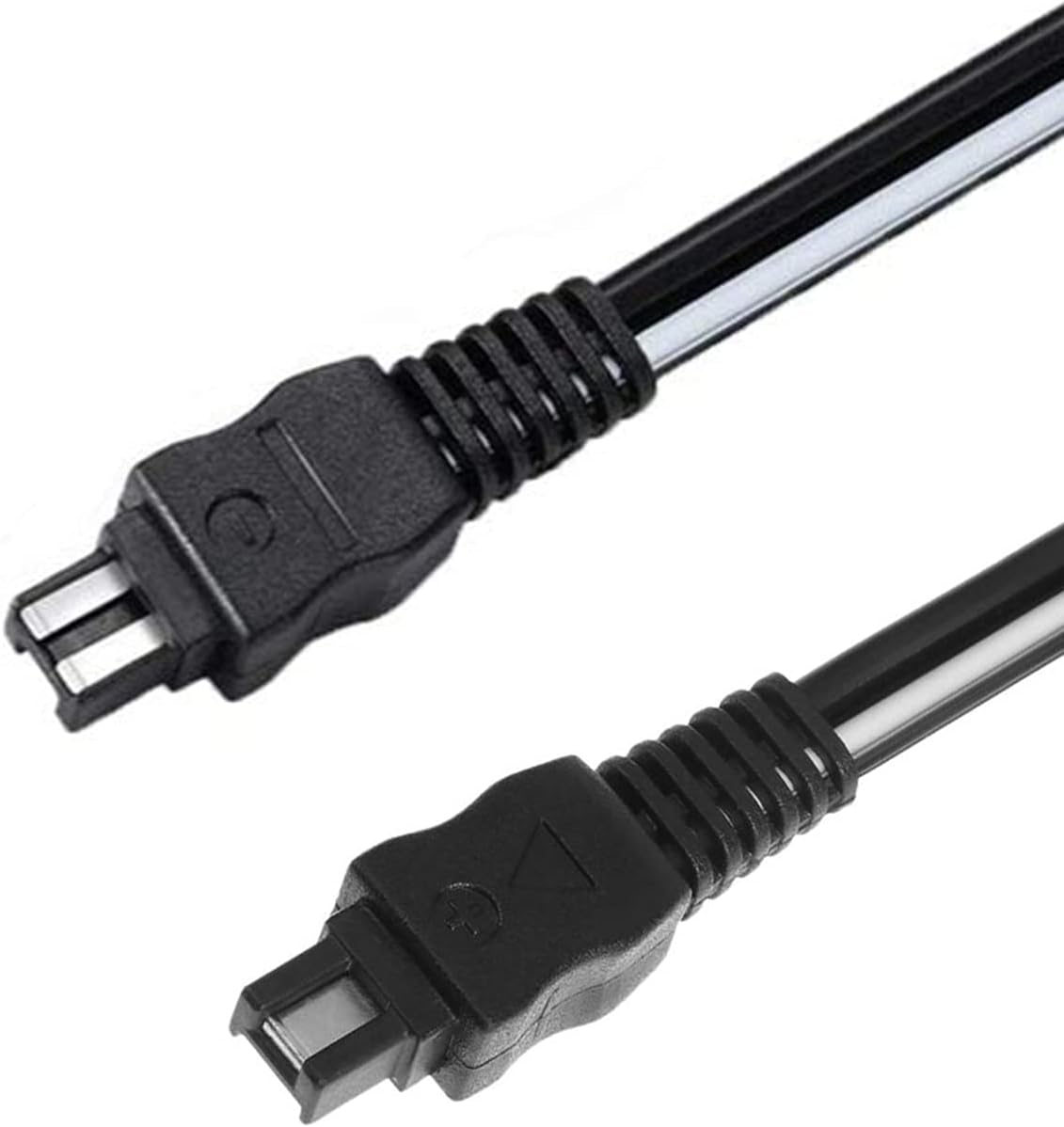
Image: A close-up view of the proprietary connector on the adapter's output cable, designed to fit Sony DCR-HC series camcorders.
- Connect to a Power Outlet: Plug the other end of the power cord cable (the wall plug) into a standard AC electrical outlet. The adapter supports input voltages from 100V to 240V.
- Verify Connection: Once connected, your camcorder should receive power. Refer to your camcorder's manual for specific power indicator lights.
Operating Instructions
After completing the setup, the adapter is ready for use. It provides continuous power to your compatible Sony DCR-HC series camcorder, allowing you to operate it without battery power or to charge the camcorder's battery (if the camcorder supports in-camera charging via AC adapter).
- Ensure all connections are secure before powering on your camcorder.
- The adapter is designed for indoor use only.
- Unplug the adapter from the wall outlet when not in use for extended periods.
Maintenance
Proper maintenance ensures the longevity and safe operation of your AC power adapter.
- Cleaning: Disconnect the adapter from all power sources before cleaning. Use a soft, dry cloth to wipe the exterior. Do not use liquid cleaners or solvents.
- Storage: Store the adapter in a cool, dry place away from direct sunlight and extreme temperatures. Avoid wrapping the cables too tightly around the adapter to prevent damage.
- Handling: Do not drop, disassemble, or attempt to repair the adapter. Avoid exposing it to moisture or liquids.
- Cable Inspection: Periodically inspect the power cord and adapter cables for any signs of damage, such as fraying or cuts. If damage is found, discontinue use and replace the unit.
Troubleshooting
If you encounter issues with your AC power adapter, please refer to the following common troubleshooting steps:
| Problem | Possible Cause | Solution |
|---|---|---|
| Camcorder does not power on or charge. |
|
|
| Adapter feels unusually hot. |
|
|
If the problem persists after trying these steps, please contact customer support for further assistance.
Specifications
| Brand | Surpassed |
| Model Number | AC-L200 |
| Input Voltage | 100-240 Volts AC |
| Output Voltage | 8 Volts DC |
| Connector Type | Proprietary (for Sony DCR-HC series) |
| Compatible Devices | Sony DCR-HC Series Camcorders (DCR-HC1000, DCR-HC20, DCR-HC21, DCR-HC26, DCR-HC28, DCR-HC30, DCR-HC32, DCR-HC36, DCR-HC38, DCR-HC40, DCR-HC42, DCR-HC46, DCR-HC48, DCR-HC52, DCR-HC62, DCR-HC65, DCR-HC85, DCR-HC90, DCR-HC96) |
| Replacement for | Sony AC-L25, AC-L25A, AC-L25B, AC-L25C, AC-L200, AC-L200B, AC-L200C, AC-L200D |
| Special Feature | Lightweight Design, Travel-friendly |
Warranty and Support
For any questions, concerns, or assistance with your Surpassed AC Power Adapter, please contact our customer support team. We are committed to providing quality power products and excellent customer service.
Please refer to your purchase documentation or the retailer's website for specific warranty details and contact information.