
1. Introduction
Thank you for purchasing the Toshiba RZE-BT110E Wireless Bluetooth Earphones. This manual provides essential information for the safe and efficient use of your new earphones. Please read it thoroughly before use and keep it for future reference.
2. Safety Information
- Hearing Protection: Avoid using earphones at high volume for extended periods to prevent hearing damage.
- Driving Safety: Do not use earphones while driving or cycling, as it may distract you and create a hazard.
- Water Exposure: These earphones are not water-resistant. Avoid exposure to water or moisture.
- Choking Hazard: Keep out of reach of small children. Contains small parts that could be a choking hazard.
- Temperature: Do not expose to extreme temperatures (hot or cold).
- Disassembly: Do not attempt to disassemble or modify the earphones. This will void the warranty.
3. Package Contents
Ensure all items are present in the package:
- Toshiba RZE-BT110E Wireless Bluetooth Earphones
- USB Charging Cable
- Ear Pads (various sizes)
- User Manual
4. Product Overview
The Toshiba RZE-BT110E earphones feature a lightweight, in-ear design with an inline remote for easy control.

Figure 4.1: Toshiba RZE-BT110E Wireless Bluetooth Earphones
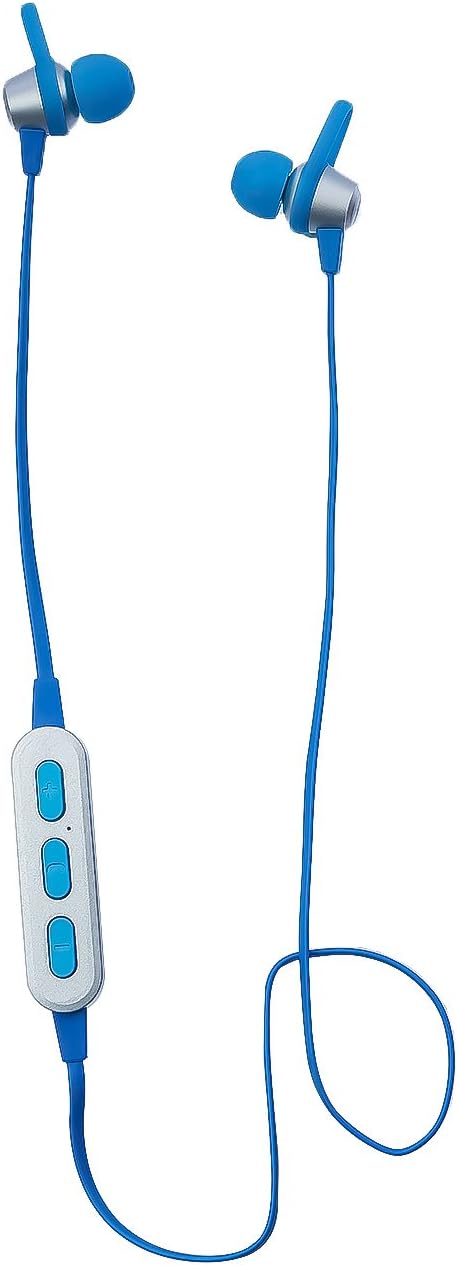
Figure 4.2: Close-up of an earbud
4.1. Inline Remote Control
The inline remote control allows you to manage music playback and phone calls.

Figure 4.3: Inline Remote Control Buttons
4.2. Charging Port
The USB charging port is located on the side of the inline remote.

Figure 4.4: USB Charging Port
5. Setup
5.1. Charging the Earphones
- Connect the supplied USB charging cable to the charging port on the inline remote.
- Connect the other end of the USB cable to a USB power source (e.g., computer USB port, USB wall adapter).
- The LED indicator will illuminate during charging. Once fully charged, the LED indicator will change or turn off (refer to LED behavior in specifications).
- A full charge provides up to 4 hours of playback time.
5.2. Bluetooth Pairing
To connect your earphones to a Bluetooth-enabled device:
- Ensure the earphones are charged and turned off.
- Press and hold the Multi-function button (usually the middle button) on the inline remote until the LED indicator flashes red and blue alternately, indicating pairing mode.
- On your device (smartphone, tablet, etc.), enable Bluetooth and search for available devices.
- Select "RZE-BT110E" from the list of found devices.
- Once paired, the LED indicator on the earphones will flash blue slowly or turn solid blue (refer to LED behavior in specifications), and you will hear an audible confirmation.
- The earphones will automatically attempt to reconnect to the last paired device when turned on.
6. Operating Instructions
6.1. Power On/Off
- Power On: Press and hold the Multi-function button for approximately 3 seconds.
- Power Off: Press and hold the Multi-function button for approximately 3 seconds.
6.2. Music Playback
- Play/Pause: Press the Multi-function button once.
- Volume Up: Press the '+' button.
- Volume Down: Press the '-' button.
- Next Track: Press and hold the '+' button.
- Previous Track: Press and hold the '-' button.
6.3. Call Management
- Answer Call: Press the Multi-function button once.
- End Call: Press the Multi-function button once during a call.
- Reject Call: Press and hold the Multi-function button for approximately 2 seconds.
- Redial Last Number: Double-press the Multi-function button.
7. Maintenance
- Cleaning: Use a soft, dry cloth to clean the earphones. Do not use liquid cleaners or aerosols.
- Ear Pads: Regularly clean or replace ear pads for hygiene and optimal sound quality.
- Storage: When not in use, store the earphones in a cool, dry place, away from direct sunlight and extreme temperatures.
- Charging: Charge the earphones at least once every three months to maintain battery health if not used regularly.
8. Troubleshooting
| Problem | Possible Cause | Solution |
|---|---|---|
| Earphones do not power on. | Battery is depleted. | Charge the earphones fully. |
| Cannot pair with device. | Earphones not in pairing mode; Bluetooth off on device; device too far. | Ensure earphones are in pairing mode (flashing red/blue). Turn on Bluetooth on your device. Move device closer to earphones. |
| No sound. | Volume too low; not connected; incorrect audio output. | Increase volume on earphones and device. Ensure earphones are paired and connected. Check device's audio output settings. |
| Poor sound quality. | Weak Bluetooth signal; ear pads not fitted correctly. | Move closer to the paired device. Adjust ear pads for a secure fit. |
9. Specifications
| Feature | Detail |
|---|---|
| Brand | Toshiba |
| Model Number | RZE-BT110E |
| Color | Blue |
| Ear Placement | In Ear |
| Headphones Form Factor | In Ear |
| Noise Control | Sound Isolation |
| Connectivity Technology | Wireless |
| Wireless Communication Technology | Bluetooth |
| Included Components | Ear pads |
| Age Range Description | Adult |
| Number of Items | 1 |
| GTIN (UPC) | 04560158878976 |
| Battery Life | Up to 4 hours |
| Audio Driver Type | Dynamic Driver |
| Special Features | Wireless, Cable-free |
| Material | Silicone |
| Specific Uses For Product | Music |
| Recommended Uses For Product | Making Calls |
| Water Resistance Level | Not Water Resistant |
| Earbud Shape | Round Tips |
10. Warranty and Support
Toshiba products are designed for reliability and performance. For warranty information, please refer to the warranty card included in your product packaging or visit the official Toshiba website for your region. For technical support or customer service, please contact your local Toshiba support center.
You can visit the TOSHIBA Store on Amazon for more information.


