
1. Product Overview
The DSTE Pro DMW-BGG1 Vertical Battery Grip is designed to enhance the handling and extend the battery life of compatible Panasonic Lumix digital cameras. It provides a comfortable grip for vertical shooting and includes additional controls for improved usability.
Key Features:
- A firm, comfortable grip for vertical-position shooting with the Camera.
- Buttons and controls are conveniently placed and easy to reach for greater comfort.
- Holds one Li-ion battery for extended shooting, complementing the camera's internal battery.
- The rugged, but lightweight, body design has gasket-sealed controls to resist dust.
- Camera menu options allow users to choose whether the camera battery or this battery grip's battery is prioritized.
- Includes a remaining power indicator.

2. Package Contents
Upon opening the package, please verify that all items are present and in good condition:
- 1x DSTE Brand Battery Grip (DMW-BGG1)
- 1x User Manual
3. Compatibility
This DSTE Vertical Battery Grip is compatible with the following Panasonic Lumix SLR Digital Camera models:
- Panasonic Lumix DMC-G80
- Panasonic Lumix DMC-G85
- Panasonic Lumix DMC-G95
4. Setup and Installation
Follow these steps to properly attach the battery grip to your camera and install the battery:
- Prepare the Camera: Ensure your camera is powered off. Remove the battery from your camera's battery compartment. Locate the rubber door covering the electrical contacts on the bottom of your camera; remove this door and store it safely.
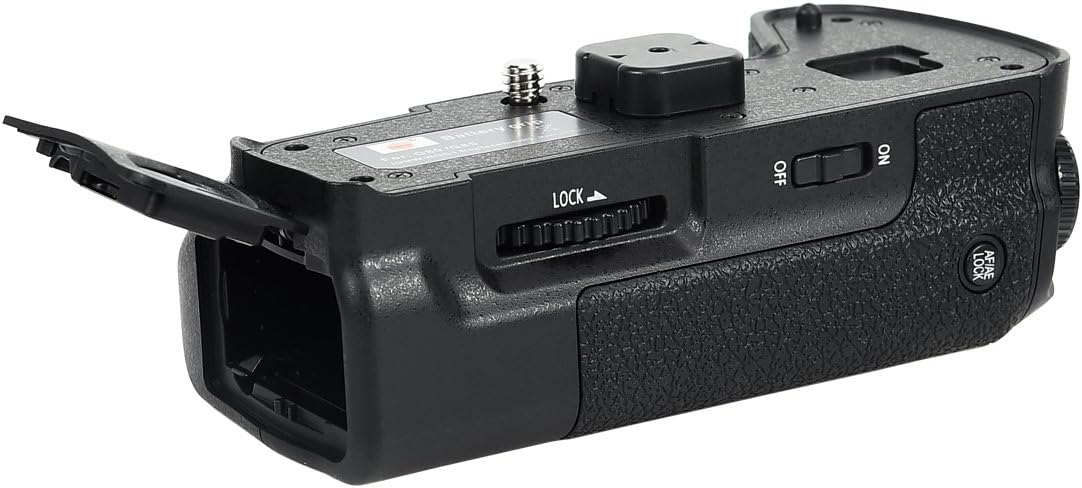
- Attach the Grip: Align the battery grip's mounting screw (7) with the tripod socket on the bottom of your camera. Ensure the electrical contacts (3) on the grip align with those on the camera. Slide the grip into place, making sure the alignment pin (2) on the grip fits into the corresponding hole on the camera body.
- Secure the Grip: Rotate the mounting screw (7) clockwise until the grip is firmly attached to the camera. Do not overtighten.
- Install Battery: Open the battery chamber lock (6) on the grip and open the battery chamber (5). Insert one DMW-BLC12 compatible Li-ion battery into the battery chamber, ensuring correct polarity. Close the battery chamber door and secure the lock.

5. Operating Instructions
The DSTE battery grip provides extended power and enhanced control for vertical shooting.
Power Management:
- The grip holds one Li-ion battery, which works in conjunction with the battery inside your camera.
- You can configure your camera's menu settings to prioritize power usage from either the camera's internal battery or the battery in the grip.
- The camera will seamlessly switch between batteries when one is depleted, allowing for continuous shooting.
- The side-loading battery compartment allows for hot-swapping batteries without removing the camera from a tripod.
Vertical Shooting Controls:
The grip features duplicate controls for comfortable vertical shooting:
- Shutter-release button (2): Functions identically to the camera's shutter button for capturing photos.
- Multi-function button (3): Provides access to various camera functions, configurable via camera settings.
- Before the thumbwheel (1) & After the thumbwheel (4): These dials replicate the camera's command dials for adjusting settings like aperture, shutter speed, or ISO.
- Fn 1 button (5): A customizable function button.
- AE/AF Lock button (9): Locks exposure and/or autofocus.
- Vertical-grip operation Switch (8): Use this switch to enable or disable the vertical shooting controls on the grip. This is useful to prevent accidental presses when shooting horizontally.

6. Maintenance
To ensure the longevity and optimal performance of your DSTE Battery Grip, follow these maintenance guidelines:
- Keep the grip clean by wiping it with a soft, dry cloth. Avoid using harsh chemicals or abrasive materials.
- Protect the electrical contacts from dust and moisture. When not in use, consider attaching the contact cap (1) if provided, or store the grip in a protective bag.
- Avoid exposing the grip to extreme temperatures or direct sunlight for prolonged periods.
- If the grip becomes wet, dry it thoroughly before use. While designed to resist dust, it is not fully waterproof.
- When detaching the grip, ensure the camera is powered off to prevent data corruption or damage.
7. Troubleshooting
If you encounter issues with your DSTE Battery Grip, refer to the following common problems and solutions:
| Problem | Possible Cause / Solution |
|---|---|
| Grip not recognized by camera / No power from grip battery. |
|
| Vertical controls not responding. |
|
| Battery drains quickly. |
|
8. Specifications
| Feature | Detail |
|---|---|
| Model Number | DB100 |
| Compatible Cameras | Panasonic Lumix DMC-G80, DMC-G85, DMC-G95 |
| Power Source | 1x DMW-BLC12 Li-ion Battery (not included) |
| Dimensions (Package) | 6.1 x 4.92 x 3.62 inches |
| Item Weight | 10.2 ounces |
| Manufacturer | Dst Electron Technological Co., Ltd |
| Date First Available | December 26, 2017 |
9. Warranty and Support
This DSTE Battery Grip comes with a Two Years Warranty from the date of purchase. Please retain your proof of purchase for warranty claims.
For technical support, troubleshooting assistance, or warranty service, please contact DSTE customer service through the retailer where you purchased the product or visit the official DSTE website for contact information.
Online Resources:
- DSTE Store on Amazon: Visit the DSTE Store