
1. Introduction
This manual provides essential instructions for the safe and effective use of your Castle Creations Talon 60 Electronic Speed Control (ESC). The Talon 60 is designed for small to medium-sized RC aircraft, including 360-450 size helicopters and .32 - .60 range airplanes, supporting up to 1400 watts on 6S LiPo power. Please read this manual thoroughly before installation and operation to ensure optimal performance and safety.
2. Safety Information
WARNING: Failure to follow these safety guidelines can result in property damage, serious injury, or death.
- Always disconnect the battery from the ESC when not in use.
- Ensure all wiring connections are secure and properly insulated to prevent short circuits.
- Never operate the ESC with damaged wires or connectors.
- Keep hands, tools, and loose clothing away from rotating propellers and motors.
- Operate RC models in open areas, away from people, animals, and property.
- Monitor ESC and motor temperatures during operation. Excessive heat can indicate an issue.
- Use only compatible batteries and motors as specified for the Talon 60.
- This product is not a toy. Adult supervision is required for users under 18 years of age.
3. Product Overview
3.1 Key Features
- Application: Ideal for small scale or aerobatic helis (360-450 size) and scale, sport, and aerobatic planes (.32 - .60 range) requiring up to 1400 watts on 6S LiPo power.
- Governor Mode: Direct entry governor mode allows precise RPM setting using the Castle Link USB adapter (sold separately) and Castle Link Programming Suite.
- Battery Eliminator Circuit (BEC): Integrated 20A peak power, 8A continuous power BEC with user-selectable 6V or 8V output (default 6V).
- Telemetry Capable: Supports telemetry with optional Castle Creations Telemetry Link (#010-0152-00 for Futaba, #010-0148-00 for Spektrum) and compatible radio systems.
- Power System Alerts: Provides notifications for conditions such as over-temperature, excessive load, and locked head speed.
3.2 What's Included
- Castle Creations Talon 60 6S 25.2V 60A Electronic Speed Control (ESC)
- Instruction Manual (this document)
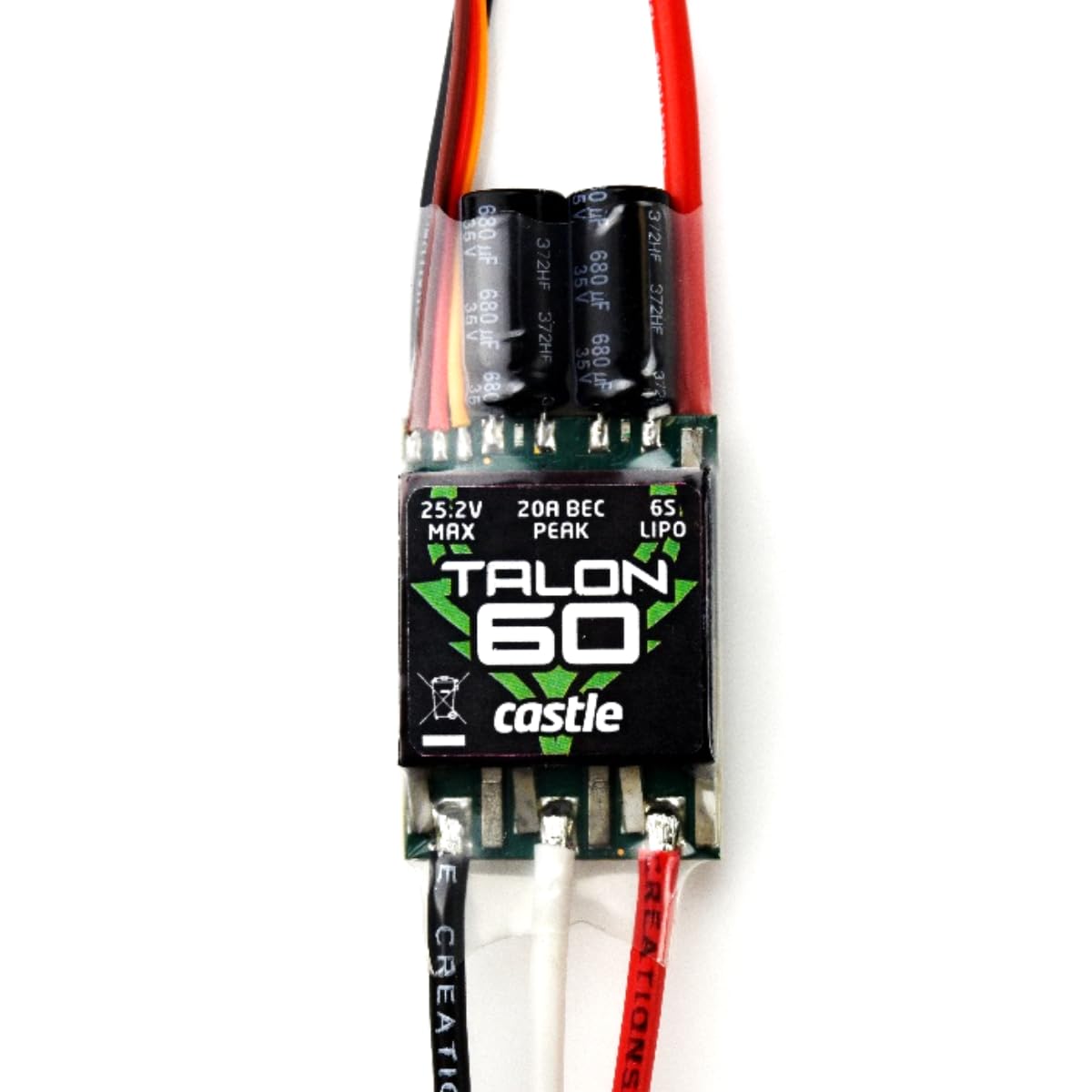
Image: The Castle Creations Talon 60 Electronic Speed Control unit.
4. Setup
4.1 Requirements
- Compatible Battery: 2-6S LiPo (up to 25.2V)
- Compatible Brushless Motor
- Battery and Motor Connectors (appropriate for your application, not included)
- RC Receiver and Transmitter
- Castle Link USB adapter (for advanced programming, sold separately)
4.2 Wiring and Installation
Carefully connect the Talon 60 ESC to your motor, battery, and receiver. Ensure correct polarity for battery connections. The three motor wires can be connected in any order; if the motor spins in the wrong direction, swap any two motor wires. Connect the ESC's throttle lead to the throttle channel of your RC receiver.

Image: An Electronic Speed Control (similar to Talon 60) installed within an RC helicopter chassis, showing wiring connections.
4.3 Initial Configuration (Castle Link)
For optimal performance and to customize settings such as BEC voltage (6V or 8V), throttle curves, and governor mode parameters, it is highly recommended to use the Castle Link USB adapter and the free Castle Link Programming Suite software on a Windows PC. This allows for precise tuning to match your specific aircraft and flying style.
5. Operating Instructions
5.1 Powering On and Arming
- Ensure your transmitter is powered on and the throttle stick is at its lowest position.
- Connect the battery to the Talon 60 ESC.
- The ESC will emit a series of tones indicating cell count and arming status. Wait for the arming tone before advancing the throttle.
5.2 Governor Mode
The Talon 60 features a direct entry governor mode. Once configured via Castle Link, you can input your desired RPM directly. The ESC will then maintain this RPM under varying load conditions, providing consistent power for aerobatics and stable flight.
5.3 Telemetry Integration
If you have purchased the optional Castle Creations Telemetry Link, follow its specific instructions for integration with your compatible Futaba or Spektrum radio. This allows real-time monitoring of critical data such as battery voltage, ESC temperature, and motor RPM directly on your transmitter.
5.4 Power System Alerts
The Talon 60 is designed to provide alerts for certain power system conditions. These may include audible tones or LED indicators for:
- Over-temperature: Indicates the ESC is operating at an unsafe temperature.
- Excessive Load: Suggests the motor or propeller combination is drawing too much current.
- Locked Head Speed: Relevant for helicopters, indicating an inability to maintain target RPM.
Refer to the Castle Link software for detailed explanations of alert codes and recommended actions.
6. Maintenance
The Talon 60 ESC is designed for durability, but regular inspection and basic maintenance are crucial for longevity:
- Visual Inspection: Periodically check the ESC for any signs of physical damage, frayed wires, or melted insulation.
- Cleanliness: Keep the ESC free from dirt, dust, and moisture. Use compressed air or a soft brush to gently clean cooling fins if present.
- Connections: Ensure all connectors (battery, motor, receiver) are clean and securely seated. Loose connections can cause intermittent power or damage.
- Firmware Updates: Check the Castle Creations website regularly for firmware updates. Updating your ESC's firmware via Castle Link can improve performance and add new features.
7. Troubleshooting
If you encounter issues with your Talon 60 ESC, consider the following common troubleshooting steps:
- No Power/No Response:
- Check battery charge level.
- Verify all battery and receiver connections are secure and correct.
- Ensure the transmitter is on and bound to the receiver.
- Motor Not Spinning/Stuttering:
- Check motor wire connections for continuity and proper seating.
- Ensure the motor is not physically obstructed.
- Recalibrate the ESC's throttle range with your transmitter.
- Motor Spins in Wrong Direction:
- Swap any two of the three motor wires connected to the ESC.
- Overheating:
- Ensure adequate airflow around the ESC.
- Check if the motor/propeller combination is too large or drawing excessive current.
- Verify battery C-rating is sufficient for the power demands.
- Inconsistent Performance:
- Connect to Castle Link and review all programmed settings.
- Check for radio interference.
For more detailed diagnostics and advanced troubleshooting, connect your ESC to the Castle Link software. The software provides diagnostic data and allows for comprehensive parameter adjustments.
8. Specifications
| Feature | Specification |
|---|---|
| Input Voltage Range | 2-6S LiPo |
| Max Continuous Amperage (Full Throttle) | 60A |
| Max Voltage | 25.2V |
| BEC Voltage | User selectable: 6V or 8V (default 6V) |
| BEC Output | 20A peak, 8A continuous |
| Dimensions (Width) | 1.19 inches (30.2 mm) |
| Dimensions (Length) | 2.56 inches (65 mm) |
| Dimensions (Height) | 0.41 inches (10.6 mm) |
| Weight (with wires) | 2.05 oz (57g) |
| Weight (without wires) | 1.09 oz (31g) |
| Model Number | CC010-0163-00 |
9. Warranty and Support
9.1 Limited Warranty
The Castle Creations Talon 60 ESC comes with a one-year limited warranty through Castle Creations, effective from the date of purchase. This warranty covers defects in materials and workmanship under normal use. It does not cover damage resulting from misuse, abuse, modification, improper installation, or accidents. Please retain your proof of purchase for warranty claims.
9.2 Customer Support
For technical assistance, warranty claims, or additional information, please visit the official Castle Creations website or contact their customer support directly. Detailed contact information and support resources can be found on their website.