1. Introduction
This manual provides essential information for the safe and efficient installation, operation, and maintenance of your ELETTROMECANICA H40-423 motor. This motor is designed for use with specific Horeca-Select and Makro-Professional models, including GFS1025, GFS2025, and HFS2025. Please read this manual thoroughly before attempting any procedures.
2. Safety Information
WARNING: Electrical components can cause serious injury or death. Installation and maintenance should only be performed by qualified personnel.
- Always disconnect power to the appliance before installation, maintenance, or troubleshooting.
- Ensure proper grounding to prevent electrical shock.
- Verify that the supply voltage matches the motor's specifications (230 Volts, 50 Hz).
- Do not operate the motor if it is damaged or if any parts are missing.
- Keep hands, clothing, and tools clear of moving parts during operation.
3. Product Description
The ELETTROMECANICA H40-423 is a robust motor designed for commercial food service equipment. It provides reliable performance for compatible Horeca-Select and Makro-Professional models.

Figure 1: ELETTROMECANICA H40-423 Motor. This image shows the general appearance of the motor unit.
Key Features:
- Rotation Speed: 1380 rpm
- Frequency: 50 Hz
- Voltage: 230 Volts
- Capacitor: 8 µF
4. Setup and Installation
Installation of the H40-423 motor requires technical expertise. It is strongly recommended that installation be performed by a certified technician.
Installation Steps:
- Power Disconnection: Ensure the main power supply to the appliance is completely disconnected and locked out before beginning any work.
- Access: Carefully open the appliance housing to access the motor compartment.
- Remove Old Motor (if applicable): Disconnect wiring and mounting hardware from the existing motor. Note the orientation and wiring connections for reference.
- Mount New Motor: Position the H40-423 motor in the designated location. Secure it firmly using appropriate mounting hardware. Refer to the technical diagram for dimensions.
- Wiring: Connect the motor wiring according to the appliance's electrical schematic. Ensure all connections are secure and insulated. Verify voltage (230V) and frequency (50Hz) compatibility.
- Capacitor Connection: Connect the 8 µF capacitor as per the wiring diagram.
- Close Housing: Carefully reassemble the appliance housing, ensuring no wires are pinched.
- Test: Restore power and perform a functional test to ensure the motor operates correctly and smoothly.
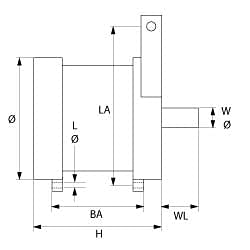
Figure 2: Technical diagram showing dimensions (Diameter, Height, Length, etc.) of the ELETTROMECANICA H40-423 motor. This diagram is crucial for proper fitment and installation.
5. Operating Instructions
The H40-423 motor operates as an integral part of your Horeca-Select or Makro-Professional appliance. Refer to your appliance's primary user manual for specific operating procedures.
- Ensure the appliance is connected to a suitable power supply (230V, 50Hz).
- Activate the appliance's power switch or control panel to start the motor.
- Monitor for unusual noises, vibrations, or overheating during initial operation.
- Deactivate the appliance's power switch to stop the motor.
6. Maintenance
Regular maintenance ensures the longevity and optimal performance of your motor. Always disconnect power before performing any maintenance.
- Cleaning: Periodically clean the exterior of the motor to prevent dust and debris buildup, which can impede cooling. Use a dry cloth or soft brush. Do not use water or harsh chemicals.
- Inspection: Regularly inspect wiring for signs of wear, fraying, or loose connections. Check mounting bolts for tightness.
- Ventilation: Ensure that the motor's ventilation openings are clear and unobstructed to prevent overheating.
- Professional Check: It is recommended to have the motor inspected by a qualified technician annually for bearing wear, electrical integrity, and overall condition.
7. Troubleshooting
If you encounter issues with your H40-423 motor, refer to the following common problems and solutions. For complex issues, contact a qualified technician.
| Problem | Possible Cause | Solution |
|---|---|---|
| Motor does not start | No power supply Loose wiring connection Faulty capacitor | Check power source and circuit breaker Inspect and secure all wiring connections Have capacitor tested and replaced by a technician |
| Motor makes unusual noise | Worn bearings Obstruction in moving parts Loose mounting | Contact a technician for inspection and repair Disconnect power and check for obstructions Tighten mounting bolts |
| Motor overheats | Blocked ventilation Overload Continuous operation | Clean ventilation openings Reduce load on the appliance Allow for cooling periods if applicable |
8. Specifications
| Attribute | Value |
|---|---|
| Brand | ELETTROMECANICA |
| Model | H40-423 |
| Voltage | 230 Volts |
| Frequency | 50 Hz |
| Rotation Speed | 1380 rpm |
| Diameter | 113 mm |
| Height | 91 mm |
| Capacitor | 8 µF |
9. Warranty and Support
For warranty information and technical support, please refer to the documentation provided with your original appliance or contact your ELETTROMECANICA distributor or the seller directly. Keep your purchase receipt as proof of purchase.