
BLU T570
BLU Tank Mega T570 GSM Unlocked Cellphone User Manual
Comprehensive instructions for your BLU Tank Mega T570 GSM Unlocked Cellphone.
Introduction
This manual provides detailed instructions for the operation and maintenance of your BLU Tank Mega T570 cellphone. Designed for reliability and ease of use, this device features a compact form factor, a 2.4-inch display, and essential functionalities including a built-in flashlight and SOS button.
Please read this manual thoroughly to ensure proper usage and to maximize the lifespan of your device.
Package Contents
Upon opening your BLU Tank Mega T570 package, please verify that all items are present:
- BLU Tank Mega T570 Cellphone
- USB Cable
- Battery (pre-installed or separate)
- Quick Start Guide (if included)
Setup
1. Inserting the SIM Card(s) and Battery
The BLU Tank Mega T570 supports dual SIM cards. Ensure the phone is powered off before inserting or removing SIM cards or the battery.
- Carefully remove the back cover of the phone.
- If the battery is not already installed, align the battery contacts with the terminals in the battery compartment and gently press down until it clicks into place.
- Locate the SIM card slot(s). Insert your GSM SIM card(s) into the designated slot(s) with the gold contacts facing down, ensuring they are fully seated.
- Replace the back cover, pressing firmly until it snaps into place.

Image: Rear view of the BLU Tank Mega T570 with the back cover removed, illustrating the battery and dual SIM card insertion points.
2. Charging the Battery
Before first use, fully charge the phone's battery. Use only the provided USB cable and a compatible power adapter.
- Connect the small end of the USB cable to the charging port on the phone (typically located at the top).
- Connect the large end of the USB cable to a power adapter, and then plug the adapter into a wall outlet.
- The charging indicator on the phone's screen will show the charging status.
- Once fully charged, disconnect the charger.

Image: Top view of the BLU Tank Mega T570, highlighting the USB charging port and 3.5mm audio jack.
Operating Your BLU Tank Mega T570
Basic Functions
- Power On/Off: Press and hold the Power/End Call button.
- Making Calls: Enter the phone number using the keypad and press the Call button (green receiver icon).
- Answering Calls: Press the Call button when the phone rings.
- Ending Calls: Press the Power/End Call button (red receiver icon).
- Navigation: Use the directional pad (up, down, left, right) and the center selection button to navigate menus.
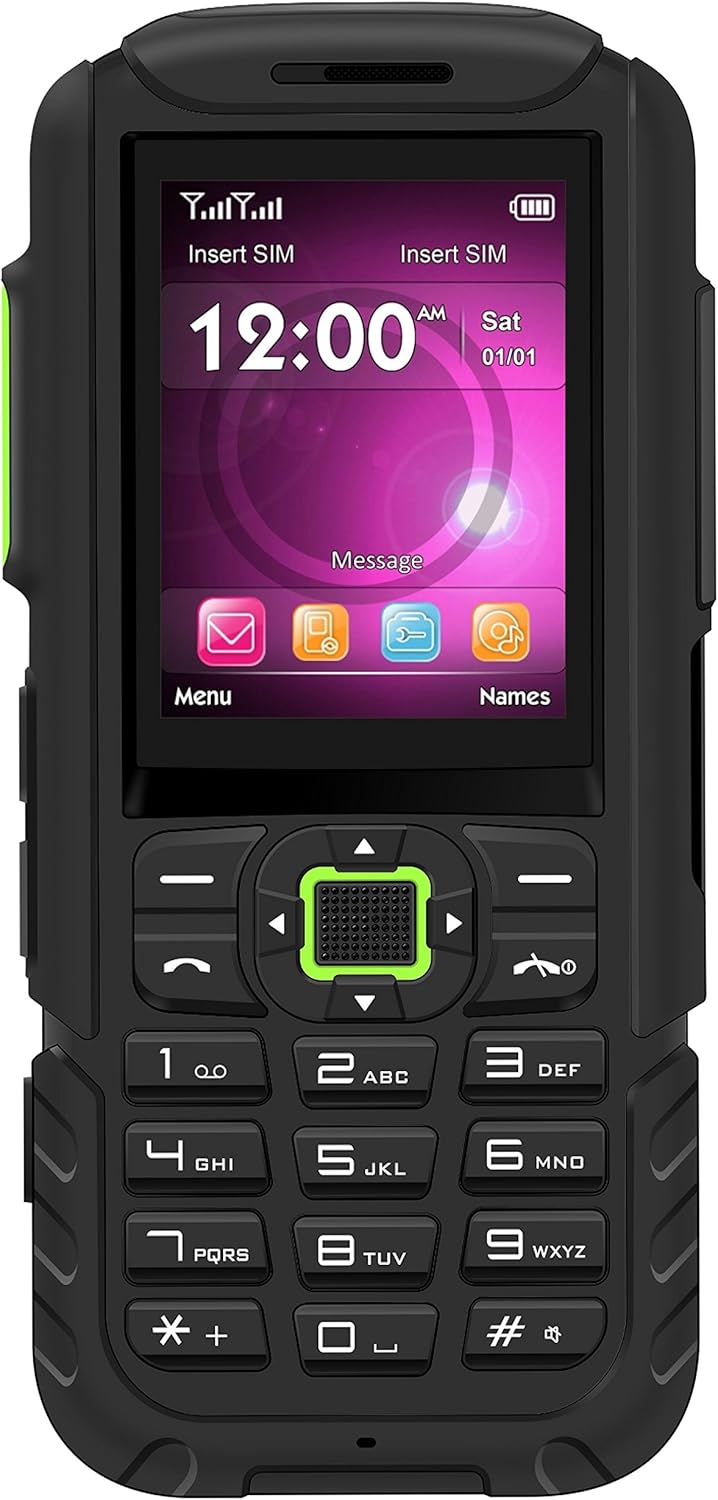
Image: Front view of the BLU Tank Mega T570, showing the 2.4-inch display, physical keypad, and navigation buttons.
Special Features
- Super Flash Light: The phone includes a dedicated flashlight. Press the designated flashlight button (often on the side) for quick activation.
- SOS Button: For emergencies, the SOS button can be configured to dial pre-set emergency contacts. Refer to the phone's settings for configuration.
- FM Radio: The built-in FM radio allows you to listen to local radio stations. A headset may be required to act as an antenna.
- Camera: The VGA standard camera allows for basic photo capture. Access it through the main menu.

Image: Side view of the BLU Tank Mega T570, illustrating the volume control buttons and the dedicated flashlight button.

Image: Bottom view of the BLU Tank Mega T570, highlighting the integrated flashlight LED.
Maintenance and Care
- Cleaning: Use a soft, dry cloth to clean the phone's surface. Avoid liquid cleaners or abrasive materials.
- Battery Care: Do not expose the battery to extreme temperatures. Avoid fully discharging the battery frequently to prolong its lifespan.
- Storage: Store the phone in a cool, dry place away from direct sunlight and extreme temperatures.
- Water Resistance: This device is not water-resistant. Avoid exposure to liquids.
Troubleshooting
| Problem | Possible Solution |
|---|---|
| Phone does not power on. | Ensure the battery is correctly installed and fully charged. Try charging the phone for at least 30 minutes. |
| Cannot make or receive calls. | Check if the SIM card is properly inserted. Verify that you have network signal. Ensure your account is active with your carrier. Remember, this phone is GSM only and not compatible with CDMA carriers (Verizon, Sprint, Boost, PagePlus). |
| Poor call quality. | Move to an area with better network coverage. Check for any obstructions around the microphone or speaker. |
| Battery drains quickly. | Reduce screen brightness. Close unused applications. Limit background activities. |
Specifications
| Feature | Detail |
|---|---|
| Model | T570 |
| Display | 2.4-inch TFT, 240 x 320 pixels |
| Operating System | Proprietary |
| Internal Memory | 32MB |
| RAM | 32MB |
| Camera | VGA Standard (Rear) |
| Network Compatibility | GSM 850/900/1800/1900 (2G). Not compatible with 3G only providers or CDMA carriers (e.g., AT&T 3G, T-Mobile 3G, Verizon, Sprint, Boost, PagePlus). |
| Special Features | Super Flash Light (One Button Touch), SOS Button, Built-in FM Radio, Dual SIM |
| Battery Type | Lithium Ion (included) |
| Battery Capacity | 3600 mAh |
| Phone Talk Time | Up to 12 Hours |
| Dimensions | 2.17 x 0.47 x 5.04 inches |
| Item Weight | 10.2 ounces |
| Audio Jack | 3.5 mm |
Helpful Videos
Understanding Unlocked Phones
Video: An informational video explaining the concept and benefits of unlocked phones, which is relevant for understanding the BLU Tank Mega T570's compatibility.
Warranty and Support
For warranty information and technical support, please refer to the warranty card included in your product packaging or visit the official BLU website. Keep your proof of purchase for warranty claims.
Online Resources:
- BLU Official Website: www.bluproducts.com
- Product Support Page: (Refer to BLU website for specific model support)
Related documentsT570

Ask a question about this manual
Ask about setup, troubleshooting, compatibility, parts, safety, or missing instructions. Manuals+ will review the question and use this page’s manual context to help answer it.